Windows | Jailbreak iPhone, iPod Touch, iPad - Part 6 Skip to content

Jailbreak iPhone, iPod Touch, iPad

новости про джейлбрейк iPhone, iPod Touch и iPad

Archive

Tag: Windows

absinthe2

Chronic Dev Team released an update to untethered iOS 5.1.1 jailbreak utility – Absinthe 2.0.2. New version supports the latest iOS 5.1.1 9B208 firmware for iPhone 4 GSM. If you experience problems with previous versions – try 2.0.2

You can download Absinthe 2.0.2 here.

Step-by-step tutorials are available here.

Seas0nPass

FireCore has announced an update to Seas0nPass that provides an untethered jailbreak for the latest 5.0.1 (5.1.1) firmware for the Apple TV 2G. Unfortunately Seas0nPass is not yet compatible with the new ATV3.


Read the rest of this entry »

tinyumbrella-mac-4

Don’t Forget to Save Your iOS 5.1.1 SHSH Blobs to preserve the ability to do iOS 5.1.1 untethered jailbreak in the future. Apple might release updated iOS firmware soon to fix and disable the jailbreak. After next firmware release you will not be able to restore to 5.1.1 any more.


Read the rest of this entry »

sn0wbreeze-294

iH8Sn0w released Sn0wBreeze 2.9.4 with the ability to perform an untethered jailbreak of A4 devices on iOS 5.1.1. Sn0wbreeze can be used to create a custom firmware with jailbreak and preserve iPhone modem (baseband) version for unlock.

Sn0wbreeze 2.9.4 supports iPhone 3GS, iPhone 4, iPad 1, iPod Touch 3G, iPod Touch 4G and Apple TV 2G. It does not work with A5 devices, like iPad 2, iPad 3 and iPhone 4S.

You can download Sn0wBreeze 2.9.4 from here.

Our step-by-step tutorials for Sn0wBreeze 2.9.5 are available here:

absinthe2

Chronic Dev Team released an update to untethered iOS 5.1.1 jailbreak utility – Absinthe 2.0.1. If you experience problems with previous version – try 2.0.1

You can download Absinthe 2.0.1 here.

Step-by-step tutorials are available here.

absinthe20

Here are recommendations from Chronic Dev Team:

  1. Make a backup of your device in iTunes by right clicking on your device name under the ‘Devices’ menu and click ‘Back Up’.
  2. Once your backup is complete return to your device and go to Settings – General – Reset – Erase all Content and Settings. This will make the jailbreak process much faster.
  3. Open Absinthe and be sure you are still connected via USB cable to your computer.
  4. Click ‘Jailbreak’ and wait…. just be patient and do not disconnect your device.
  5. Once jailbroken return to iTunes and restore your backup from earlier. Right click on your device name under the ‘Devices’ menu in the left panel of iTunes and click ‘Restore from Back Up…’ then select the latest backup you created before. (restoring this backup will return all the content previously on your device ie, apps, photos, etc.)

Step-by-step tutorials are available here.

absinthe2

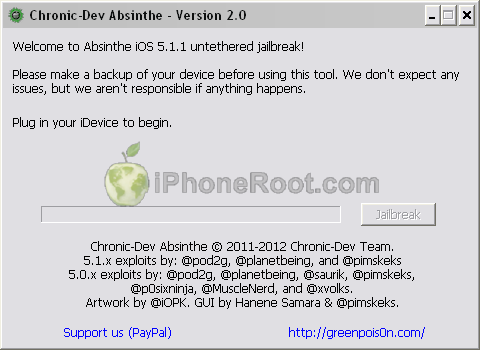
Chronic Dev Team released Absinthe 2.0 with much anticipated untethered jailbreak for iOS 5.1.1.

Absinthe 2.0 supports the following devices:

You can download Absinthe 2.0 here.

Step-by-step tutorials are available here.

jailbreak-iOS-5.1.1

Here are our step-by-step tutorials that will guide you through all the process of jailbreaking iOS 5.1.1 with redsn0w:

iphone-4 iPhone 4

Tethered jailbreak iOS 5.1.1:

iphone3gs_s iPhone 3GS

(Un)Tethered jailbreak iOS 5.1.1:


Read the rest of this entry »

IOS-51-jailbreak

UPDATE: Tutorials for iOS 5.1.1 can be found here.

Here are our step-by-step tutorials that will guide you through all the process of jailbreaking iOS 5.1 with redsn0w and sn0wbreeze:

iphone-4 iPhone 4

Tethered jailbreak iOS 5.1:

iphone3gs_s iPhone 3GS

(Un)Tethered jailbreak iOS 5.1


Read the rest of this entry »

sn0wbreeze-293

iH8sn0w has released new version of popular jailbreak utility Sn0wBreeze 2.9.3.

What is New?

  • Added Apple TV 2 support for iOS 4.4.3/4.4.4.
  • Fixed rare issues with iOS 5.0.1 where it would halt on the Apple upon boot.

Just adding this in mainly for users who dumped their SHSH blobs. On the initial boot, the Apple TV may have a black screen for 60 seconds after setting up the Apple TV. This is normal.

You can download Sn0wBreeze 2.9.3 here.