Cydia | Jailbreak iPhone, iPod Touch, iPad - Part 12 Skip to content

Jailbreak iPhone, iPod Touch, iPad

новости про джейлбрейк iPhone, iPod Touch и iPad

Archive

Category: Cydia

a5-jail-1

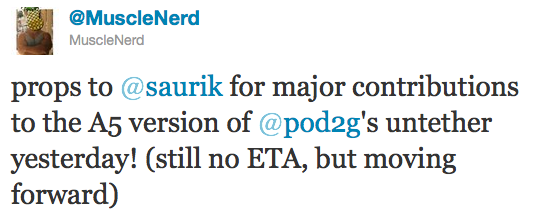
It looks like iPad 2 and iPhone 4S untethered jailbreak will truly be a team effort. Recently another hacker Saurik joined the team and made “some major contributions” yesterday.

Last week Pod2g announced that Planetbeing, MuscleNerd, and P0sixninja joined his effort to release an untethered iOS 5.0.1 jailbreak of the iPhone 4S and iPad 2 (A5 CPU devices).

Today, MuscleNerd noted that the team has received some major contributions from saurik:


Read the rest of this entry »

pwnagetool-501

The iPhone Dev-Team has updated PwnageTool with support for the iOS 5.0.1 untethered jailbreak. PwnageTool lets you easily create a custom ipsw for upgrading to iOS 5.0.1.

Unlockers can use custim firmware to preserve baseband version and unlock with ultrasn0w or gevey. Depending on your device you can also configure the ipsw with boot logos and Cydia packages.

PwnageTool 5.0.1 supports iPhone 3GS, iPhone 4, iPad 1, Apple TV 2G, iPod Touch 3G, iPod Touch 4G.

You can download the new version of PwnageTool 5.0.1 from here.

UPDATE: Here are our step-by-step tutorials that will guide you through all the process of untethered jailbreaking iOS 5.0.1 with PwangeTool 5.0.1:

iphone-4iPhone 4

iphone3gs_siPhone 3GS

pwned

Pod2g has recently announced that Planetbeing, MuscleNerd, and P0sixninja have joined his effort to release an iOS 5.0.1 untethered jailbreak for the iPhone 4S and iPad 2.

@planetbeing, the legendary hacker behind iPhone Linux and lot of jailbreaks has joined the A5 research! The famous @MuscleNerd, the leader of the iPhone Dev Team, who did a lot of tests for Corona and whom integrated it and made it simple in redsn0w is willing to help also. And last, but not least @p0sixninja, the leader of the Chronic Dev Team, and my partner for years on iPhone security research has started to code and fuzz the Apple sandbox.

That means that we now have a dream team to create a public release of the A5 jailbreak.


Read the rest of this entry »

Here are our step-by-step tutorials that will guide you through all the process of jailbreaking iOS 5.0.1 with sn0wbreeze, redsn0w, pwnagetool and absenthe:

iphone4s iPhone 4S

UnTethered jailbreak iOS 5.0 / iOS 5.0.1:

iphone-4 iPhone 4

UnTethered jailbreak iOS 5.0.1:


Read the rest of this entry »

redsn0w-0919b3

Совместными усилиями хакеры выпустили новую версию утилиты для отвязанного джейлбрейка прошивки iOS 5.0.1RedSn0w 0.9.10b3. Исправлены ошибки, связанные с работой launchctl и MobileSubstrate. Аналогичные обновления были интегрированы и в пакет Corona.

Если у вас после отвязки джейлбрейка возникли проблемы при работе некоторых приложений или выскакивали ошибки, мы рекомендуем обновить Corona или заново запустить RedSn0w (можно поверх старого джейлбрейка, при этом необходимо убрать галку с Install Cydia).

Скачать RedSn0w 0.9.10b3 можно здесь. Обновление Corona доступно в Cydia.

redsn0w-0-9-10-b1 untether-ios501

Untethered jailbreak is available for iOS 5.0.1 firmware on iPhone3GS, iPhone4, iPhone4-CDMA, iPad1, iPod touch 3G, iPod touch 4G.

1. If you’re already on iOS 5.0.1 with a tethered jailbreak, you have two even choices:

  1. Run redsn0w 0.9.10 over your current jailbreak (deselect “Install Cydia”)
  2. Install the Cydia package prepared by the chronic devteam. It is called Corona 5.0.1 Untether. (tutorial)

2. If you are not on 5.0.1 yet, update now! If you unlock via ultrasn0w or gevey, make sure you update to 5.0.1 via a custom IPSW! See our guides for sn0wbreeze here. Once you’re at 5.0.1, use the latest redsn0w 0.9.10 to both jailbreak and untether.

You can download RedSn0w 0.9.10b1 here.

Our step-by-step tutorials for untethered jailbreak using redsn0w 0.9.10:

pwned

Great news!!! Much anticipated untethered jailbreak for iOS 5.0.1 released.

We will publish details shortly!

UPDATE: How to use untethered iOS 5.0.1 jailbreak

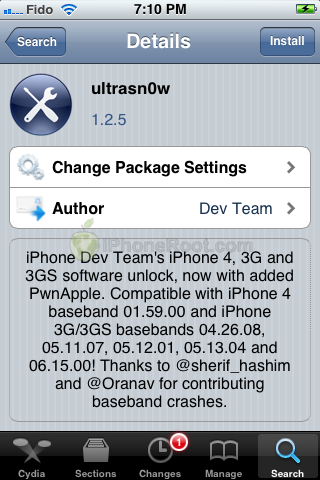
The iPhone Dev-Team has released UltraSn0w 1.25 which brings iOS 5.0.1 support to the unlock for older compartible basebands.

iPhone Dev Team’s iPhone 4, 3G, and 3GS software unlock, now with added PwnApple. Compatible with iPhone 4 baseband 01.59.00 and iPhone 3G/3GS basebands 04.26.08, 05.11.07, 05.12.01, 05.13.04 and 06.15.00! Thanks to @sherif_hashim and @Oranav for contributing baseband crashes

UltraSn0w 1.2.5 is now available in Cydia.

If you have one of the supported basebands and wish to update to iOS 5.0.1 you will need to do so with a custom ipsw that doesn’t update your baseband.

ultrasn0w-125

redsn0w-099b9

iPhone Dev-Team released RedSn0w 0.9.9b9 with full iOS 5.0.1 support (no need to point to iOS 5.0 any more). New version also features support for SHSH and APTickets:

  • native support for 5.0.1 (no need to point redsn0w at 5.0 IPSW or use command-line args).  Support automatically extends to all of redsn0w’s various functions: “Jailbreak”, “Just boot”, “Fetch blobs”, “Stitch blobs”, “Recovery Fix”
  • iBooks fixed in 5.0 and 5.0.1.  This is a targeted fix that doesn’t remove entire sandbox mechanism.  5.x users already using redsn0w “Just Boot” can just use the new version without redoing entire jailbreak again
  • 3GS old-bootrom owners can now create custom IPSWs without blobs
  • ultrasn0w compatability update (i.e. same baseband requirements) for 5.0.1 will be available on Cydia Monday
  • support for newer 8GB iPhone4 (which until now had problems with “Fetch blobs”).  Thanks to @JKjeepnJeff for loaning us one of these newer i4 units for testing!
  • allows Windows users (not just OS X users) to use the “Custom” button to create IPSWs without baseband updates.  (Update: please wait for 0.9.9b9b for this!)
  • accommodates APTickets in 5.x (until next Apple countermove).  APTickets are crypto-verified before submitting to Cydia, just like the main blobs.  Cydia server support for sending back the APTickets is upcoming.  For now, use stitched IPSWs for 5.x.  Due to APTickets, stitched 5.x IPSWs now require user to start in “Pwned DFU” mode
  • Support added for stitching 4.x blobs to iPad2-GSM IPSWs.  Similar to @notcom’s TinyCFW but doesn’t require lots of RAM or a TSS-assisted restore. Won’t work for iPad2 5.x blobs (or iPhone4S at all) until a bootrom-level exploit is out
  • top line now shows whether (and where) a redsn0w update is available, or if the version being run is the latest.  Uses DNS TXT record to alleviate any concerns about snooping
  • no 5.1 beta support at this time (major apps like Cydia are not yet compatible)
  • @pod2g has been doing a great job porting his 5.x untether…check his blog for updates!
  • Owners of newer 3GS iPhones must not flash the iPad baseband.  The iPad baseband will not work on 3GS iPhones built later than 2011 week 35.  You have a week 35 or later device if your serial # starts with xx135.
Update #17b: Version 0.9.9b9b enables the “Custom” button for Windows users, and make the 3GS week 35 warning a more explicit part of the process.

You can download RedSn0w 0.9.9b9b here.

UPDATE: redsn0w updated to redsn0w 0.9.9b9d.

Read the rest of this entry »

crash-reporter

Semi-tethered jailbreak is already available for some devices for both iOS 5 and iOS 5.0.1. But we all want untethered jailbreak and we want jailbreak for iPad 2 and iPhone 4S. So why not help hackers to find new exploits and vulnerabilities?

The Chronic Dev-Team has a released a tool to collect crash reports from iOS devices in order to find vulnerabilities that could lead to an untethered jailbreak.

The idea is very simple. When your iPhone, iPad or iPod Touch crashes it sends data to Apple (you can turn it this off though). Apple uses these reports to update iOS in the future. By the way, it also uses them to fix exploits found by jailbreakers. P0sixninja says that Apple closed several exploits they have found in IOS 5 beta before the final version of the software was released.

In order to find more vulnerabilities as fast as possible, the team has developed a tool which will copy the crash reports from your device and analyze them to locate potential exploits. The tool will also remove the crash reports from your device and modify your iTunes installation to prevent uploading of that diagnostic information to Apple.


Read the rest of this entry »