IPS | Jailbreak iPhone, iPod Touch, iPad Skip to content

Jailbreak iPhone, iPod Touch, iPad

новости про джейлбрейк iPhone, iPod Touch и iPad

Archive

Tag: IPS

This is step-by-step instructions on how to perform untethered jailbreak of iOS 7.1 – iOS 7.1.2 firmwares using Pangu for Windows.

This tutorial works for:

  • iPhone 4, iPhone 4S, iPhone 5, iPhone 5C, iPhone 5S
  • iPod Touch 5G
  • iPad 2, iPad 3, iPad 4, iPad Air, iPad Mini, iPad Mini 2

Supported firmwares:

  • iOS 7.1
  • iOS 7.1.1
  • iOS 7.1.2


Read More »

A3 tweaks, a group of hackers behind Auxo, a tweak that allowed to extend the functionality of the app switcher in iOS 5 and iOS 6, has announced the Auxo 2 -- an updated jailbreak tweak compatible with iOS 7. Take a look.

httpvh://youtu.be/f1SMnwxx3O8


Read the rest of this entry »

This is step-by-step instructions on how to perform untethered jailbreak of iOS 7.0 – iOS 7.0.6 firmwares using Evasi0n 7 for Windows.

This tutorial works for:

  • iPhone 4, iPhone 4S, iPhone 5, iPhone 5C, iPhone 5S
  • iPod Touch 5G
  • iPad 2, iPad 3, iPad 4, iPad Air, iPad Mini, iPad Mini 2

Supported firmwares:

  • iOS 7.0, 7.0.1, 7.0.2, 7.0.3, 7.0.4, 7.0.5, 7.0.6, 7.1 beta 1, 7.1 beta 2

This tutorial is for Windows users. Mac OS X tutorial is available here (tutorial is being prepared).


Read More »

iH8Sn0w released Sn0wBreeze 2.9.13 that still supports untethered jailbreak of iOS 6.1.2. Version 2.9.13 fixes several issues and bugs found in earlier sn0wbreeze releases.

Sn0wbreeze 2.9.13 supports iPhone 3GS, iPhone 4 and iPod Touch 4G. It does not work with A5/A6 devices, like iPad 2, iPad 3, iPhone 4S, iPhone 5, etc.

Sn0wbreeze can be used to create a custom firmware with jailbreak and preserve iPhone modem (baseband) version for unlock. It can also be used to upgrade iPhone 3GS modem version to 06.15.

You can find the release notes below. You can download the latest version of Sn0wBreeze from here.

Our step-by-step tutorials:


Read the rest of this entry »

iH8Sn0w released Sn0wBreeze 2.9.10 that brings support for untethered jailbreak of iOS 6.1.2. New version supports iPhone 3GS, iPhone 4 and iPod Touch 4G. It does not work with A5/A6 devices, like iPad 2, iPad 3, iPhone 4S, iPhone 5, etc.

Sn0wbreeze can be used to create a custom firmware with jailbreak and preserve iPhone modem (baseband) version for unlock. It can also be used to upgrade iPhone 3GS modem version to 06.15.

You can find the release notes below. You can download the latest version of Sn0wBreeze from here.

Our step-by-step tutorials:


Read the rest of this entry »

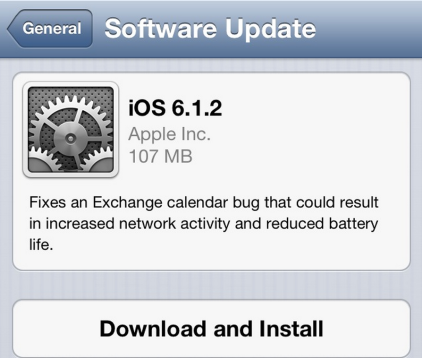
Apple has released iOS 6.1.2 to fix a bug with Microsoft Exchange Calendar.

Fixes an Exchange calendar bug that could result in increased network activity and reduced battery life.

Today’s update also fixes the passcode bug that was found last week. There is no information, whether this firmware is jailbreakable.

You can update via OTA or in iTunes. Jailbreakers have to perform restore to upgrade to iOS 6.1.2.

You can download the new firmware from here.

This step-by-step tutorial will guide you through the process of full restore, that is highly recommended for iOS 6.1 jailbreak. You can use this tutorial for any iPhone, iPod Touch and iPad.

Important: do not update to iOS 6.1 if you need carrier unlock.

Step 1

Make a folder called “Firmware”. Download iOS 6.1 for your Apple device: here

We have downloaded iOS 6.1 for uour iPhone 4:


Read the rest of this entry »

iH8Sn0w released Sn0wBreeze 2.9.7 that brings support for tethered jailbreak of iOS 6.0.1. New version supports iPhone 3GS, iPhone 4 and iPod Touch 4G. It does not work with A5/A6 devices, like iPad 2, iPad 3, iPhone 4S, iPhone 5, etc.

Sn0wbreeze can be used to create a custom firmware with jailbreak and preserve iPhone modem (baseband) version for unlock.

You can find the release notes below. You can download the latest version of Sn0wBreeze from here.


Read the rest of this entry »

The iPhone Dev-Team has announced an updated version of RedSn0w and an upcoming update to UltraSn0w for iOS 6 compatibility.

Version 0.9.15b3 fixes the redsn0w “error 2601” that Windows users were seeing using the Restore button. It also fixes a related Windows iTunes error 14 for stitched files. Note that if you have a baseband, you should probably avoid stitching and simply use redsn0w’s native Restore (not iTunes).

Those lucky recipients of new iPad minis and iPad4s on Friday can use this redsn0w to save your 6.0 blobs off to Cydia. First connect your new device and turn it on, then use redsn0w’s Extras->SHSH Blobs->New and point it at the 6.0 IPSW.

Expect an ultrasn0w compatibility update for iOS 6.0 by Friday (mostly useful for 3GS old-bootrom users who are currently enjoying the untethered 6.0 jailbreak!). Same baseband support as with 5.x.

Thanks to @iamgolfy for helping test the 2601 Windows fix!

You can download the latest version of RedSn0w from here.

redsn0w-0914b2

The iPhone Dev-Team released RedSn0w 0.9.14b2 with improved algorithm for baseband downgrade from the iPad’s 06.15 baseband to 05.13 on the iPhone 3GS and iPhone 3G. The 06.15 baseband was used by many users to unlock their device. Now it is possible to to get back true GPS and an ultrasn0w unlock.

You can download RedSn0w 0.9.14b2 here.

Here is additional info from DevTeam:


Read the rest of this entry »