Cydia | Jailbreak iPhone, iPod Touch, iPad - Part 20 Skip to content

Jailbreak iPhone, iPod Touch, iPad

новости про джейлбрейк iPhone, iPod Touch и iPad

Archive

Category: Cydia

There is a big a security hole in iPhone iOS. The device is insecure in a big and obvious way. You should be extremely careful of what sites you visit.

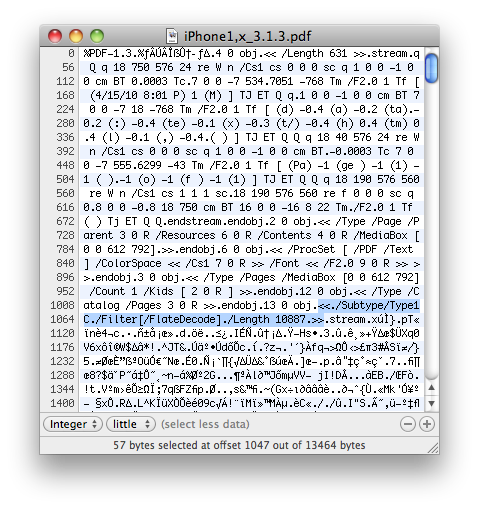
The FlateDecode vulnerability can be used when a PDF File is embedded within a Web page. Basically Safari tries to parse the PDF. And when it does it executes some code. Hackers can use this exploit to read and write iPhone data, get your contacts, sms, even delete something. So they can get all kinds to access your personal information stored on your iOS device.

Apple will fix it some day. Until then you need to take care of your iPhone security. There is a fix for that. It is available via Cydia for jailbroken devices. So you need to jailbreak in order to secure (funny isn’t it?).
Read the rest of this entry »

spirit_jailbreak

The first release of Spirit had a bug that accidently could delete all of your photos from the device that was jailbroken. If you have a backup which you made before jailbreaking your iPhone/iPod Touch/iPad, here is a quick guide how to recover deleted photos.

Read the rest of this entry »

spirit_jailbreak

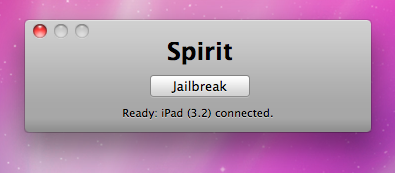
Finally the jailbreak for iPad, iPhone and iPod Touch from the Dev Team is available for download. It’s free and untethered and it’s called “Spirit”. The jailbreak supports every iDevice with firmware version 3.1.2, 3.1.3 or 3.2.


Read the rest of this entry »

iPad Console

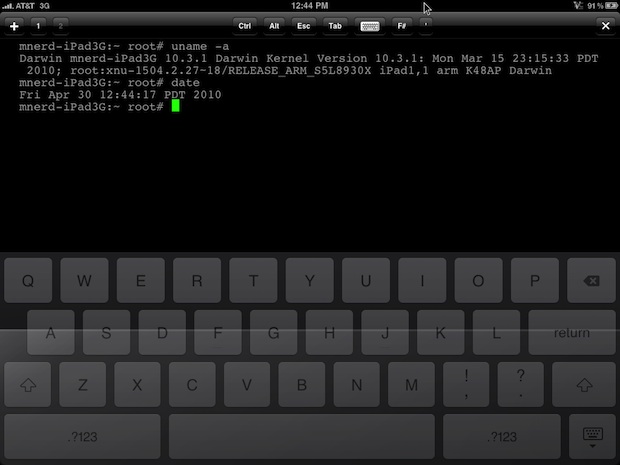
Wow! Hours after iPad 3G sales launch and it has already been jailbroken! Below is a video of MuscleNerd where jailbroken iPad 3G runs Cydia.

MuscleNerd used the jailbreak called “Spirit”. It’s a tool that makes untethered unlock of iPad, iPod Touch 3G and iPhone 3GS and DevTeam promises it will be available soon. Stay tuned for further instructions how to save your SHSH Blobs and then use Spirit to jailbreak your device.


Read the rest of this entry »

This is good news for for those who use Cydia, an alternative to Apple’s AppStore for jailbreaked iPhones and iPod Touches. Saurik has uploaded a new version of APT that has an optimized cache generator and greatly improves Cydia performance:

“I also uploaded a new version of APT I’ve been working on: it has an optimized cache generator and more error tolerant repository parsing.”

When launching Cydia the next time you will find updates for some APT packages (up to 3 depending on what you have installed). Perform the install and enjoy the speed improvements!

redsn0w-092

Redsn0w is a cross-platform jailbreaking tool for iPhone and iPod Touch. New version redsn0w 0.9.2 supports the latest firmware 3.1.2.

redsn0w 0.9.2 supports:

  • All iPhones and iPod touches
  • Windows and Mac OSX (x86)
  • Apple firmwares 3.0 and 3.1.2

We expect to see Linux version quite soon.

If you need a carrier unlock, redsn0w will handle iPhone 2G by itself (by installing the BootNeuter utility). For the iPhone 3G and iPhone 3GS use Cydia after you’re jailbroken to install ultrasn0w (baseband 04.26) or blacksn0w (baseband 05.11).

If you have a late-model iPhone 3GS, or if you have an iPod touch 2G whose serial number begins with “MC” (newer than week 40 of last year), or any iPod touch 3G, you can use redsn0w to jailbreak but you are currently restricted to “tethered” rebooting. That means you need to connect your device to a computer each time you boot it – so just try no to reboot.

You can download the latest version of redsn0w here.

nfs-shift

Need For Speed Shift is a wonderful game that recently appeared in AppStore. Many users want to customize and enhance their cars, but they need a lot of money for that. Now users of jailbreaked iPhones can use a money patch from Cydia, that will solve this problem with $6 000 000.

The steps to install the patch are very simple and fast:

  • open Cydia and add еру repository http://repo.beyouriphone.com
  • after refresh install Need For Speed Shift $ 6M Cheat!
  • start the game and we enjoy all the money available!

Have fun!

SBSettings is a great application to quickly turn on and off different services. Recently two developers have released tethering toggles to easily enable and disable iPhone tethering from SBSettings.

The first called, “Tethering” by Filipe Pina makes changes to the files that the preferences framework makes, then restarts the service. The second called, “Tether” by Ryan Petrich uses the preferences frameworks and calls the functions that the settings app calls.

SBSetting-tether-toggle SBSetting-tethering-toggle

According to BigBoss, both toggles work well. You can download togles and SBSettings via Cydia (for jailbreaked iPhones only).

via iclarified and bigboss

blackra1n

Geohot has released his BlackSn0w utility. BlackSn0w is an unlock for the iPhone 3G and iPhone 3GS. It supports the latest firmware 3.1 and 3.1.2 with baseband 05.11.07 and enables official tethering. Available for both Windows and Mac.

Here is a quick tutorial:
If you havn’t done the jailbreak: go to blackra1n.com, download blackra1n, run it, follow the instructions (it is really simple) to perform the jailbreak. Run balckra1n app on iPhone and install BlackSnow.
If your device is already jailbroken – run Cydia, add repository blackra1n.com and install blacksn0w. That’s it!

The latest version of blackra1n is RC3. It now has hacktivation support, 15 second speed improvement, Tiger+PPC support.

PS: If you just bought a new iPhone 3GS or have one that was made recently (approximately after 40th week after iPhone 3GS release): your device has a new BootROM. Unfortunately it is impossible to run regular jailbreak with this new BootROM. There is a sloution – tethered jailbreak. Everything including unlock will work fine. However every time you restart your iPhone, you need to plug it to a computer with blackra1n installed.

We have seen a video from Verizon named iDon’t and an ansfer from iPhone fans – the video named iDon’t Care. Here’s a new one, called iCan. It describes what a jailbreaked iPhone can do:

Here is the list of apps for that:

  • Can be customized: using Winterboard
  • I can run applications simultaneously: thanks to Backgrounder and Kirikae
  • I can always use the tethering: thanks to the tweaks available in Cydia
  • I call with Skype on 3G network: using VoiceOver3G or 3GUnrestrictor
  • Support an open development: with applications to be released via Cydia

Nice, isn’t it?