Battery | Jailbreak iPhone, iPod Touch, iPad Skip to content

Jailbreak iPhone, iPod Touch, iPad

новости про джейлбрейк iPhone, iPod Touch и iPad

Archive

Tag: battery

Pod2g, the hacker who has been an integral part of the last few jailbreaks, has announced that he is ‘about to switch to an Android device’ after spending some time testing iOS 7.

After a few days of iOS 7 beta 1 testing, I must admit that I am about to switch to an Android device.

IMHO, this version of iOS is the worst move Apple did in a long time.

iOS 7 design is awful, it’s slow, battery life time is the worst ever, it’s full of UI bugs and crashes. OK it’s beta 1, but still…

I am pretty disappointed by the features I’ve seen in iOS 7. No revolution here. No big news. Just kid painting.
Read the rest of this entry »

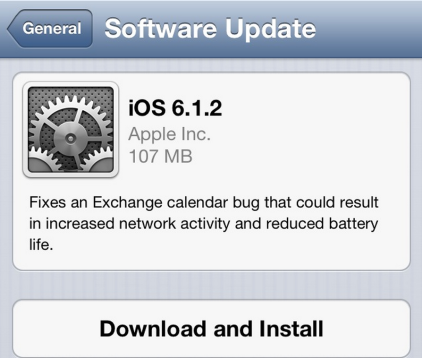
Apple has released iOS 6.1.2 to fix a bug with Microsoft Exchange Calendar.

Fixes an Exchange calendar bug that could result in increased network activity and reduced battery life.

Today’s update also fixes the passcode bug that was found last week. There is no information, whether this firmware is jailbreakable.

You can update via OTA or in iTunes. Jailbreakers have to perform restore to upgrade to iOS 6.1.2.

You can download the new firmware from here.

Apple has posted a document warning users that jailbreaking their iOS devices may cause instability, security vulnerabilities, shortened battery life, and other issues. The document was posted on February 3rd, the same day the Evasi0n jailbreak was originally expected to drop. Take a look:


Read the rest of this entry »

noupdate501

Apple has recently released iOS 5.0.1. It is still tethered jailbreakable. However if you want untethered jailbreak or unlock – you should stay away from 5.0.1

Earlier this week pod2g reported that a code signing bug found in iOS 5.0 will make it easier for hackers to develop a full jailbreak for iOS 5 firmware version. That bug might have been closed in iOS 5.0.1. UPDATE: According to pod2g the bug is still present, but harder to exploit because another exploit found by Charlie Miller is fixed in iOS 5.0.1.

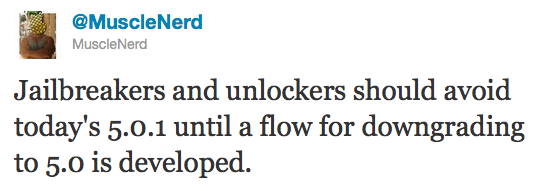
Also, MuscleNerd via twitter has warned iOS users that there is no downgrade from iOS 5.0.1 to iOS 5.0 yet and he recommends to wait until downgrade mechanism is available.

Jailbreakers and unlockers should avoid today’s 5.0.1 until a flow for downgrading to 5.0 is developed.

Downgrade flow needs to be modified for AP “nonce” http://is.gd/b3G0io … saved SHSH blobs are not enough to downgrade to 5.0

voomapeel

Vooma announced a new case for iPhone that includes a backup battery and a slot for SIM-card. The case can work with the app on jailbroken iPhone that emulates the native phone app to make calls via the external SIM card.


Read the rest of this entry »

Here is a nice video overview of popular Cydia apps.

My personal top 30 Cydia tweaks of 2011. The tweaks chosen are both new and old, popular and unpopular. 30 is a big number so, I hope that most of you are able to find a tweak that you will enjoy having on your iPhone, iPod Touch, or iPad. The tweaks are my personal picks and we all will have our opinion. I know that there are allot of other awesome Cydia tweaks that I was unable to mention but, feel free to tell us about them in a video response or comment.

Cydia tweaks include: Tab+, Multiconmover, Infiniboard, Infinidock, SBSettings, Alphacon, Android Delete, Graviboard, Grid Lock, Animate Battery, Winterboard, Flipover, List Launcher, Cy Delete, Folder Enhancer, Pull to Refresh Safari, RetinaPad, Barrel, Camera Wallpaper, icon renamer, double tap to open, Pagenames, iSwipe, Stayopened, iTypeappleicon, retina app, icons, page pusher, Bytafont, AndroidLock XT, Insomnia

If you have never done jailbreak, you might want to try 🙂

pwnagetool413-3gs-3

UPDate: save your iOS 4.2.1 SHSH blobs now!

UPDate 2: Attention! We’ve received info, that Apple stopped signing iOS 4.2 for devices for which iOS 4.3 is available. This means you will not be able to restore to 4.2.1 without saved SHSH keys.

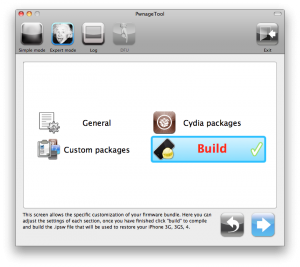
Using this tutorial you will be able to jailbreak iOS 4.2.1 running on iPhone 3G, iPhone 3GS, iPhone 4, iPod Touch 3G, iPod Touch 4G and iPad. Pwnagetool will also preserve baseband version if you need carrier unlock. If you have updated the baseband to version 06.15, you can use this tutorial. This tutorial uses PwnageTool 4.2 for Mac OS X.

We are not developers of jailbreak utilities, so we cannot assure that everything will work just fine. However we tried this tutorial on several devices and succeeded.

We will use iPhone 4 in our jailbreak tutorial. The process is the same for all devices.

Step One
Make a folder called “Pwnage” on the desktop. Download a couple of things:

Read the rest >>>

iphone-os-3.1.3

Apple has just released new firmware 3.1.3 (7E18) for iPhone 3GS, iPhone 3G, iPhone 2G, iPod touch, iPod touch 2G and iPod touch 3G.

The update includes:

  • Improves accuracy of reported battery level on iPhone 3GS
  • Resolves issue where third-party apps would not launch in some instances
  • Fixes bug that may cause an app to crash when using the Japanese Kana keyboard
  • Other security updates (more info)

So this is a minor update, which fixing only the accuracy of the 3GS battery meter and the stability of some third-party app launches. This update is avaliable via iTunes.

New firmware 3.1.3 also introduces a new version of the baseband, the 05.12.01. So if you need unlock do not update! DevTeam also warns us:

If you care about your jailbreak and unlock, don’t update your device – 3G and 3G(S) owners should pay particular attention to this warning.
PwnageTool and redsn0w are not yet compatible with 3.1.3

Experimenters show that the latest version of redsn0w 0.9.2 is able to jailbreak iPhone 2G, iPhone 3G and iPod touch 1G. Just point it at the 3.1.2 IPSW (download here) after doing update or restore to firmware 3.1.3. Sounds like DevTeam will release an updated version of redsn0w that will handle firmware 3.1.3 officially. They say iPod touch 2G with firmware 3.1.3 is also jailbreakable.

Users report that unlock software, blacksn0w and ultrasn0w, doesn;t work with the new baseband.

We had a post about SBSettings – the future of BossPrefs (link). Couple days ago this application became  avaliable in Cydia.

SBSettings doenst have an icon so after you install to access it you must slide across the statusbar (aka the top bar that displays service, time, battery, etc.)

Current version is 0.92. But the application is updated almost every day.

This application is avaliable for jailbreaked iPhones via Cydia installer.

Many iPhone 3G users would like to use internet on a desktop or notebook through their phone. There were several solutions: iPhoneModem, NetShare, 3Proxy.. they all used SSH and SOCKS proxy. One of the working ones was described here get internet on a desktop or notebook through IPhone 3G.

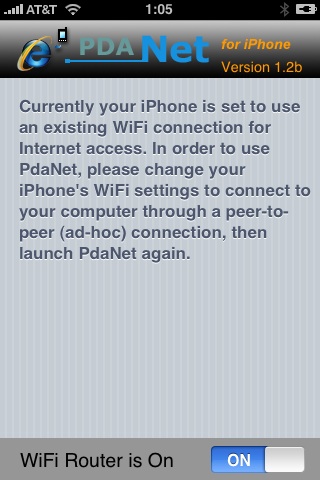
Couple days ago PdaNet (fullname is PdaNet WiFi Router) was ported to iPhone. Now our life is much much easier.


Read the rest of this entry »

  • Page 1 of 2
  • 1
  • 2
  • >