Microsoft | Jailbreak iPhone, iPod Touch, iPad Skip to content

Jailbreak iPhone, iPod Touch, iPad

новости про джейлбрейк iPhone, iPod Touch и iPad

Archive

Tag: Microsoft

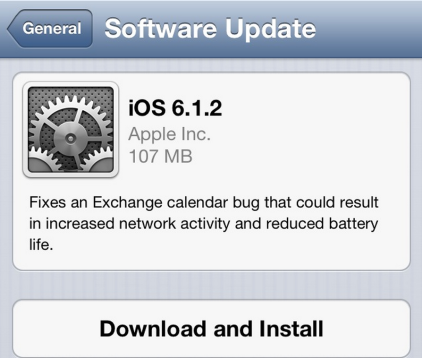
Apple has released iOS 6.1.2 to fix a bug with Microsoft Exchange Calendar.

Fixes an Exchange calendar bug that could result in increased network activity and reduced battery life.

Today’s update also fixes the passcode bug that was found last week. There is no information, whether this firmware is jailbreakable.

You can update via OTA or in iTunes. Jailbreakers have to perform restore to upgrade to iOS 6.1.2.

You can download the new firmware from here.

iH8Sn0w released Sn0wBreeze 2.9.7 that brings support for tethered jailbreak of iOS 6.0.1. New version supports iPhone 3GS, iPhone 4 and iPod Touch 4G. It does not work with A5/A6 devices, like iPad 2, iPad 3, iPhone 4S, iPhone 5, etc.

Sn0wbreeze can be used to create a custom firmware with jailbreak and preserve iPhone modem (baseband) version for unlock.

You can find the release notes below. You can download the latest version of Sn0wBreeze from here.


Read the rest of this entry »

JustinLongJailbrokeniPhoneDuring Jimmy Kimmel’s live show Justin Long picked up his iPhone to share some interesting SMS he had. Meanwhile he also showed Cydia on his iPhone’s main screen. For those of you who do not know anything about this man, Justin Long is the very guy who starred in the most popular and successful commercials called “Get a Mac” by Apple, which appeared between 2006-2009 years.

Now that he no longer works with Apple, he is not afraid to break the rules of his former employer. By the way, today jailbreaking is fully legal in the USA, is not it?

iRinger creates free ringtones for your iPhone from virtually any music or video file you own. Even YouTube videos! iRinger exports ringtones to iTunes, so there is no need to “jailbreak” your iPhone. You will be creating ringtones in seconds. It’s that simple. Here is a video tutorial:

Feature:

  • FREE
  • Three Steps: Import, Preview then Export. Done.
  • Convert virtually any audio format into an iPhone ringtone
  • Extracts audio out of video
  • Choose which section of the audio you want to hear
  • Adjust ringtone length, volume, fade in, fade out and loop gap
  • Export to iPhone ringtone format and import right into iTunes
  • Export to iPhone using SCP/SFTP and skip using iTunes
  • Use audio effects: Delay, Flanger, Boost, Reverse, etc.
  • Runs on all versions of Microsoft Windows including Windows Vista
  • Requires iPhone firmware 1.1.2 or newer, iTunes software 7.5 or newer
  • Works with the new iPhone 3G!

Download here: iRinger.exe. Developer’s site: www.iringer.net

Here is an advanced video tutorial, it shows how to use some advanced features:


Read the rest of this entry »