Many people don’t like iOS 7 and this has been proven by thousands or even millions of users who complain and ask Apple to bring back the old school design. Quite obvious, nobody will do that, so the only way to make your iOS 7 device look more like the iOS 6 gadget is to jailbreak it and use various Cydia tweaks to adjust the look of the operating system.
Archive
Tag: USAAccording to secret documents leaked by WikiLeaks not long ago, the White House has been in talks with other countries to make phone unlocking illegal by international law. And it is rather strange since in public the US government supports those who struggle for the legalization of unlocking.
Many users experience problems with Cydia. This is normal. Due to the release of untethered jailbreak for iOS 6.1 hundreds thousands of users started to do jailbreak and use Cydia. Cydia servers are having hard time right now.
Here are some of the most common errors we’re seeing:
The ‘Dream Team’ of hackers have just released their untethered jailbreak for the iPhone 4S and the iPad 2. The utility is called Absinthe.
The initial release is currently for Mac OS X only but Windows is coming soon!
You can download Absinthe .
Here are our step-by-step tutorials:
- iPad 2 with iOS 5.0.1 (Mac OS X)
- HowTo untether jailbreak iPhone 4S with iOS 5.0/5.0.1 (Mac OS X)
UPDATE: Absinthe for Windows is ready – read !
Usage tips:
Step-by-step Tutorial: jailbreak iOS 4.2.1 on iPhone/iPod/iPad using PwnageTool 4.2 (Mac OS)
Mar 9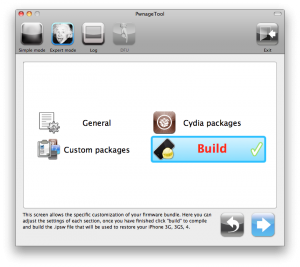
UPDate: !
UPDate 2: Attention! We’ve received info, that Apple stopped signing iOS 4.2 for devices for which iOS 4.3 is available. This means you will not be able to restore to 4.2.1 without saved SHSH keys.
Using this tutorial you will be able to jailbreak iOS 4.2.1 running on iPhone 3G, iPhone 3GS, , iPod Touch 3G, iPod Touch 4G and iPad. Pwnagetool will also preserve baseband version if you need carrier unlock. If you have updated the baseband to version 06.15, you can use this tutorial. This tutorial uses PwnageTool 4.2 for Mac OS X.
We are not developers of jailbreak utilities, so we cannot assure that everything will work just fine. However we tried this tutorial on several devices and succeeded.
We will use iPhone 4 in our jailbreak tutorial. The process is the same for all devices.
Step One
Make a folder called “Pwnage” on the desktop. Download a couple of things:
Step-by-step Tutorial: how to jailbreak and unlock your iPhone using PwnageTool 4.1.2 (Mac)
Oct 21These are instructions on how to jailbreak your iPhone using PwnageTool 4.1 for Mac OS X. If you need unlock and you have not updated to iOS 4 you will be able to preserve baseband and unlock iPhone using ultrasn0w.
This guide will work for , iPhone 3GS, iPhone 3G, iPod Touch 3G, iPod Touch 4G, iPad and AppleTV. Just use the right firmware and select the right device (step four).
Step One
Make a folder called “Pwnage” on the desktop. Now you need to download there PwnageTool 4.1 from and iOS 4.1 firmware from .
When downloading the IPSW file, it is best to download it with Firefox since Safari often auto extracts it!
Step Two
Double click to mount PwnageTool then drag the PwnageTool icon into the Pwnage folder.
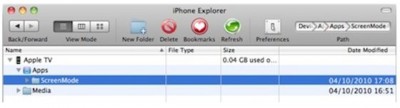
Developer Steven Troughton-Smith found out that iOS applications can installed on the new Apple TV. You only need to slightly modify the applications to identify them as Apple TV-compatible. Of course, Steven’s discovery is an important step in developers’ quest to run applications on the device, but the applications are not yet usable, as the Apple TV doesn’t have any application launcher that would be required for an app to function.
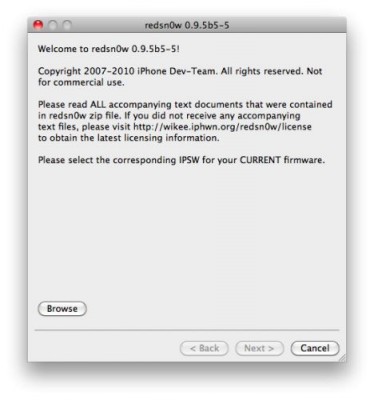
You cannot use JailBreakMe method to jailbreak and unlock iOS 4.0.2 on iPhone 3G. However you can still jailbreak and unlock iPhone 3G using redsn0w. Here are the instructions:
- Download the latest RedSn0w 0.9.5-b5 in our utilities page .
- Download firmware images for iOS 4.0 .
- Run RedSn0w and point it at the 4.0 IPSW. (Yes – point it at the 4.0 IPSW even though you’re at 4.0.2). This will also hacktivate your iPhone3G at 4.0.1 if you haven’t already been activated by iTunes.
- If you need a carrier unlock – install ultrasn0w in Cydia (add repository http://repo666.ultrasn0w.com). For T-Mobile in the USA remember to turn off 3G mode in Settings→General→Network.
 During Jimmy Kimmel’s live show Justin Long picked up his iPhone to share some interesting SMS he had. Meanwhile he also showed Cydia on his iPhone’s main screen. For those of you who do not know anything about this man, Justin Long is the very guy who starred in the most popular and successful commercials called “Get a Mac” by Apple, which appeared between 2006-2009 years.
Now that he no longer works with Apple, he is not afraid to break the rules of his former employer. By the way, today jailbreaking is fully legal in the USA, is not it?
There is no official jailbreak utility for iOS 4.0.1. However you can still jailbreak and unlock iPhone 3G. Just do the following:
- Download the latest RedSn0w 0.9.5-b5 in our utilities page .
- Download firmware images for iOS 4.0 .
- Run RedSn0w and point it at the 4.0 IPSW. (Yes – point it at the 4.0 IPSW even though you’re at 4.0.1). This will also hacktivate your iPhone3G at 4.0.1 if you haven’t already been activated by iTunes.
- Install ultrasn0w in Cydia (add repository http://repo666.ultrasn0w.com) if you need a carrier unlock (and in the USA, remember to turn off 3G mode in Settings→General→Network).