Saurik | Jailbreak iPhone, iPod Touch, iPad - Part 2 Skip to content

Jailbreak iPhone, iPod Touch, iPad

новости про джейлбрейк iPhone, iPod Touch и iPad

Archive

Tag: Saurik

Jailbreak-iPhone4S

The ‘dream team‘ of iPhone hackers has made more progress on the A5 jailbreak with planetbeing just announcing that they’re out of Apple’s sandbox.

And we’re out of the sandbox with @saurik’s invaluable help! (well, at least there’s a PoC) 😀 Turning out more complex than X-Gold 618.

pod2g also mentioned progress in twitter:

@planetbeing escaped from the sandbox with the help of @saurik. Thanks to their awesome work, there should be nothing left blocking for the A5 jailbreak. Now it should be a matter of days. Still no precise ETA of course.

Read the rest of this entry »

a5-jail-1

It looks like iPad 2 and iPhone 4S untethered jailbreak will truly be a team effort. Recently another hacker Saurik joined the team and made “some major contributions” yesterday.

Last week Pod2g announced that Planetbeing, MuscleNerd, and P0sixninja joined his effort to release an untethered iOS 5.0.1 jailbreak of the iPhone 4S and iPad 2 (A5 CPU devices).

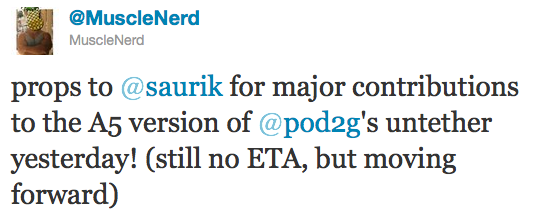
Today, MuscleNerd noted that the team has received some major contributions from saurik:


Read the rest of this entry »

mgf

Watch saurik, p0sixninja and other members of the jailbreak community speak at MyGreatFest via videos posted by VIZBOXtv:


Read the rest of this entry »

pwnagetool-42

DevTeam released PwnageTool 4.2 utility. It is able to create a custom IPSW that can perform an untethered jailbreak on iOS 4.2.1. As usual it can preserve baseband version for unlockers. Devteam used the same method that was implemented in greenpois0n.

PwnageTool supports all 4.2.1 devices other than iPod touch 2G:

Jailbreak is even improved compared to GreenPois0n RC6:


Read the rest of this entry »

pwnagetool-42

DevTeam released PwnageTool 4.2 utility. It is able to create a custom IPSW that can perform an untethered jailbreak on iOS 4.2.1. As usual it can preserve baseband version for unlockers. Devteam used the same method that was implemented in greenpois0n.

PwnageTool supports all 4.2.1 devices other than iPod touch 2G:

Jailbreak is even improved compared to GreenPois0n RC6:


Read the rest of this entry »

cydia3 cydia2 cydia1png

Jay Freeman (better known as Saurik) has reported that he added a new feature to Cydia, the jailbreak application store. “Cydia Theme Center” provides easer search of for Retina and non-Retina themes. Right now, you will find a selection of free and paid themes popular in Cydia, as well as themes selected by the employees of MacCiti and ModMyi. Soon Cydia user also will be able to vote their favorites into Theme Center. Freeman has predicted that the feature would be really popular. After release of Theme Center he posted to Twitter: The second feature to use my Whole Package Index, the “Cydia Theme Center”, went up an hour ago, and 15,000 people have already tried it! ;P

ipad

Cydia, the jailbreak App Store, is without a doubt the symbol of jailbreaking.  Rock, a second App Store, has had some success of its own over its 18 months of existence. Well, times have changed. Saurik, Cydia’s creator, has now acquired Rock and will merge it into Cydia. As a result, all apps, licenses and so on will be moved from Rock to Cydia over the next couple of days. This will bring the total number of available jailbreak apps, themes and extensions to over 20,000. As for Rock, it will be shut down.


Read the rest of this entry »

pdffix

As you may know, few days ago Apple had released a new version of iOS for all its mobile devices except first-generation iPhone and iPod touch, so owners of the latter are still not protected from a security flaw that allows hackers to obtain a remote control of their handsets. In fact, the latest compatible version for them is currently iOS 3.1.3.

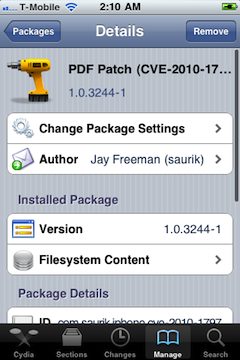
But Saurik (who is known as a developer of Cydia) recently announced on the Dev-Team blog that he released a PDF patch that is compatible with any iOS version down to 2.x. It can be found in Cydia if you’ll search for “PDF Patch”. After installing it you can check if the patch is working properly with visiting jailbreakme.com page. After sliding the box to jailbreak you should only see the star background (and not a dialog box), which means you are no longer vulnerable.

Read the rest of this entry »

Jay Freeman, better known as Saurik, the creator of Cydia, was interviewed by the home radio Make It Work. He speaks about the history and the future of the iPhone jailbreak.

Saurik describes the origins of Jailbreak and Unlock for the very first model of the iPhone. Jay explains that initially there were two important things to do with the iPhone 2G -- to use other carrier than AT&T and to install any application.

He continues discussing the main applications from Cydia. Cycorder was the first to allow video recording, and Winterboard was the only one that allowed users to change the graphical interface of the iPhone. He also speaks about Comex, the hacker who is currently working with the Dev Team for releasing and Unlock for the iPhone 4. According to Saurik the tool is still not ready to be released to the public due to severe bugs in the code. Here the second part:


Read the rest of this entry »

Last week Apple has released its iPhone Os 4.0 beta 4 and redsn0w is finally updated to support this as well as beta 1. New version of jailbreak is 0.9.5.b4 and it can be applied on iPhone 3G only(!).

Redsn0w 0.9.5.b4 is targeted at developers who make jailbroken apps, and will not work if you are already using blacksn0w, ultrasn0w or yellowsn0w.

iPhone Dev-Team warns:

“You should stay clear of this beta software if you rely on a carrier unlock.”

To use the jailbreak, follow the guide below:

  1. Download redsn0w 0.9.5.b4 here. (Only Mac OS X version since app are developed on this OS).
  2. Make sure you have already activated your iPhone 3G with iTunes and your own developer ID.
  3. Launch the jailbreak.
  4. Select your stock iPhone1,2_4.0_8A274b_Restore.ipsw (beta4) or iPhone1,2_4.0_8A230m_Restore.ipsw (beta1) file that you used to update your firmware.
  5. Choose “Install Cydia” and then click “Next”. Use DFU mode to install the redsn0w.
  6. When your iPhone 3G comes back up, you will notice Cydia has a blank white icon. It also has no sources so you should go to the Sources panel and add this repo: http://apt.saurik.com/cydia-3.7 (make sure you are connected to the Internet before). When Cydia restarts, you should see its real logo now, and the standard sources should be ready to use.