AT&T | Jailbreak iPhone, iPod Touch, iPad Skip to content

Jailbreak iPhone, iPod Touch, iPad

новости про джейлбрейк iPhone, iPod Touch и iPad

Archive

Tag: AT&T

As announced, AT&T has begun unlocking off contract iPhones for customers. TNW details the procedure. If you quality you can contact the company via phone, chat, or in-store.

The only piece of information required by AT&T is the International Mobile Equipment Identity (IMEI) number, which can be found under Settings -> General ->About on your device. Then in 72 hours you will receive email confirmation.

The maximum amount of unlock codes that can be given to an account is 5/year. You can see a copy of the unlock confirmation below.
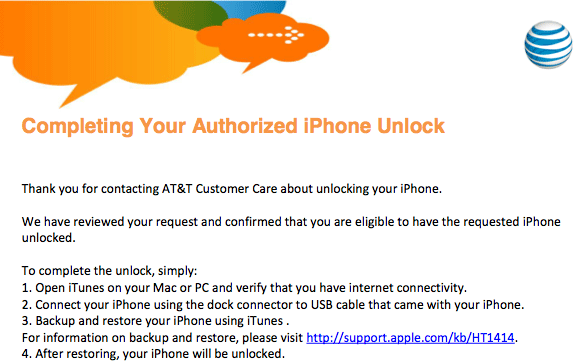
iphone-unlock

jailbreak

UPDATE: Apple latest firmware is iOS 5.1.1. Apple has stopped signing all other firmwares, including iOS 5.0.1, iOS 4.3.3 and iOS 4.3.5. This means you can NOT restore to 5.0.1/4.3.3/4.3.5 any more (both original and custom), unless you have saved your SHSH keys for it.

If you have decided to perform an untethered jailbreak and unlock, you need to get the following information:

  1. What type of device do you have (iPhone 3G/3GS/4, iPod Touch 3G/4G, iPad 1/2, Apple TV)?
  2. Do you need unlock (if your iPhone locked to one carrier and you want to use it with another)?
    The answer is NO, if the device is not iPhone, if it was purchased as factory unlocked and can be used with any cellular carrier (f.e. in Canada, France, etc).
    If the answer is YES, you need to find out your modem version (Setting-General-About-Modem).
  3. What firmware version do you have? Take a look at Setting-General-About-Version. For example it could be iOS 4.3.3.
  4. What operating system do you use on your desktop (Windows, Mac OS)?

How to perform jailbreak, when you do NOT need an unlock

For iPhone 3G the latest is iOS 4.2.1. You can perform jailbreak with any utility. For iOS 4.2.1 you can also use them or GreenPois0n (Windows, Mac OS).

iPad 2 jailbreak is available only for iOS 4.3.3 via JailbreakMe and and iOS 5.0.1 via Absenthe.

iPhone 4S jailbreak is available for iOS 5.0 / iOS 5.0.1 via Absenthe.

iOS 4.3.3

Apple stopped signing iOS 4.3.3, so you cannot update to iOS 4.3.3 without SHSH keys saved (in advance some time ago). If you have iPhone 4, iPhone 3GS, iPad 1, iPod Touch 3G or iPod Touch 4G that run iOS 4.3.3 – use JailbreakMe or RedSn0w to untether jailbreak your device.

If you have saved SHSH keys for iOS 4.3.3 you can use PwnageTool (Mac OS) or Sn0wBreeze (Windows).

iOS 4.3.4/4.3.5

For iOS 4.3.4/4.3.5 only tethered jailbreak is possible with redsn0w. Tethered means that each time you restart your device you will have to connect it to a computer and run redsn0w. The untethered iOS 4.3.5 jailbreak is possible only for iPhone 3GS with old bootrom. You can detect your bootrom version using this tutorial.

iOS 5

To jailbreak and unlock iOS 5 use latest version of redsn0w 0.9.9 or sn0wbreeze 2.8. You can jailbreak tethered or semi-tethered.

The untethered iOS 5 jailbreak is possible only for iPhone 3GS with old bootrom. You can detect your bootrom version using this tutorial.

iOS 5.0.1

For iPhone 4/3GS, iPad 1, iPod Touch 3G/4G an untethered jailbreak is available for iOS 5.0.1. For untethered jailbreak use the latest redsn0w 0.9.10 or Corona – package from Cydia to untether currently installed tethered jailbreak.

Tutorial how to untether installed tethered jailbreak is available here.

For iPhone 4S and iPad 2 use Absenthe.

For tethered iOS 5.0.1 jailbreak you an use redsn0w 0.9.9 and sn0wbreeze 2.8.

iOS 5.1 / iOS 5.1.1

For now only tethered jailbreak is available for iPhone 4/3GS, iPad 1 and iPod Touch 3G/4G for iOS 5.1 and iOS 5.1.1.

You can download all firmwares here.

Tutorials

Here are our step-by-step tutorials that will guide you through the jailbreak process:

iphone4s iPhone 4S

UnTethered jailbreak iOS 5.0 / iOS 5.0.1:

iphone-4 iPhone 4

Tethered jailbreak iOS 5.1.1:

Tethered jailbreak iOS 5.1:

UnTethered jailbreak iOS 5.0.1:

Semi-Tethered jailbreak iOS 5:

Tethered jailbreak iOS 4.3.5:

UnTethered jailbreak iOS 4.3.3:


Read the rest of this entry »

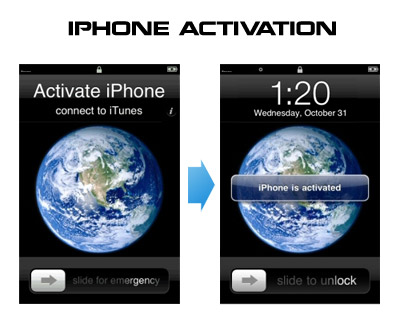
Having problems activating your iPhone? Don’t have original SIM-card? Cannot get passed emergency unlock screen? We have a solution:

If you have iPhone 3G, just use redsn0w to jailbreak and hactivate. If you have iPhone 3GS or iPhone 4 follow these instructions:

If you are already Jailbroken:

So you have an iPhone with iOS 4.0, but don’t have the original SIM and stuck on the Emergency Call Screen:

  1. Download ifunbox software (download link)
  2. Run ifunbox software and sync with phone
  3. Go to /private/var/root/Library/, delete original lockdown folder and put this lockdown folder after you extract it from the zip file
  4. Restart phone

If you are not jailbroken


Read the rest of this entry »

Jay Freeman, better known as Saurik, the creator of Cydia, was interviewed by the home radio Make It Work. He speaks about the history and the future of the iPhone jailbreak.

Saurik describes the origins of Jailbreak and Unlock for the very first model of the iPhone. Jay explains that initially there were two important things to do with the iPhone 2G -- to use other carrier than AT&T and to install any application.

He continues discussing the main applications from Cydia. Cycorder was the first to allow video recording, and Winterboard was the only one that allowed users to change the graphical interface of the iPhone. He also speaks about Comex, the hacker who is currently working with the Dev Team for releasing and Unlock for the iPhone 4. According to Saurik the tool is still not ready to be released to the public due to severe bugs in the code. Here the second part:


Read the rest of this entry »

Today Apple began selling iPhones without AT&T plan. Apple’s new policy is that anyone can walk into an Apple Store and pick up an iPhone 8GB for $499, 16GB for $599 and 32GB for $699. They allow one unit per customer per day, up to 10 iPhones.

The iPhones are still locked to AT&T’s network. Of course, these devices will be sold with the latest baseband which is not yet unlockable; however, you can use RedSn0w to perform a tethered jailbreak.

firmware-312

Apple has just released a new firmware version 3.1.2 for all the iPhones and iPod Touches. Weights around 300 MB. Here is the changelog:

This update contains bug fixes and improvements including the following:

  • Resolves sporadic issues that may cause iPhone not to wake from sleep
  • Resolves intermittent issue that may interrupt cellular network services until restart
  • Fixes bug that could cause occasional crash during video streaming

Also, the iPhone OS 3.1.2 update for iPhone in U.S. is accompanied by an update to AT&T’s carrier settings file, which brings the settings to version 5.6.

You can download firmware 3.1.2 here or via iTunes. We strongly recommend users who want jailbreak or unlock NOT to upgrade, just wait for new utilities.

Here’s an extremely easy way to enable tethering on your iPhone 3G and 3GS (even on AT&T!) by just visiting a site on your iPhone’s Safari. No jailbreaking needed. Here’s where you go:

http://help.benm.at/help.php

Then scroll down to the Tethering & Internet Settings, then choosing your country and provider. This works for both AT&T and T-Mobile, and will let you install the appropriate configuration. Just be careful though, that AT&T doesn’t officially sponsor this and might charge you extra for using tethering while you’re not supposed to.

And if this disables visual voicemail on your phone, just go and reset your network settings, and it should be fixed. If that doesn’t work, try updating your phone with an older version of the AT&T carrier settings.

via gizmodo

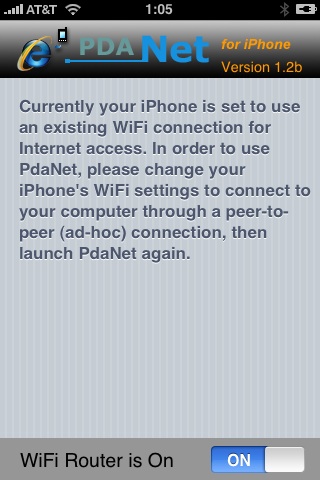
Many iPhone 3G users would like to use internet on a desktop or notebook through their phone. There were several solutions: iPhoneModem, NetShare, 3Proxy.. they all used SSH and SOCKS proxy. One of the working ones was described here get internet on a desktop or notebook through IPhone 3G.

Couple days ago PdaNet (fullname is PdaNet WiFi Router) was ported to iPhone. Now our life is much much easier.


Read the rest of this entry »

There are so many tools, some for Mac OS, others for Windows, different versions… Complicated. So let’s summerize a little bit.

If you have iPhone 3G, you’ll be able to install 3-rd party non AppStore applications (through separate applications called Cydia and Installer) and run these applications. If you have old iPhone, in addition to that you’ll be able to unlock the device (use with any carrier).

There are two methods: quickpwn and custom firmware method. First one is for quikly pwning and jailbreaking  the device without restore. You should use it if you have unlocked device or an AT&T contract.

If you are Windows user:

  • Go for WinPwn. The current version is 2.5.0.2 (also called 2.5 beta-2). Download here. It supports both iPhone and iPhone 3G, firmwares 2.0, 2.0.1, 2.0.2. You can use either quickpwn or custom firmware method.
  • There is a separate QuickPwn tool for Windows. The current version is RC3. Download here. Do you need it? Yes, if you want to quick pwn and you do not like WinPwn (or you had problems with it).

If you’re using Mac OS:

  • Go for PwnageTool. The current version is 2.0.3.1. Download here. Works with 2.0, 2.0.1, 2.0.2 firmwares using custom-firmware method.
  • There is a version of QuickPwn tool for MAC OS. The current version is 1.0.0. Download here. It works only with firmware 2.0.2. Do you need it? Yes, if you want to quick pwn.
    QuickPwn is not a replacement for PwnageTool, they are different tools and provide different features, QuickPwn is for quickly pwning a device, whereas PwnageTool is designed to custom build and tailor the ipsw production process, both tools will be actively developed in the future.

    DevTeam created a quick solution for jailbreaking an iPhone. It is called QuickPwn. It is in beta, so be careful. It will allow you to pwn (jailbreak) your device very quickly without restoring!

    Who should use this tool? This is for those that are not planning to restore. It’s not clear what the activation state is after the process therefore, I only recommend this for those that have a contract carrier or an unlocked phone already.

    If you are on a stock device and using AT&T or a contract carrier, this is the perfect jailbreak for you. You will not lose your contacts or have to do any backups. Finally, if you are going to restore anyway, especially if you need to unlock a 2g, you may as well use winpwn or such.

    Currently QuickPwn requires your device to be running version 2.0.1 of the iPhone/iPod firmware. And it runs only on Windows. This requirement will change in a subsequent release.

    You can download it here.

    • Page 1 of 2
    • 1
    • 2
    • >