According to secret documents leaked by WikiLeaks not long ago, the White House has been in talks with other countries to make phone unlocking illegal by international law. And it is rather strange since in public the US government supports those who struggle for the legalization of unlocking.
Archive
Tag: Operating systemFamous hacker Planetbeing, member of Evad3rs team, posted an update regarding team’s iOS 7 jailbreak progress. They’ve achieved one important step – unsigned userland code execution. Basically this means that they’ve got behind Apple’s walls of security and now can poke at the kernel. Bugs found in the kernel could be used to create a jailbreak for the new operating system.
Achieved unsigned userland code execution with some of our stuff in reserve. Now we have a good platform for poking the kernel.
Good new for all those who use an CDMA with iOS 5.1 on board -- there’s an untethered jailbreak for this device. For more details -- read the rest of the article below and watch a video.
UPDATE: Apple latest firmware is iOS 5.1.1. Apple has stopped signing all other firmwares, including iOS 5.0.1, iOS 4.3.3 and iOS 4.3.5. This means you can NOT restore to 5.0.1/4.3.3/4.3.5 any more (both original and custom), unless you have saved your SHSH keys for it.
If you have decided to perform an untethered jailbreak and unlock, you need to get the following information:
- What type of device do you have (iPhone 3G/3GS/4, iPod Touch 3G/4G, iPad 1/2, Apple TV)?
- Do you need unlock (if your iPhone locked to one carrier and you want to use it with another)?
The answer is NO, if the device is not iPhone, if it was purchased as factory unlocked and can be used with any cellular carrier (f.e. in Canada, France, etc).
If the answer is YES, you need to find out your modem version (Setting-General-About-Modem). - What firmware version do you have? Take a look at Setting-General-About-Version. For example it could be iOS 4.3.3.
- What operating system do you use on your desktop (Windows, Mac OS)?
How to perform jailbreak, when you do NOT need an unlock
For iPhone 3G the latest is iOS 4.2.1. You can perform jailbreak with any utility. For iOS 4.2.1 you can also use them or GreenPois0n (Windows, Mac OS).
iPad 2 jailbreak is available only for iOS 4.3.3 via JailbreakMe and and iOS 5.0.1 via Absenthe.
iPhone 4S jailbreak is available for iOS 5.0 / iOS 5.0.1 via Absenthe.
iOS 4.3.3
Apple stopped signing iOS 4.3.3, so you cannot update to iOS 4.3.3 without SHSH keys saved (in advance some time ago). If you have , iPhone 3GS, iPad 1, iPod Touch 3G or iPod Touch 4G that run iOS 4.3.3 – use JailbreakMe or RedSn0w to untether jailbreak your device.
If you have saved SHSH keys for iOS 4.3.3 you can use PwnageTool (Mac OS) or Sn0wBreeze (Windows).
iOS 4.3.4/4.3.5
For iOS 4.3.4/4.3.5 only tethered jailbreak is possible with redsn0w. Tethered means that each time you restart your device you will have to connect it to a computer and run redsn0w. The untethered iOS 4.3.5 jailbreak is possible only for iPhone 3GS with old bootrom. You can detect your bootrom version using .
iOS 5
To jailbreak and unlock iOS 5 use latest version of redsn0w 0.9.9 or sn0wbreeze 2.8. You can jailbreak tethered or .
The untethered iOS 5 jailbreak is possible only for iPhone 3GS with old bootrom. You can detect your bootrom version using .
iOS 5.0.1
For iPhone 4/3GS, iPad 1, iPod Touch 3G/4G an untethered jailbreak is available for iOS 5.0.1. For untethered jailbreak use the latest redsn0w 0.9.10 or Corona – package from Cydia to untether currently installed tethered jailbreak.
Tutorial how to untether installed tethered jailbreak is available .
For iPhone 4S and iPad 2 use Absenthe.
For tethered iOS 5.0.1 jailbreak you an use redsn0w 0.9.9 and sn0wbreeze 2.8.
iOS 5.1 / iOS 5.1.1
For now only tethered jailbreak is available for iPhone 4/3GS, iPad 1 and iPod Touch 3G/4G for iOS 5.1 and iOS 5.1.1.
You can download all firmwares .
Tutorials
Here are our step-by-step tutorials that will guide you through the jailbreak process:
 iPhone 4S
UnTethered jailbreak iOS 5.0 / iOS 5.0.1:
 iPhone 4
Tethered jailbreak iOS 5.1.1:
Tethered jailbreak iOS 5.1:
UnTethered jailbreak iOS 5.0.1:
Semi-Tethered jailbreak iOS 5:
Tethered jailbreak iOS 4.3.5:
UnTethered jailbreak iOS 4.3.3:
- (works without a computer)
Apple has reportedly disabled its jailbreak detection API through iOS 4.2 software update. The API helped third-party mobile device management (MDM) applications to check for unauthorized modifications of system files. Apple’s jailbreak detection API provided MDM applications direct access to iOS system information and was able to ask the operating system directly if it had been jailbroken. Jailbreak exploits typically change a number of operating system files, and exploit one or another low-level OS features to let users directly load their own or third-party applications.
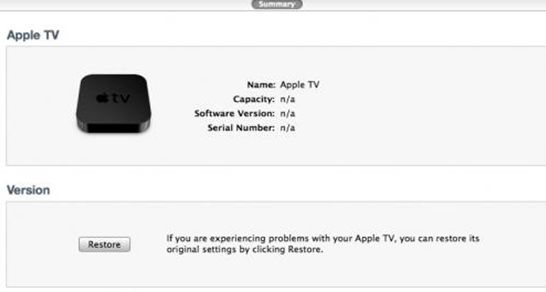
Twitter user with nickname StealthBravo recently confirmed that the new Apple TV can be restored in iTunes as well as any iOS device, easing the way for jailbreakers to bring new functionality to the set-top box. This means that the hackers soon be able to offer us tools, as they currently do for other iOS devices, to save SHSH blobs, jailbreak the Apple TV, and install 3rd party software.
Moreover, Apple TV offers a Micro-USB port for connectivity, but the port also offers a means for users to physically connect the device to computers to employ the techniques required for jailbreak of operating system.

iH8sn0w has just released a new version of Sn0wbreeze, the Windows tool that allows you to jailbreak Firmware 3.1.3. This is a small update that fixes a problem that occurs only on 64bit operating system.
You can download the new sn0wbreeze 1.5.2 .
We still recommend to use DevTeam – RedSn0w (Windows and MAC OS) and PwnageTool (MAC OS only).

The iPhone OS is a great operating system and is also one of the safest. That’s why Apple rejected the anti-virus application developed by Kaspersky Lab. Such app will never make it to AppStore, just because users don’t need it.
Some users who run the jailbreak might catch a virus. However – there will be no troubles and no viruses.
This information is for those who are worried about not being able to run the iPhone Jailbreak with the new operating system Snow Leopard. Dev Team said that RedSn0w and PwnageTool works perfectly.

Looks like Apple didn’t create any anti-jailbreak system. Good news.