The PanguTeam on Saturday released an important update on the status of its jailbreak utility for iOS 8 – 8.1. As you probably know, earlier this week, the hackers released a new version of untethered jailbreak for iOS 8 – 8.1. It should be noted, however, that this version turned out to be very unstable and was available only for Windows users, that is why the PaunguTeam decided to pull the update back and make it available only for jailbreak developers.
Archive
Tag: ECIDAs you probably know, Apple has recently iOS 7.1 to users worldwide. However, I recommend that you should wait for a while and don’t update since Apple has patched the kernel exploit used by evasi0n7 jailbreak tool. What this means is that it is temporarily impossible to hack the device running iOS 7.1, either it is an iPhone or iPad or iPod touch.
Well known iPhone hacker p0sixninja has teased the upcoming release of some ‘amazing things’ on Twitter that are bigger than a jailbreak.
Last night he tweeted:
I got a lot of amazing things coming to you all soon. think bigger than jailbreak 😉
In March, p0sixninja revealed that he had found the exploits necessary to release a new jailbreak; however, as expected, he decided to hold those back for iOS 7 or iOS 7.1.

UPDATE: Apple latest firmware is iOS 5.1.1. Apple has stopped signing all other firmwares, including iOS 5.0.1, iOS 4.3.3 and iOS 4.3.5. This means you can NOT restore to 5.0.1/4.3.3/4.3.5 any more (both original and custom), unless you have saved your SHSH keys for it.
If you have decided to perform an untethered jailbreak and unlock, you need to get the following information:
- What type of device do you have (iPhone 3G/3GS/4, iPod Touch 3G/4G, iPad 1/2, Apple TV)?
- Do you need unlock (if your iPhone locked to one carrier and you want to use it with another)?
The answer is NO, if the device is not iPhone, if it was purchased as factory unlocked and can be used with any cellular carrier (f.e. in Canada, France, etc).
If the answer is YES, you need to find out your modem version (Setting-General-About-Modem). - What firmware version do you have? Take a look at Setting-General-About-Version. For example it could be iOS 4.3.3.
- What operating system do you use on your desktop (Windows, Mac OS)?
How to perform jailbreak, when you do NOT need an unlock
For iPhone 3G the latest is iOS 4.2.1. You can perform jailbreak with any utility. For iOS 4.2.1 you can also use them or GreenPois0n (Windows, Mac OS).
iPad 2 jailbreak is available only for iOS 4.3.3 via JailbreakMe and and iOS 5.0.1 via Absenthe.
iPhone 4S jailbreak is available for iOS 5.0 / iOS 5.0.1 via Absenthe.
iOS 4.3.3
Apple stopped signing iOS 4.3.3, so you cannot update to iOS 4.3.3 without SHSH keys saved (in advance some time ago). If you have , iPhone 3GS, iPad 1, iPod Touch 3G or iPod Touch 4G that run iOS 4.3.3 – use JailbreakMe or RedSn0w to untether jailbreak your device.
If you have saved SHSH keys for iOS 4.3.3 you can use PwnageTool (Mac OS) or Sn0wBreeze (Windows).
iOS 4.3.4/4.3.5
For iOS 4.3.4/4.3.5 only tethered jailbreak is possible with redsn0w. Tethered means that each time you restart your device you will have to connect it to a computer and run redsn0w. The untethered iOS 4.3.5 jailbreak is possible only for iPhone 3GS with old bootrom. You can detect your bootrom version using .
iOS 5
To jailbreak and unlock iOS 5 use latest version of redsn0w 0.9.9 or sn0wbreeze 2.8. You can jailbreak tethered or .
The untethered iOS 5 jailbreak is possible only for iPhone 3GS with old bootrom. You can detect your bootrom version using .
iOS 5.0.1
For iPhone 4/3GS, iPad 1, iPod Touch 3G/4G an untethered jailbreak is available for iOS 5.0.1. For untethered jailbreak use the latest redsn0w 0.9.10 or Corona – package from Cydia to untether currently installed tethered jailbreak.
Tutorial how to untether installed tethered jailbreak is available .
For iPhone 4S and iPad 2 use Absenthe.
For tethered iOS 5.0.1 jailbreak you an use redsn0w 0.9.9 and sn0wbreeze 2.8.
iOS 5.1 / iOS 5.1.1
For now only tethered jailbreak is available for iPhone 4/3GS, iPad 1 and iPod Touch 3G/4G for iOS 5.1 and iOS 5.1.1.
You can download all firmwares .
Tutorials
Here are our step-by-step tutorials that will guide you through the jailbreak process:
 iPhone 4S
UnTethered jailbreak iOS 5.0 / iOS 5.0.1:
 iPhone 4
Tethered jailbreak iOS 5.1.1:
Tethered jailbreak iOS 5.1:
UnTethered jailbreak iOS 5.0.1:
Semi-Tethered jailbreak iOS 5:
Tethered jailbreak iOS 4.3.5:
UnTethered jailbreak iOS 4.3.3:
- (works without a computer)
MuscleNerd has announced via Twitter that jailbreak utility RedSn0w 0.9.9b1 is released with major update and numerous new features:
Major improvements and features added to redsn0w 0.9.9b1! See update #9 at http://is.gd/6eek4Y Feedback: @redsn0w_testers
Indeed the list of new features is quite high. There are two main ones:
- There is no need to download firmware any more. There is no need to push Browse IPWS button any more (but you still can).
- Developers added lots of functionality to work with SHSH keys (extract, submit, download, verify, stitch etc)
However this new version does not bring features like untethered jailbreak for iOS 4.3.5 or iOS 5.
Due to some possible bugs we still recommend to use the old RedSn0w 0.9.8b7b, but the new 0.9.9b1 is worth seeing and playing with.
Here are links to our RedSn0w 0.9.8b7b iOS 4.3.5 jailbreak tutorials:
- Mac OS: , , , ,
- Windows: , , , ,
You can download RedSn0w 0.9.9b1 :
Here is the full list of features from DevTeam:
Step-by-step Tutorial: jailbreak iOS 4.2.1 on iPhone/iPod/iPad using PwnageTool 4.2 (Mac OS)
Mar 9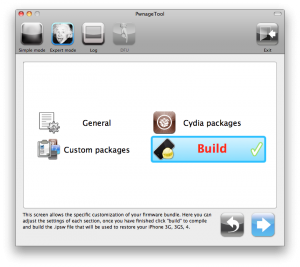
UPDate: !
UPDate 2: Attention! We’ve received info, that Apple stopped signing iOS 4.2 for devices for which iOS 4.3 is available. This means you will not be able to restore to 4.2.1 without saved SHSH keys.
Using this tutorial you will be able to jailbreak iOS 4.2.1 running on iPhone 3G, iPhone 3GS, , iPod Touch 3G, iPod Touch 4G and iPad. Pwnagetool will also preserve baseband version if you need carrier unlock. If you have updated the baseband to version 06.15, you can use this tutorial. This tutorial uses PwnageTool 4.2 for Mac OS X.
We are not developers of jailbreak utilities, so we cannot assure that everything will work just fine. However we tried this tutorial on several devices and succeeded.
We will use iPhone 4 in our jailbreak tutorial. The process is the same for all devices.
Step One
Make a folder called “Pwnage” on the desktop. Download a couple of things:

UPDATE: Please think first, before you do something.
UPDATE2: If you have 05.13 baseband or lower – do not update to 4.2.1, use PwnageTool to create custom firmware!
This is step-by-step instructions on how to jailbreak and unlock your iPhone 3GS on iOS 4.2.1 firmware using RedSn0w 0.9.6b5 for Windows.
For iPhone 3G use .
If you have an iPhone 3GS with the new bootrom you will only be able to perform a tethered jailbreak at this time. This means you will need Redsn0w’s assistance to boot into your jailbroken device.
IMPORTANT FOR UNLOCKERS
During this process you can update your baseband to the 06.15 version. If you are on 05.14 or 05.15 or higher you will need to do this to unlock. You do not need to do this for jailbreak only. Please read the following very carefully before deciding whether to do this.
UPDATE: Please think first, before you do something.
UPDATE2: If you have 05.13 baseband or lower – do not update to 4.2.1, use PwnageTool to create custom firmware!
This is step-by-step instructions on how to jailbreak and unlock your iPhone 3G on iOS 4.2.1 firmware using RedSn0w 0.9.6b5 for Windows.
For iPhone 3GS use .
IMPORTANT FOR UNLOCKERS
During this process you can update your baseband to the 06.15 version. If you are on 05.14 or 05.15 or higher you will need to do this to unlock. You do not need to do this for jailbreak only. Please read the following very carefully before deciding whether to do this.
Step-by-step Tutorial: how to jailbreak and unlock your iPhone using PwnageTool 4.1.2 (Mac)
Oct 21These are instructions on how to jailbreak your iPhone using PwnageTool 4.1 for Mac OS X. If you need unlock and you have not updated to iOS 4 you will be able to preserve baseband and unlock iPhone using ultrasn0w.
This guide will work for , iPhone 3GS, iPhone 3G, iPod Touch 3G, iPod Touch 4G, iPad and AppleTV. Just use the right firmware and select the right device (step four).
Step One
Make a folder called “Pwnage” on the desktop. Now you need to download there PwnageTool 4.1 from and iOS 4.1 firmware from .
When downloading the IPSW file, it is best to download it with Firefox since Safari often auto extracts it!
Step Two
Double click to mount PwnageTool then drag the PwnageTool icon into the Pwnage folder.
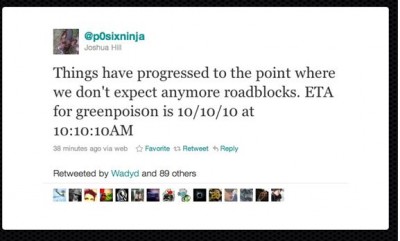
Chronic Dev-Team member Joshua Hill has just confirmed that the new Greenpois0n jailbreak, which will allow you to jailbreak Apple’s latest iOS 4.1 software, is expected to be released this Sunday. To make the event more special, Dev-Team has decided to launch the tool at 10 past 10 AM on October 10th 2010. They will be releasing multiple tools, some of which will help you update to 4.1 without losing the possibility of unlocking your baseband for other carriers.