Mac | Jailbreak iPhone, iPod Touch, iPad - Part 6 Skip to content

Jailbreak iPhone, iPod Touch, iPad

новости про джейлбрейк iPhone, iPod Touch и iPad

Archive

Tag: Mac

Seas0nPass

Seas0nPass has been updated to perform an untethered jailbreak of the Apple TV running iOS 4.4.4.

Happy New Year! Today we are happy to release an updated version of Seas0nPass that supports an untethered jailbreak of the latest 4.4.4 (iOS 5.0.1) AppleTV software. Big thanks goes to the world famous @pod2g for doing the lion’s share of the work to make this new version possible.

Most of the apps are working just fine:


Read the rest of this entry »

Here are our step-by-step tutorials that will guide you through all the process of jailbreaking iOS 5.0.1 with sn0wbreeze, redsn0w, pwnagetool and absenthe:

iphone4s iPhone 4S

UnTethered jailbreak iOS 5.0 / iOS 5.0.1:

iphone-4 iPhone 4

UnTethered jailbreak iOS 5.0.1:


Read the rest of this entry »

unlock-Ultrasnow-5.01

UPDATE: official ultrasn0w with iOS 5.0.1 released!

This tutorial is for those users of locked iPhone 3GS and iPhone 4, who updated to iOS 5.0.1 and realized that ultrasn0w unlock doesn’t work there.

Indeed DevTeam have not updated software unlock utility ultrasn0w to work with the latest iOS 5.0.1. There are two workarounds, that will make ultrasn0w work on 5.0.1.


Read the rest of this entry »

crashreporter

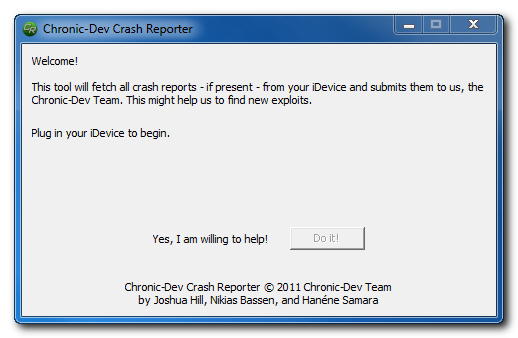
The Chronic Dev-Team has released CDevReporter, their new tool that lets you help find jailbreak vulnerabilities, for Windows.

You can download the Mac and Windows versions of CDevReporter here:

More information is available in our recent post “Want untethered iOS 5 jailbreak? Help hackers to find new exploits!“.

crash-reporter

Semi-tethered jailbreak is already available for some devices for both iOS 5 and iOS 5.0.1. But we all want untethered jailbreak and we want jailbreak for iPad 2 and iPhone 4S. So why not help hackers to find new exploits and vulnerabilities?

The Chronic Dev-Team has a released a tool to collect crash reports from iOS devices in order to find vulnerabilities that could lead to an untethered jailbreak.

The idea is very simple. When your iPhone, iPad or iPod Touch crashes it sends data to Apple (you can turn it this off though). Apple uses these reports to update iOS in the future. By the way, it also uses them to fix exploits found by jailbreakers. P0sixninja says that Apple closed several exploits they have found in IOS 5 beta before the final version of the software was released.

In order to find more vulnerabilities as fast as possible, the team has developed a tool which will copy the crash reports from your device and analyze them to locate potential exploits. The tool will also remove the crash reports from your device and modify your iTunes installation to prevent uploading of that diagnostic information to Apple.


Read the rest of this entry »

redsn0w-099b8

The iPhone Dev-Team has updated RedSn0w with support for jailbreaking iOS 5.0.1 beta which was recently released for iOS developers.

RedSn0w 0.9.9b8 recognizes 5.0.1 beta and you don’t have to “point at 5.0 IPSW” any more. Since the IPSW isn’t public, you’ll still need to provide it once to redsn0w (Extra -> Select IPSW).


Read the rest of this entry »

Here are our step-by-step tutorials that will guide you through all the process of jailbreaking iOS 5 with redsn0w 0.9.9 and sn0wbreeze 2.8:

iphone-4 iPhone 4

Semi-Tethered jailbreak iOS 5:


Read the rest of this entry »

redsn0w-099b6

The iPhone Dev-Team released jailbreak utility RedSn0w 0.9.9b6 for both Windows and Mac users. The new version offers full iOS 5 jailbreak support for Windows and fixes Location Services issue for iPhone 3GS devices running the 06.15 baseband. This is still a tethered jailbreak for iPhone 4, iPhone 3GS, iPad 1, iPod Touch 3G and iPod Touch 4G:

We’ve released version 0.9.9b6 of redsn0w, with both a functional fix and cosmetic fix for iOS5 jailbreakers. For iPhone3GS owners with the 06.15 baseband, this redsn0w eliminates the network crash you saw when using Location Services in iOS5 (in fact, you don’t even need to disable Location Services anymore during the initial setup). The cosmetic fix is to the visual countdown you see when going into DFU mode.

It’s okay to re-run this redsn0w over an existing device jailbroken at iOS5. Just choose “Jailbreak” again and de-select Cydia (in other words, all the checkboxes will be unchecked). If you are lucky enough to have an old-bootrom iPhone3GS, please pre-select the IPSW first (redsn0w can’t yet auto-detect the FW version of your old-bootrom 3GS if it’s already been jailbroken).

Just as redsnow 0.9.9b5 the new version supports creating custom firmwares with preserving baseband (modem) version for unlock. Unfortunately right now custom firmware functionality works only with Mac version.

You can download the latest RedSn0w version here.

UPDATE:
Here are links to our RedSn0w 0.9.9 iOS 5 jailbreak tutorials:

ultrasn0w-124

The iPhone Dev-Team has released an update to their UltraSn0w unlock bringing support for iOS 5. Remember that NO new basebands are supported in this release. It only adds support for iOS 5 with old basebands.

Here is the list of supported basebands:

  • iPhone 4: 01.59.00
  • iPhone 3G/3GS: 04.26.08, 05.11.07, 05.12.01, 05.13.04, 06.15.00.

If have one of the above baseband version and need unlock you can upgrade to iOS 5 without updating your baseband using RedSn0w 0.9.9b5.

Ultrasn0w 1.2.4 is available in Cydia.


Read the rest of this entry »

redsn0w-099b5-mac1 redsn0w-099b5-mac2

The iPhone Dev-Team has released RedSn0w 0.9.9b5 – an official tethered jailbreak for iOS 5. Users don’t have to point to downloaded iOS 5 ipws any more. Just run and jailbreak.

Currently only the Mac version has been made available. Windows version is coming soon. However Windows users can still jailbreak iOS 5 with Redsn0w 0.9.9.b4, – just go to “Extras” -> “Select IPWS” and select your iOS 5 ipsw file (can download here).

Good news for users who need carrier unlock (ultrasn0w or Gevey Sim). With RedSn0w 0.9.9b5 you can update to iOS 5 and preserve the baseband (modem) version for unlock:

The new “Custom IPSW” button on the Extras screen will create a custom IPSW without the baseband update for 4.3.3 or 5.0gm (iPhone3GS and iPhone4 only, for now). Remember not to accidentally restore to the stock IPSW after you create the custom one! The custom one begins with NO_BB_ (for “no baseband”).

You must enter “Pwned DFU” mode before trying to use the NO_BB_ IPSW with iTunes (and your hosts file cannot be pointing to Cydia’s servers due to the new blob nonce mechanism they’re using in iOS5).

We will update our step-by-step tutorials soon.

You can download RedSn0w 0.9.9b5 (Mac) and RedSn0w 0.9.9b4 (Windows) here.

PS: RedSn0w 0.9.9 is a bit different from 0.9.8 version. You can learn more about other new redsn0w 0.9.9 features here.
UPDATE: redsn0w 0.9.9b6 released, download here

UPDATE:
Here are links to our RedSn0w 0.9.9 iOS 5 jailbreak tutorials: