Mac | Jailbreak iPhone, iPod Touch, iPad - Part 12 Skip to content

Jailbreak iPhone, iPod Touch, iPad

новости про джейлбрейк iPhone, iPod Touch и iPad

Archive

Tag: Mac

itunes

iTunes continues to serve iOS updates even if your Apple’s device was jailbroken. And if these updates are downloaded and installed occasionally, your device may be returned to  a non-jailbroken state.  Here the script, which prevents iTunes from automatically downloading updates:


Read the rest of this entry »

Famous hacker Geohot is back and today he released the latest iOS 4.1 jailbreak. It is called LimeRa1n and supports iPhone 3GS, iPod Touch 3G, iPad, iPhone 4, iPod Touch 4G with iOS firmwares 4.0-4.1 and beyond. It can also hacktivate your device, so there is no need in phone SIM-cards and other tricks.

This software is still in beta and was updated 3 times in last several hours. So use with caution.

There is Windows version only for now. Geohot plans to release LimeRa1n for Mac and Linux soon. You can Download it here.

Some users report that they have jailbroken their iOS 3.2.2 iPads successfully with limera1n, while others report that they tried, but failed.

Do not forget to backup.

For many users of iPhone 3GS and iPhone 4 with iOS 4.0.2 now there is a hope to perform jailbreak using LimeRa1n and unlock using ultrasn0w. We recommend NOT to do it if you have not saved your SHSH keys. You can try, but if something goes wrong without SHSH keys you’ll have to restore to iOS 4.1, and there is no unlock for iOS 4.1 (possibly forever). Just wait for PwnageTool utility.

DevTeam reported that Limera1n uses a different exploit than SHAtter, so they will not release SHAtter utility, they don’t want let Apple fix both security holes. However they plan to release PwnageTool using the same exploit.


Read the rest of this entry »

redsn0w-0-9-6-b1

RedSn0w 0.9.6 b1 for Mac OS X was released a while ago. Today DevTeam created a version for Windows users. RedSn0w 0.9.6 b1 can jailbreak iOS 4.1 and iOS 4.1 running on iPhone 3G or iPod touch 2G.

You can download it here.

Redsn0w is easy to use:

  1. Download firmware here.
  2. Launch redsn0w 0.9.6 b1
  3. Select your stock 4.1 or 4.0 ipsw (you’ve already used this to update your device to 4.1 or 4.0)
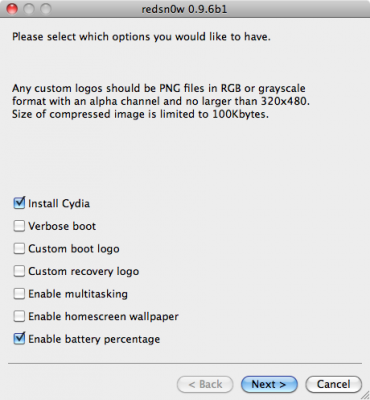
  4. Select “Install Cydia” and any of the other options shown above, then click “Next”. Use DFU mode to install the jailbreak.

This is still beta, so there might be some problems:

Any Windows users seeing “Waiting for reboot” for too long (more than 20 seconds or so), please try “shaking” the JB process by unplugging then replugging your USB cable (while letting redsn0w continue to run). Also, try using a USB port “closer” to your computer (as opposed to on your monitor or behind another hub).

As usual DevTeam reminds us:

IF YOU USE THE ULTRASN0W UNLOCK, PLEASE WAIT FOR PWNAGETOOL TO SUPPORT 4.1. DO NOT USE REDSN0W

That’s because to use redsn0w at 4.1, you need to already have updated to official 4.1 from Apple. If you do that, you lose the ultrasn0w unlock (possibly forever).

redsn0w-0-9-6-b1

DevTeam recently released new version of redsn0w to jailbreak iOS 4.1. New RedSn0w 0.9.6 b1 supports iOS 4.0 and iOS 4.1 running on iPhone 3G or iPod touch 2G.

There is only Mac OS X x86 version, that you can download here.

Redsn0w is easy to use:

  1. Download firmware here.
  2. Launch redsn0w 0.9.6 b1
  3. Select your stock 4.1 or 4.0 ipsw (you’ve already used this to update your device to 4.1 or  4.0)
  4. Select “Install Cydia” and any of the other options shown above, then click “Next”.  Use DFU mode to install the jailbreak.

As usual DevTeam reminds us:

IF YOU USE THE ULTRASN0W UNLOCK, PLEASE WAIT FOR PWNAGETOOL TO SUPPORT 4.1.  DO NOT USE REDSN0W

That’s because to use redsn0w at 4.1, you need to already have updated to official 4.1 from Apple.  If you do that, you lose the ultrasn0w unlock (possibly forever).

Have you ever wanted to display something on your iPad to external big screen? Here’s a quick video tutorial how to do that:


Read the rest of this entry »

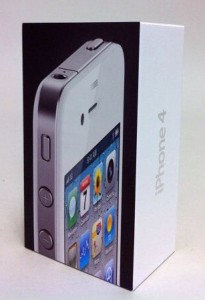
WhiteiPhone4It seems the device is the latest version of the white iPhone 4, which is officially scheduled for release in the end of this year. “Some people believe that this may be one of those devices that have been destroyed by Apple in the last minute after the discovery of defects of white color that have been found.” Check out


Read the rest of this entry »

JustinLongJailbrokeniPhoneDuring Jimmy Kimmel’s live show Justin Long picked up his iPhone to share some interesting SMS he had. Meanwhile he also showed Cydia on his iPhone’s main screen. For those of you who do not know anything about this man, Justin Long is the very guy who starred in the most popular and successful commercials called “Get a Mac” by Apple, which appeared between 2006-2009 years.

Now that he no longer works with Apple, he is not afraid to break the rules of his former employer. By the way, today jailbreaking is fully legal in the USA, is not it?

T1000Do you remember the robot called T-1000 Skynet made of liquid metal in the film Terminator 2? It seems that Steve Jobs decided to create devices of next generation using Liquidmetal Technologies, a California company from which Apple has recently acquired the exclusive rights for creation of liquid metal alloy products.

One of the best and most distinctive factors in all Apple products is how this company produces its own devices, the quality of production, as well as the materials used, which, undoubtedly, have first-class quality.

Now that Apple has the exclusive rights to create products of the liquid metal, we can assume that it has no plans to create a robot for the next Terminator movie, but probably will use it for such devices as iMac, iPad and iPhone of the next generation in order to be one step ahead of its competitors.

AppleLiquidMetal

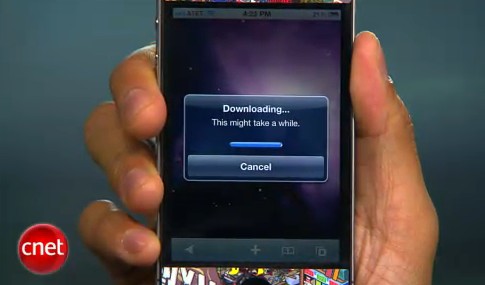
CNet specialists will show how to jailbreak using jailbreakme.com and how to turn on FaceTime over 3G (out tutorial is available here):


Read the rest of this entry »

That was funny when people started jailbreaking iPhone’s inside Apple Stores. The fun ended because stores started banning jailbreakme.com from their WiFi networks. Well, it looks like it didn’t help.

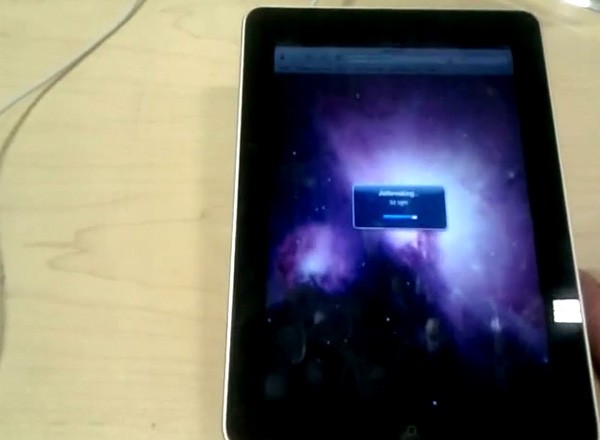
One Apple fan published a video where he jailbreaks iPad by using his Nexus One’s mobile hotspot capabilities. Take a look at the video after the break:


Read the rest of this entry »