Archive
Tag: Car
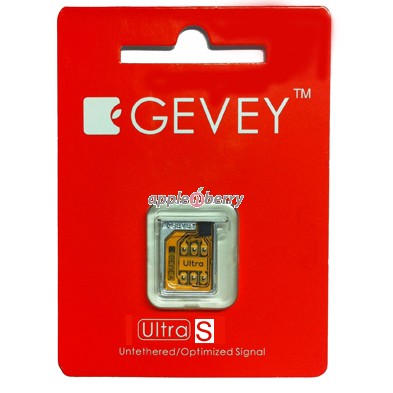
Gevey has announced the Gevey Ultra S SIM interposer which unlocks iPhone 4S without the need for dialing 112 or jailbreaking. The makers claim to be using a new exploit that ‘fully unlocks’ the device.
Pre-Order ONLY (Shipping ETA Between March 3-March 7)
GEVEY Ultra S for GSM iPhone 4S
- No Need to Dial International Emergency Number 112
- Untethered Unlock with no Jailbreak Required
- Compatible with all GSM iPhone 4S SIM Cards (Does not work on CDMA iPhone)
- Complete Unlock with all 2G and 3G data services
- No SIM Card Cutting or Physical Modifications
- Works on iOS 5.0, 5.0.1
- Works on Baseband 1.0.11, 1.013, 1.0.14
- Guaranteed Better Reception than Previous
- Decreased Power Consumption
Gevey Ultra S is available for $54.99 .
Take a look at video demonstration:

Pod2g has revealed that the new iPhone 4S and iPad 2 jailbreak tool developed by the Chronic Dev Team is called Absinthe.
A tool named Absinthe and developed by the Chronic Dev Team will install the untether on your device. Also the iPhone Dev Team will release a CLI (command line) tool to help diagnose issues and repair things if it goes wrong.
This is a little scary I know, but the chance you break something is really small, since we made lots of tests to verify the process on different devices. But it is the first time we use the backup / restore functions of iTunes to install software, and there are maybe things we are not aware of.
For more detailed information ahead of the jailbreak please the information from iPhone Dev-Team.
The iPhone 4S and iPad 2 jailbreak utilities are undergoing testing and polishing before the public release. According to ‘Dream Team’ member planetbeing:
We’re testing & fixing problems with the jb app (that @pimskeks finished the majority of at incredible speed). Still needs to be polished.
P0sixninja also tweeted it should not be much longer before the jailbreak gets released.
not much longer now
We hope to see the utilities soon, because more than a week ago there were .
iPhone Dev Team has posted a about upcoming public release. If you have iPad 2 or iPhone 4S go ahead and read it:
Vooma a new case for iPhone that includes a backup battery and a slot for SIM-card. The case can work with the app on jailbroken iPhone that emulates the native phone app to make calls via the external SIM card.
The iPhone Dev-Team has released an update to their UltraSn0w unlock bringing support for iOS 5. Remember that NO new basebands are supported in this release. It only adds support for iOS 5 with old basebands.
Here is the list of supported basebands:
- : 01.59.00
- iPhone 3G/3GS: 04.26.08, 05.11.07, 05.12.01, 05.13.04, 06.15.00.
If have one of the above baseband version and need unlock you can upgrade to iOS 5 without updating your baseband using .
Ultrasn0w 1.2.4 is available in Cydia.
The iPhone Dev-Team has released RedSn0w 0.9.9b5 – an official tethered jailbreak for iOS 5. Users don’t have to point to downloaded iOS 5 ipws any more. Just run and jailbreak.
Currently only the Mac version has been made available. Windows version is coming soon. However Windows users can still jailbreak iOS 5 with Redsn0w 0.9.9.b4, – just go to “Extras” -> “Select IPWS” and select your iOS 5 ipsw file (can download ).
Good news for users who need carrier unlock (ultrasn0w or Gevey Sim). With RedSn0w 0.9.9b5 you can update to iOS 5 and preserve the baseband (modem) version for unlock:
The new “Custom IPSW” button on the Extras screen will create a custom IPSW without the baseband update for 4.3.3 or 5.0gm (iPhone3GS and iPhone4 only, for now). Remember not to accidentally restore to the stock IPSW after you create the custom one! The custom one begins with NO_BB_ (for “no baseband”).
You must enter “Pwned DFU” mode before trying to use the NO_BB_ IPSW with iTunes (and your hosts file cannot be pointing to Cydia’s servers due to the new blob nonce mechanism they’re using in iOS5).
We will update our step-by-step tutorials soon.
You can download RedSn0w 0.9.9b5 (Mac) and RedSn0w 0.9.9b4 (Windows) .
PS: RedSn0w 0.9.9 is a bit different from 0.9.8 version. You can learn more about other new redsn0w 0.9.9 features .
UPDATE: redsn0w 0.9.9b6 released, download
UPDATE:
Here are links to our RedSn0w 0.9.9 iOS 5 jailbreak tutorials:
- Windows: , , , ,
- Mac OS: , , , ,
UPDATE: Apple latest firmware is iOS 5.1.1. Apple has stopped signing all other firmwares, including iOS 5.0.1, iOS 4.3.3 and iOS 4.3.5. This means you can NOT restore to 5.0.1/4.3.3/4.3.5 any more (both original and custom), unless you have saved your SHSH keys for it.
If you have decided to perform an untethered jailbreak and unlock, you need to get the following information:
- What type of device do you have (iPhone 3G/3GS/4, iPod Touch 3G/4G, iPad 1/2, Apple TV)?
- Do you need unlock (if your iPhone locked to one carrier and you want to use it with another)?
The answer is NO, if the device is not iPhone, if it was purchased as factory unlocked and can be used with any cellular carrier (f.e. in Canada, France, etc).
If the answer is YES, you need to find out your modem version (Setting-General-About-Modem). - What firmware version do you have? Take a look at Setting-General-About-Version. For example it could be iOS 4.3.3.
- What operating system do you use on your desktop (Windows, Mac OS)?
How to perform jailbreak, when you do NOT need an unlock
For iPhone 3G the latest is iOS 4.2.1. You can perform jailbreak with any utility. For iOS 4.2.1 you can also use them or GreenPois0n (Windows, Mac OS).
iPad 2 jailbreak is available only for iOS 4.3.3 via JailbreakMe and and iOS 5.0.1 via Absenthe.
iPhone 4S jailbreak is available for iOS 5.0 / iOS 5.0.1 via Absenthe.
iOS 4.3.3
Apple stopped signing iOS 4.3.3, so you cannot update to iOS 4.3.3 without SHSH keys saved (in advance some time ago). If you have , iPhone 3GS, iPad 1, iPod Touch 3G or iPod Touch 4G that run iOS 4.3.3 – use JailbreakMe or RedSn0w to untether jailbreak your device.
If you have saved SHSH keys for iOS 4.3.3 you can use PwnageTool (Mac OS) or Sn0wBreeze (Windows).
iOS 4.3.4/4.3.5
For iOS 4.3.4/4.3.5 only tethered jailbreak is possible with redsn0w. Tethered means that each time you restart your device you will have to connect it to a computer and run redsn0w. The untethered iOS 4.3.5 jailbreak is possible only for iPhone 3GS with old bootrom. You can detect your bootrom version using .
iOS 5
To jailbreak and unlock iOS 5 use latest version of redsn0w 0.9.9 or sn0wbreeze 2.8. You can jailbreak tethered or .
The untethered iOS 5 jailbreak is possible only for iPhone 3GS with old bootrom. You can detect your bootrom version using .
iOS 5.0.1
For iPhone 4/3GS, iPad 1, iPod Touch 3G/4G an untethered jailbreak is available for iOS 5.0.1. For untethered jailbreak use the latest redsn0w 0.9.10 or Corona – package from Cydia to untether currently installed tethered jailbreak.
Tutorial how to untether installed tethered jailbreak is available .
For iPhone 4S and iPad 2 use Absenthe.
For tethered iOS 5.0.1 jailbreak you an use redsn0w 0.9.9 and sn0wbreeze 2.8.
iOS 5.1 / iOS 5.1.1
For now only tethered jailbreak is available for iPhone 4/3GS, iPad 1 and iPod Touch 3G/4G for iOS 5.1 and iOS 5.1.1.
You can download all firmwares .
Tutorials
Here are our step-by-step tutorials that will guide you through the jailbreak process:
 iPhone 4S
UnTethered jailbreak iOS 5.0 / iOS 5.0.1:
 iPhone 4
Tethered jailbreak iOS 5.1.1:
Tethered jailbreak iOS 5.1:
UnTethered jailbreak iOS 5.0.1:
Semi-Tethered jailbreak iOS 5:
Tethered jailbreak iOS 4.3.5:
UnTethered jailbreak iOS 4.3.3:
- (works without a computer)
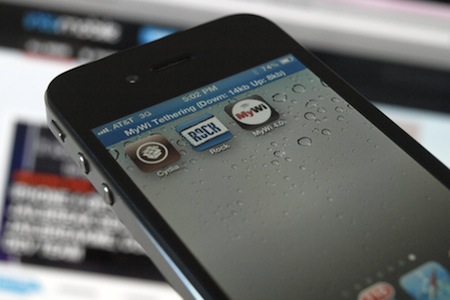
It seems that jailbreaking of iOS devices become a really profitable business, at least for Kevin Lee, a George Mason University senior, who managed to earn $50,000 a year by jailbreaking and unlocking iPhones. At first, it was a hobby for him that eventually grew into a real business with 30-40 clients per week asking for jailbreak, Cydia installations, graphical customizations and “unlocks” to use the iPhone on wireless carriers otherwise unsupported by Apple. To achieve success, Kevin posted posting a “Get Your iPhone Jailbroken Today” ad on the popular online community. That helped him to get hundreds of requests. But his business goes against Apple’s rules and as far as we know, at that moment his ad was already removed from the site.
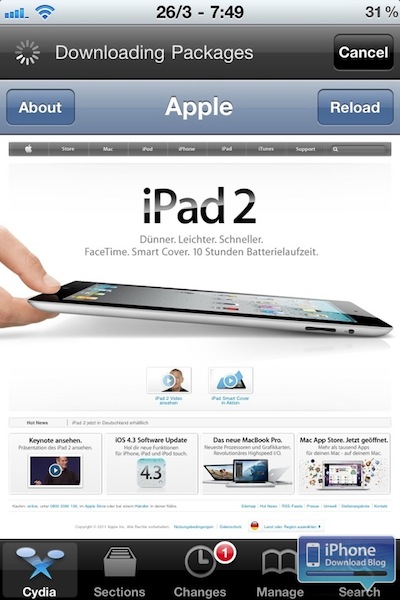
Apple seems really dislike everything that helps users to jailbreak their devices. This time Apple blocked access to the Cydia website via Wi-Fi network in Apple retail stores. If you try accessing Cydia on a device connected to one of Apple’s Wi-Fi hotspots, you’ll be surprised to see Apple’s website load instead. As far as we remember, last year federal regulators said that it was no longer illegal to hack or jailbreak an iPhone. However, Apple doesn’t care about that and continues its “war” with jailbroken devices.