As you probably know, not long ago evad3rs released their untethered jailbreak for iOS 7. Right after the release, many iPad 2 owners began to complain that their tablets won’t boot properly. Good news – the hackers came up with a fix for the problem; it is called Evasi0n 1.0.2 and it’s a beta that is said to be very helpful for all those who have problems with second-gen iPads (Wi-Fi models in particular).
Archive
Tag: Wi-FiAccording to 9to5Mac, a Russian hacker has published a relatively simple method that allows users to obtain in-app purchases from many iOS apps for free.
The method, which doesn’t require a jailbreak, involves installation of two certificates on the user’s iOS device and changing DNS entry in wi-fi settings. Then users can perform purchases of in-app content as usual.
Apple seems really dislike everything that helps users to jailbreak their devices. This time Apple blocked access to the Cydia website via Wi-Fi network in Apple retail stores. If you try accessing Cydia on a device connected to one of Apple’s Wi-Fi hotspots, you’ll be surprised to see Apple’s website load instead. As far as we remember, last year federal regulators said that it was no longer illegal to hack or jailbreak an iPhone. However, Apple doesn’t care about that and continues its “war” with jailbroken devices.
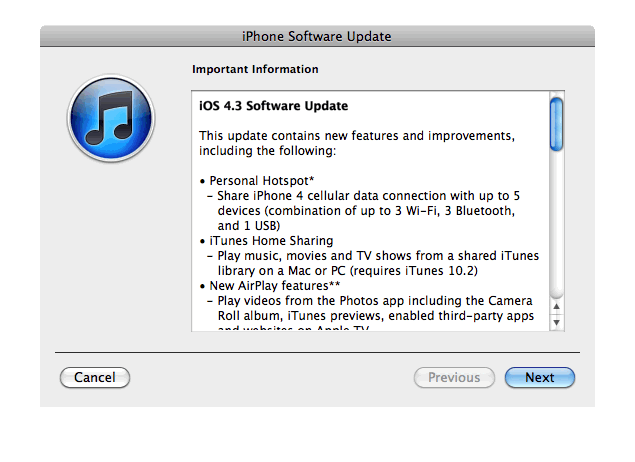
Apple just released new iOS 4.3 firmware. Jailbreakers and unlockers should wait for new tools. Everybody else will benefit. iOS 4.3 has Safari speed improvements, AirPlay features, hotspot, Home sharing, a new option for customizing the iPad’s side switch to serve as a mute toggle or screen orientation lock and much more:
This update contains new features and improvements, including the following:
* Personal Hotspot
– Share cellular data with up to 5 devices (combination of up to 3 Wi-Fi, 3 Bluetooth, and 1 USB)* iTunes Home Sharing
– Play music, movies, and TV shows from a shared iTunes library on a Mac or PC (requires iTunes 10.2)* New AirPlay features
– Play videos from the Photos app including the Camera Roll album, iTunes previews, enabled third-party apps and websites on Apple TV
– Play slideshows from Photos on Apple TV using transitions available on Apple TV* Faster Safari performance with Apple Nitro JavaScript engine
* HD video out using the Apple Digital AV Adapter
– View 720p HD videos from Videos app, iPod app, Photos, YouTube, Safari, Keynote, and enabled third-party apps on an HDMI display* Ping features
– Push notifications for comments and follow requests
– Post and Like songs directly from the Now Playing screen
– Parental controls* New Settings
– Messages setting for number of times to repeat an alert
– iPad side switch setting to lock screen rotation or mute audio notifications and sound effects* Single tap conference call dialing with a pause to send a passcode
* Bug fixes
Products compatible with the software update:
- iPhone 4 (GSM model)
- iPhone 3GS
- iPad
- iPod touch (4th generation)
- iPod touch (3rd generation)
- Apple TV 2G
iPhone 3G, iPod Touch 2G and iPhone 4 Verizon do not have iOS 4.3 update.
Here are the direct links to download iOS 4.3:
| device | version | release date |
|---|---|---|
| AppleTV(2G) (AppleTV2,1) | 03/09/2011 13:07:02 | |
| iPad (iPad1,1) | 03/09/2011 13:07:02 | |
| iPad2,1 (iPad2,1) | 03/09/2011 13:07:02 | |
| iPad2,2 (iPad2,2) | 03/09/2011 13:07:02 | |
| iPad2,3 (iPad2,3) | 03/09/2011 13:07:02 | |
| iPhone3GS (iPhone2,1) | 03/09/2011 13:07:02 | |
| iPhone4 (iPhone3,1) | 03/09/2011 13:07:02 | |
| iPodTouch(3G) (iPod3,1) | 03/09/2011 13:07:02 | |
| iPodTouch(4G) (iPod4,1) | 03/09/2011 13:07:02 |

Developer Steve Troughton-Smith has tweeted that customers of Three in Ireland and the UK and China Unicom in China woke up today and found that that Cydia on their devices was blocked by the carrier. So, now the jailbroken devices don’t have access to certain content from Cydia when on the Three and China Unicom networks. Though, only main page is unavailable. Moreover, Cydia is blocked over 3G networks that means that the popular store still available via Wi-Fi.
These are step-by-step instructions on how to jailbreak iOS 4.2.1 on iPhone 3GS, , iPad, iPod Touch 2G, iPod Touch 3G, iPod Touch 4G using Greenpois0n for Windows. Tutorial for Mac OS X users is available . All the steps are the same for all devices, we will cover iPhone.
Greenpois0n has been updated to support the iOS 4.1 and iOS 4.2.1 firmware. Use Limera1n if you want to jailbreak iOS 4.0, iOS 4.0.1, iOS 4.0.2.
Remember: Greenpois0n recommends a clean restore before continuing.
Unlockers: do not update to iOS 4.1 or iOS 4.2.1 if you need the unlock. Ultrasn0w does not support that baseband yet. The only exception is the iPhone 4. Experienced users can also try update to iOS 4.2.1 without upgrading your baseband by using TinyUmbrella. Start TSS Server->Start iTunes->Plug in your iPhone->Restore 4.2.1->Error 1013->Put phone into DFU Mode->Launch Greenpois0n.
We are not authors of this app. We do not promise that everything will go well, use this tutorial at your own risk.
Step One
Open your web browser and download the latest Windows version of GreenPois0n from .
Step-by-step tutorial: Jailbreak iOS 4.2.1 on iPhone, iPod or iPad using Greenpois0n for Mac OS
Feb 4
These are step-by-step instructions on how to jailbreak iOS 4.2.1 on iPhone 3GS, , iPad, iPod Touch 2G, iPod Touch 3G, iPod Touch 4G using Greenpois0n for Mac OS X. Tutorial for Windows users is available . All the steps are the same for all devices.
Greenpois0n has been updated to support the iOS 4.1 and iOS 4.2.1 firmware. Use Limera1n if you want to jailbreak iOS 4.0, iOS 4.0.1, iOS 4.0.2.
Remember: Greenpois0n recommends a clean restore before continuing.
Unlockers: do not update to iOS 4.1 or iOS 4.2.1 if you need the unlock. Ultrasn0w does not support that baseband yet. The only exception is the iPhone 4. You can unlock iPhone 4 with iOS 4.1 using ultrasn0w. Experienced users can also try update to iOS 4.2.1 without upgrading your baseband by using TinyUmbrella. Start TSS Server->Start iTunes->Plug in your iPhone->Restore 4.2.1->Error 1013->Put phone into DFU Mode->Launch Greenpois0n.
We are not authors of this app. We do not promise that everything will go well, use this tutorial at your own risk.
These are step-by-step instructions on how to jailbreak iOS 4.2.1 on iPhone 3GS, , iPad, iPod Touch 2G, iPod Touch 3G, iPod Touch 4G using Greenpois0n for Mac OS X. Tutorial for Windows users is available . All the steps are the same for all devices, we will cover iPhone.
Greenpois0n has been updated to support the iOS 4.1 and iOS 4.2.1 firmware. Use Limera1n if you want to jailbreak iOS 4.0, iOS 4.0.1, iOS 4.0.2.
Remember: Greenpois0n recommends a clean restore before continuing.
Unlockers: do not update to iOS 4.1 or iOS 4.2.1 if you need the unlock. Ultrasn0w does not support that baseband yet. The only exception is the iPhone 4. Experienced users can also try update to iOS 4.2.1 without upgrading your baseband by using TinyUmbrella. Start TSS Server->Start iTunes->Plug in your iPhone->Restore 4.2.1->Error 1013->Put phone into DFU Mode->Launch Greenpois0n.
We are not authors of this app. We do not promise that everything will go well, use this tutorial at your own risk.
Step One
Open your web browser and download the latest Mac version of GreenPois0n from .
Apple has released iOS 4.1 for the iPhone 3G, iPhone 3GS, , iPod Touch 2G, iPod Touch 3G and iPod touch 4G.
iOS 4.1 enables the Game Center social gaming network, support for High Dynamic Range (HDR) photos, and HD video uploading to YouTube. The update also fixes several bugs, including proximity sensor issues, performance issues and Bluetooth problems.
Full official changelog and download links are after the break:
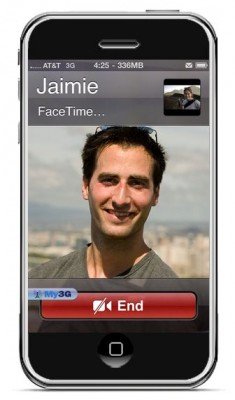
FaceTime feature gives users the possibility to make voice calls. Apple restricted this feature to Wi-Fi only. Today it became possible to use it over 3G!
Setup Instructions:
- Jailbreak your via .
- Download and upgrade to the latest Cydia package.
- Open Cydia, Go to Manage then Sources.
- Click Sources, Edit then add: http://apt.modmyi.com
- Search for “My3G” — download, and install it. It costs $2.79. My3G makes Apps believe that they are on WiFi instead of 3G.
- Go through the Rock setup process with a username and password. Open My3G and leave all settings on the default.
- FaceTime should now work over 3G! — Make sure to “Forget” the WiFi network you are on (via iOS settings) if you want to test it.
We haven’t seen any difference between the 3G FaceTime call and a WiFi FaceTime call. The quality is very good.
Here’s a video demo: