Car | Jailbreak iPhone, iPod Touch, iPad - Part 3 Skip to content

Jailbreak iPhone, iPod Touch, iPad

новости про джейлбрейк iPhone, iPod Touch и iPad

Archive

Tag: Car

pwnagetool413-3gs-3

UPDate: save your iOS 4.2.1 SHSH blobs now!

UPDate 2: Attention! We’ve received info, that Apple stopped signing iOS 4.2 for devices for which iOS 4.3 is available. This means you will not be able to restore to 4.2.1 without saved SHSH keys.

Using this tutorial you will be able to jailbreak iOS 4.2.1 running on iPhone 3G, iPhone 3GS, iPhone 4, iPod Touch 3G, iPod Touch 4G and iPad. Pwnagetool will also preserve baseband version if you need carrier unlock. If you have updated the baseband to version 06.15, you can use this tutorial. This tutorial uses PwnageTool 4.2 for Mac OS X.

We are not developers of jailbreak utilities, so we cannot assure that everything will work just fine. However we tried this tutorial on several devices and succeeded.

We will use iPhone 4 in our jailbreak tutorial. The process is the same for all devices.

Step One
Make a folder called “Pwnage” on the desktop. Download a couple of things:

Read the rest >>>

Cydia blocked

Developer Steve Troughton-Smith has tweeted that customers of Three in Ireland and the UK and China Unicom in China woke up today and found that that Cydia on their devices was blocked by the carrier. So, now the jailbroken devices don’t have access to certain content from Cydia when on the Three and China Unicom networks. Though, only main page is unavailable. Moreover, Cydia is blocked over 3G networks that means that the popular store still available via Wi-Fi.

betatest

The iPhone Dev team has just released the second beta of their untethered RedSn0w jailbreak (the first beta has been released few hours ago and has more bugs).

New jailbreak is called “Jailbreak Monte”, as it uses new “backup method”. The iPhone Dev Team warns that their beta-version is not a general release and you should back up all your media before using it. There are also other limitations and bugs:


Read the rest of this entry »

redsn0w-096b5-top

UPDATE: Please think first, before you do something.

UPDATE2: If you have 05.13 baseband or lower – do not update to 4.2.1, use PwnageTool to create custom firmware!

This is step-by-step instructions on how to jailbreak and unlock your iPhone 3GS on iOS 4.2.1 firmware using RedSn0w 0.9.6b5 for Windows.

For iPhone 3G use this tutorial.

If you have an iPhone 3GS with the new bootrom you will only be able to perform a tethered jailbreak at this time. This means you will need Redsn0w’s assistance to boot into your jailbroken device.

IMPORTANT FOR UNLOCKERS
During this process you can update your baseband to the 06.15 version. If you are on 05.14 or 05.15 or higher you will need to do this to unlock. You do not need to do this for jailbreak only. Please read the following very carefully before deciding whether to do this.

Read the rest >>>

redsn0w-096b5-top

UPDATE: Please think first, before you do something.

UPDATE2: If you have 05.13 baseband or lower – do not update to 4.2.1, use PwnageTool to create custom firmware!

This is step-by-step instructions on how to jailbreak and unlock your iPhone 3G on iOS 4.2.1 firmware using RedSn0w 0.9.6b5 for Windows.

For iPhone 3GS use this tutorial.

IMPORTANT FOR UNLOCKERS
During this process you can update your baseband to the 06.15 version. If you are on 05.14 or 05.15 or higher you will need to do this to unlock. You do not need to do this for jailbreak only. Please read the following very carefully before deciding whether to do this.

Read the rest >>>

ultrasn0w-421-release

This is the tweet from MuscleNerd posted a minute ago. So it is just minutes to wait for new unlock utility ultrasn0w.

UPDATE: New ultrasn0w released! New PwnageTool released. Read carefully this post from DevTeam first, then reread again!

John Savio created a very amazing costume for Halloween, which looks like a real iPhone 4, but 10 times larger than the original. It is thin, has rounded corners, LED light on the back as a flash and even touchscreen. The costume was created from 40″ LED LCD Panel used as the smartphone’s screen. It is powered by two car batteries and run by Jailbroken iPhone 4, weighs roughly 75 lbs. The process of costume’s creation took about 40 hours to complete.

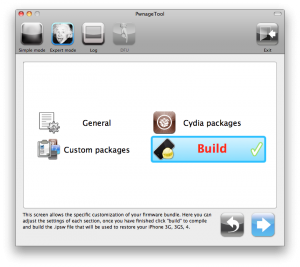
These are instructions on how to jailbreak your iPhone using PwnageTool 4.1 for Mac OS X. If you need unlock and you have not updated to iOS 4 you will be able to preserve baseband and unlock iPhone using ultrasn0w.

This guide will work for iPhone 4, iPhone 3GS, iPhone 3G, iPod Touch 3G, iPod Touch 4G, iPad and AppleTV. Just use the right firmware and select the right device (step four).

Step One
Make a folder called “Pwnage” on the desktop. Now you need to download there PwnageTool 4.1 from here and iOS 4.1 firmware from here.

When downloading the IPSW file, it is best to download it with Firefox since Safari often auto extracts it!

pwnagetool-41-1

Step Two
Double click to mount PwnageTool then drag the PwnageTool icon into the Pwnage folder.

Read the rest of this entry

Famous hacker Geohot is back and today he released the latest iOS 4.1 jailbreak. It is called LimeRa1n and supports iPhone 3GS, iPod Touch 3G, iPad, iPhone 4, iPod Touch 4G with iOS firmwares 4.0-4.1 and beyond. It can also hacktivate your device, so there is no need in phone SIM-cards and other tricks.

This software is still in beta and was updated 3 times in last several hours. So use with caution.

There is Windows version only for now. Geohot plans to release LimeRa1n for Mac and Linux soon. You can Download it here.

Some users report that they have jailbroken their iOS 3.2.2 iPads successfully with limera1n, while others report that they tried, but failed.

Do not forget to backup.

For many users of iPhone 3GS and iPhone 4 with iOS 4.0.2 now there is a hope to perform jailbreak using LimeRa1n and unlock using ultrasn0w. We recommend NOT to do it if you have not saved your SHSH keys. You can try, but if something goes wrong without SHSH keys you’ll have to restore to iOS 4.1, and there is no unlock for iOS 4.1 (possibly forever). Just wait for PwnageTool utility.

DevTeam reported that Limera1n uses a different exploit than SHAtter, so they will not release SHAtter utility, they don’t want let Apple fix both security holes. However they plan to release PwnageTool using the same exploit.


Read the rest of this entry »

2

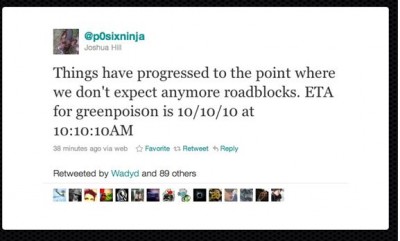
Chronic Dev-Team member Joshua Hill has just confirmed that the new Greenpois0n jailbreak, which will allow you to jailbreak Apple’s latest iOS 4.1 software, is expected to be released this Sunday. To make the event more special, Dev-Team has decided to launch the tool at 10 past 10 AM on October 10th 2010. They will be releasing multiple tools, some of which will help you update to 4.1 without losing the possibility of unlocking your baseband for other carriers.