Safari | Jailbreak iPhone, iPod Touch, iPad Skip to content

Jailbreak iPhone, iPod Touch, iPad

новости про джейлбрейк iPhone, iPod Touch и iPad

Archive

Tag: Safari

The PanguTeam has released Pangu8 1.2.1, an updated version of their utility to jailbreak iOS 8.0 – 8.1.

Here’s what’s new…

Version 1.2.1 – (2014.11.06)
1. Integrate with Cydia 1.1.16 (Cydia fixed boot issue when using “Restore from Backup” feature)

Cydia 1.1.16 resolved the iOS 8 “Restore from Backup” issue, increased iOS 8 multitask timeout, improved App Store redirect block, and fixed the login dialog on iPad.

You can download the latest version of the Pangu Jailbreak utility from here. If you haven’t jailbroken already, you can find our step-by-step instructions on how to do so here.

Saurik has just released an update to Cydia that brings us one step closer to a stable jailbreak.

Cydia 1.1.14 no longer causes your device to lock up while booting on iOS 8 when you use a passcode. If you have installed unsupported modifications you may want to restore and jailbreak again, as those modifications are not supported.


Read the rest of this entry »

The PanguTeam has just released an update for their utility for untethered jailbreak of iOS 8 – 8.1. According to what the hackers write, this update contains important improvements and bug fixes for Cydia, Mobile Substrate, iMessage and Safari. Those who had problems with these apps or those who waited for the stable version of Pangu8 can now upgrade to iOS 8.1 and jailbreak their devices with no fear at all. Everything will work fine, the developers claim.


Read the rest of this entry »

The PanguTeam on Saturday released an important update on the status of its jailbreak utility for iOS 8 – 8.1. As you probably know, earlier this week, the hackers released a new version of untethered jailbreak for iOS 8 – 8.1. It should be noted, however, that this version turned out to be very unstable and was available only for Windows users, that is why the PaunguTeam decided to pull the update back and make it available only for jailbreak developers.


Read the rest of this entry »

Apple on Wednesday released iOS 8 to users worldwide. As it was expected, the new mobile operating system brings lots of improvements and bug fixes. Apart from that, it is far more secured and efficient and can boast lots of new features. The most noticeable among them are the widely-rumored Health app, QuickType, the support of third-party keyboards, updated Mail, Photos, Camera and Safari and the apps like Continuity, Handoff, AirDrop, Instant Hotspot, which were previously unavailable for users.


Read the rest of this entry »

semitethered

Iinstructions how to change tethered iOS 5 jailbreak to a semi tethered jailbreak are available here.

Here is a nice video overview of popular Cydia apps.

My personal top 30 Cydia tweaks of 2011. The tweaks chosen are both new and old, popular and unpopular. 30 is a big number so, I hope that most of you are able to find a tweak that you will enjoy having on your iPhone, iPod Touch, or iPad. The tweaks are my personal picks and we all will have our opinion. I know that there are allot of other awesome Cydia tweaks that I was unable to mention but, feel free to tell us about them in a video response or comment.

Cydia tweaks include: Tab+, Multiconmover, Infiniboard, Infinidock, SBSettings, Alphacon, Android Delete, Graviboard, Grid Lock, Animate Battery, Winterboard, Flipover, List Launcher, Cy Delete, Folder Enhancer, Pull to Refresh Safari, RetinaPad, Barrel, Camera Wallpaper, icon renamer, double tap to open, Pagenames, iSwipe, Stayopened, iTypeappleicon, retina app, icons, page pusher, Bytafont, AndroidLock XT, Insomnia

If you have never done jailbreak, you might want to try 🙂

The Smart Sign is the iPad in front of each Apple product. It explains and provides specifications for the product. Customers are not able to actually use this iPad for anything but the Smart Sign application However with the right top-secret gesture anything is possible. One user figured out the secret gesture, went to the home screen, launched up Safari, and jailbroke the Smart Sign with the new JailbreakMe 3.0 tool. Here is the video:

UPDATE: Video is deleted from youtube by Apple request 🙂

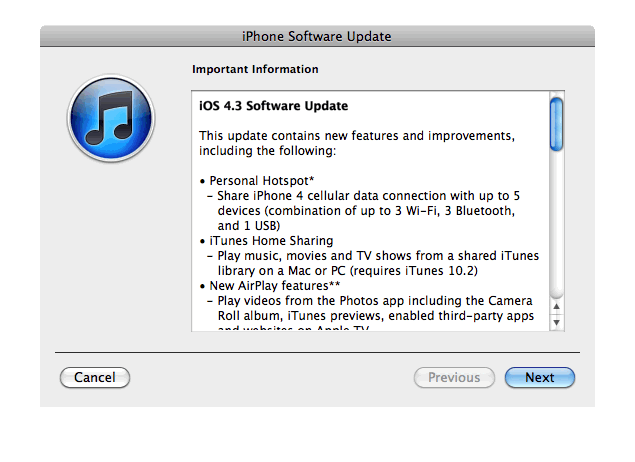
Apple just released new iOS 4.3 firmware. Jailbreakers and unlockers should wait for new tools. Everybody else will benefit. iOS 4.3 has Safari speed improvements, AirPlay features, hotspot, Home sharing, a new option for customizing the iPad’s side switch to serve as a mute toggle or screen orientation lock and much more:

This update contains new features and improvements, including the following:

* Personal Hotspot
– Share iPhone 4 cellular data with up to 5 devices (combination of up to 3 Wi-Fi, 3 Bluetooth, and 1 USB)

* iTunes Home Sharing
– Play music, movies, and TV shows from a shared iTunes library on a Mac or PC (requires iTunes 10.2)

* New AirPlay features
– Play videos from the Photos app including the Camera Roll album, iTunes previews, enabled third-party apps and websites on Apple TV
– Play slideshows from Photos on Apple TV using transitions available on Apple TV

* Faster Safari performance with Apple Nitro JavaScript engine

* HD video out using the Apple Digital AV Adapter
– View 720p HD videos from Videos app, iPod app, Photos, YouTube, Safari, Keynote, and enabled third-party apps on an HDMI display

* Ping features
– Push notifications for comments and follow requests
– Post and Like songs directly from the Now Playing screen
– Parental controls

* New Settings
– Messages setting for number of times to repeat an alert
– iPad side switch setting to lock screen rotation or mute audio notifications and sound effects

* Single tap conference call dialing with a pause to send a passcode

* Bug fixes

Products compatible with the software update:

  • iPhone 4 (GSM model)
  • iPhone 3GS
  • iPad
  • iPod touch (4th generation)
  • iPod touch (3rd generation)
  • Apple TV 2G

iPhone 3G, iPod Touch 2G and iPhone 4 Verizon do not have iOS 4.3 update.

Here are the direct links to download iOS 4.3:

device version release date
AppleTV(2G) (AppleTV2,1) 4.3 (8F191m) 03/09/2011 13:07:02
iPad (iPad1,1) 4.3 (8F190) 03/09/2011 13:07:02
iPad2,1 (iPad2,1) 4.3 (8F191) 03/09/2011 13:07:02
iPad2,2 (iPad2,2) 4.3 (8F191) 03/09/2011 13:07:02
iPad2,3 (iPad2,3) 4.3 (8F191) 03/09/2011 13:07:02
iPhone3GS (iPhone2,1) 4.3 (8F190) 03/09/2011 13:07:02
iPhone4 (iPhone3,1) 4.3 (8F190) 03/09/2011 13:07:02
iPodTouch(3G) (iPod3,1) 4.3 (8F190) 03/09/2011 13:07:02
iPodTouch(4G) (iPod4,1) 4.3 (8F190) 03/09/2011 13:07:02

pwnagetool413-3gs-3

UPDate: save your iOS 4.2.1 SHSH blobs now!

UPDate 2: Attention! We’ve received info, that Apple stopped signing iOS 4.2 for devices for which iOS 4.3 is available. This means you will not be able to restore to 4.2.1 without saved SHSH keys.

Using this tutorial you will be able to jailbreak iOS 4.2.1 running on iPhone 3G, iPhone 3GS, iPhone 4, iPod Touch 3G, iPod Touch 4G and iPad. Pwnagetool will also preserve baseband version if you need carrier unlock. If you have updated the baseband to version 06.15, you can use this tutorial. This tutorial uses PwnageTool 4.2 for Mac OS X.

We are not developers of jailbreak utilities, so we cannot assure that everything will work just fine. However we tried this tutorial on several devices and succeeded.

We will use iPhone 4 in our jailbreak tutorial. The process is the same for all devices.

Step One
Make a folder called “Pwnage” on the desktop. Download a couple of things:

Read the rest >>>