SSH | Jailbreak iPhone, iPod Touch, iPad Skip to content

Jailbreak iPhone, iPod Touch, iPad

новости про джейлбрейк iPhone, iPod Touch и iPad

Archive

Tag: SSH

Saurik has released an iOS 8 compatible version of Cydia for manual download following the release of an untethered Pangu jailbreak for iOS 8 – iOS 8.1.

I’ve given a new version of Cydia Installer in the form of a standard jailbreak bootstrap for inclusion in a new version of their jailbreak. I’ve also pushed the .deb of the iOS 8 version of Cydia to apt.saurik.com for manual download, but not yet to my repository. A lot of thanks goes out to limneos, who tested the new build for me, as I was at an airport (and now am frantically typing this message while they figure out how to retract the jetbridge from the plane I’m on that is about to take off).

Recently the Pangu8 jailbreak was released for Windows only, and without a compatible version of Cydia. Now that the compatible Cydia deb has been released you can download it from here: http://apt.saurik.com/debs/cydia_1.1.13 … os-arm.deb.


Read the rest of this entry »

After initial signs pointed towards a good chance that iOS 8 was jailbreakable, famous hacker Stefan Esser (nickname i0n1c), tweeted an image that shows off the ability to SSH into an iPod touch running iOS 8 from his Mac, which basically means he has successfully jailbroken iOS 8 on iPod Touch 5G.

I just leave this here …

There is no information whether i0n1c will release a public jailbreak. Anyway, It would be logical to wait until iOS 8 is officially released so as to not burn any exploits.

Redsn0w-0.9.13dev2

The iPhone Dev-Team has released an update to iOS 6 jailbreakRedSn0w 0.9.13dev2. New version resolves problems with SSH.

The “dev2” version should fix the various SSH problems and crashes with apps that some have been seeing.

You can download the latest version of RedSn0w from here.

redsn0w-0912b1 redsn0w-0912b1-extras

The iPhone Dev-Team has released updates to RedSn0w and PwnageTool that bring support for the iOS 5.1.1 untethered jailbreak.

RedSn0w 0.9.12b1 supports untethered iOS 5.1.1 jailbreak for all devices:

  • iPhone 3GS
  • iPhone 4
  • iPhone 4S
  • iPad 1
  • iPad 2
  • new iPad 3
  • iPod Touch 3G
  • iPod Touch 4G

PwnageTool 5.1.1 allows to create custom firmware and preserve modem version for unlock with ultrasn0w or Gevey. PwnageTool 5.1.1 supports all A4 devices:

  • iPhone 3GS
  • iPhone 4
  • iPad 1
  • iPod Touch 3G
  • iPod Touch 4G
  • Apple TV 2G

You can download RedSn0w 0.9.12b1 here and PwnageTool 5.1.1 here.

iOS 5.1.1 untethered jailbreak tutorial using Redsn0w is available here.

Official DevTeam comments:


Read the rest of this entry »

ios5-jail-3 ios5-jail-2

MuscleNerd has announced in Twitter that iOS 5 has been successfully jailbroken using old good LimeRa1n exploit. Cydia and SSH is working without any problems.

iOS5 jailbroken on ipt4g: http://is.gd/7GxIcK http://is.gd/BwPvfh via limera1n + tethered boot..not too many surprises 🙂

Cydia works fine too from quick testing (I installed SSH) http://is.gd/oADWEo

It is currently tethered, that means jailbreak is gone after reboot. Hopefully i0n1c will be able to port his untether to iOS 5. Anyway great news for all jailbreakers!


Read the rest of this entry »

Here is a nice video for all jailbreakers. Hacker used sn0wbreeze to tether jailbreak iPod Touch 4G. Than he installed new untether exploit using SSH. Watch the result:

pwnagetool413-3gs-3

UPDate: save your iOS 4.2.1 SHSH blobs now!

UPDate 2: Attention! We’ve received info, that Apple stopped signing iOS 4.2 for devices for which iOS 4.3 is available. This means you will not be able to restore to 4.2.1 without saved SHSH keys.

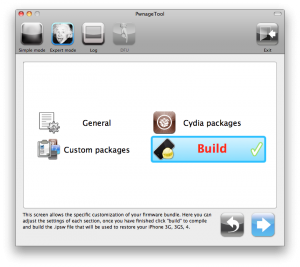
Using this tutorial you will be able to jailbreak iOS 4.2.1 running on iPhone 3G, iPhone 3GS, iPhone 4, iPod Touch 3G, iPod Touch 4G and iPad. Pwnagetool will also preserve baseband version if you need carrier unlock. If you have updated the baseband to version 06.15, you can use this tutorial. This tutorial uses PwnageTool 4.2 for Mac OS X.

We are not developers of jailbreak utilities, so we cannot assure that everything will work just fine. However we tried this tutorial on several devices and succeeded.

We will use iPhone 4 in our jailbreak tutorial. The process is the same for all devices.

Step One
Make a folder called “Pwnage” on the desktop. Download a couple of things:

Read the rest >>>

MobileTerminal-iPhone4-04

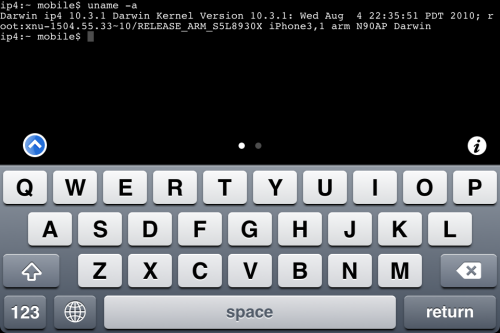
MobileTerminal is a terminal emulator application for the iPad and iPhone. The version of MobileTerminal that is available in Cydia doesn’t work with iPhone iOS 4.x. However there are beta versions that do work, but aren’t on Cydia because they are still in beta stages. This tutorial will show you step-by-step how to install MobileTerminal on iPhone with iOS 4.x (tutorial for iPad is here). If you have old version of MobileTerminal installed – uninstall it in Cydia (Search – MobileTerminal – Remove).

First of all you need to jailbreak your iPhone. If you have not done it already here is an easy tutorial: how to jailbreak iOS 4.0-4.1 on iPhone using Limera1n. After you successfully jailbreaked iPhone:

  1. Run Cydia by tapping on Cydia icon
  2. cydia_icon

  3. The Cydia will start:

Read the rest of this entry

MobileTerminal-iPad-05

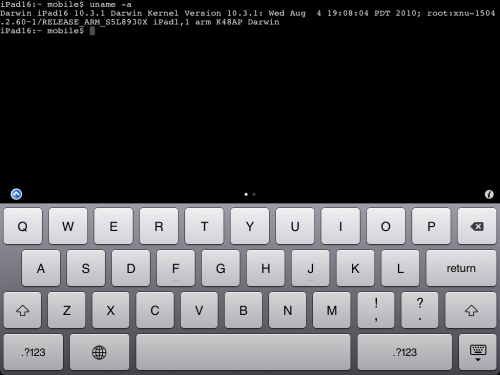
MobileTerminal is a terminal emulator application for the iPad and iPhone. The version of MobileTerminal that is available in Cydia doesn’t work with iPad iOS 3.2.2 and iPhone iOS 4.x. However there are beta versions that do work, but aren’t on Cydia because they are still in beta stages. This tutorial will show you step-by-step how to install MobileTerminal on iPad (tutorial for iPhone is here). If you have old version of MobileTerminal installed – uninstall it in Cydia (Search – MobileTerminal – Remove).

First of all you need to jailbreak your iPad. Here is an easy tutorial: how to jailbreak iPad with iOS 3.2.2 using Limera1n. After you successfully jailbreaked iPad:

  1. Run Cydia by tapping on Cydia icon
  2. cydia_icon

  3. The Cydia will start:

Read the rest of this entry

Mike Pan has successfully modified his iPhone 3GS and now it can record HD video at 1080x800px with 30 frames per second and up to 20Mbps! The original ability of this handset is 640x480px at 3 Mbps. Mike used the non-standard resolution so the video could be kept at the right aspect ratio.

So here is a short instruction how to enable HD-video recording on your iPhone 3GS with firmware 4.1 (as other firmwares haven’t been tested yet):


Read the rest of this entry »

  • Page 1 of 2
  • 1
  • 2
  • >