Pod2g has confirmed that his untethered jailbreak is working for the iPad 1 and iPad 2 on iOS 5.1.1.
iPad1,1 and iPad2,1 tested with iOS 5.1.1. Untethering worked.
iPhone 4S 5.1.1 confirmed to work perfect with the upcoming jailbreak
Pod2g has confirmed that his untethered jailbreak is working for the iPad 1 and iPad 2 on iOS 5.1.1.
iPad1,1 and iPad2,1 tested with iOS 5.1.1. Untethering worked.
iPhone 4S 5.1.1 confirmed to work perfect with the upcoming jailbreak
Pod2g has announced via Twitter that he successfully made untethered jailbreak of the on iOS 5.1. Previously, three parties had demonstrated the jailbreak of iOS 5.1: I0n1c, the iPhone Dev-Team, and Chpwn/Phoenixdev. Only I0n1c claimed untethered jailbreak, but made it clear that he will not be releasing his jailbreak to the public.
Thankfully pod2g has announced that he’s also succeeded in untethering the jailbreak.
SBSettings is a great application to quickly turn on and off different services. Recently two developers have released tethering toggles to easily enable and disable iPhone tethering from SBSettings.
The first called, “Tethering” by Filipe Pina makes changes to the files that the preferences framework makes, then restarts the service. The second called, “Tether” by Ryan Petrich uses the preferences frameworks and calls the functions that the settings app calls.
According to BigBoss, both toggles work well. You can download togles and SBSettings via Cydia (for jailbreaked iPhones only).
via iclarified and bigboss
Geohot has released his BlackSn0w utility. BlackSn0w is an unlock for the iPhone 3G and iPhone 3GS. It supports the latest firmware 3.1 and 3.1.2 with baseband 05.11.07 and enables official tethering. Available for both Windows and Mac.
Here is a quick tutorial:
If you havn’t done the jailbreak: go to , download blackra1n, run it, follow the instructions (it is really simple) to perform the jailbreak. Run balckra1n app on iPhone and install BlackSnow.
If your device is already jailbroken – run Cydia, add repository blackra1n.com and install blacksn0w. That’s it!
The latest version of blackra1n is RC3. It now has hacktivation support, 15 second speed improvement, Tiger+PPC support.
PS: If you just bought a new iPhone 3GS or have one that was made recently (approximately after 40th week after iPhone 3GS release): your device has a new BootROM. Unfortunately it is impossible to run regular jailbreak with this new BootROM. There is a sloution – tethered jailbreak. Everything including unlock will work fine. However every time you restart your iPhone, you need to plug it to a computer with blackra1n installed.
We have seen a video from Verizon named iDon’t and an ansfer from iPhone fans – the video named iDon’t Care. Here’s a new one, called iCan. It describes what a jailbreaked iPhone can do:
Here is the list of apps for that:
Nice, isn’t it?

iPhone OS hacker, GeoHot, released Blackra1n RC2 today, an updated jailbreak utility for the iPhone 3GS and iPod Touch.
This version provides a tethering jailbreak for the new iPhone 3GS with the updated Bootrom. GeoHot lists these new features on his blog:
You can download BlackRa1n .

AdMob, a company that supplies advertising services for iPhone developers, says that between September 15th and 22nd only 23% of devices were updated to iPhone OS 3.1. This counts only devices that run apps with AdMob ads.
Some more statistics: 51% are still running OS 3.0, and 19% are still running v2.2.1, while 7% are still running v2.0 or earlier.
The reasons, as always, are very different. The update for the iPod Touch costs money, there are problems with internet tethering in 3.1, there is no firmware 3.1 jailbreak tool for Windows and it is impossible to jailbreak iPhone 3GS.
Have you perfomed the upgrade or not? Please, leave a comment why.
via
Here’s an extremely easy way to enable tethering on your iPhone 3G and 3GS (even on AT&T!) by just visiting a site on your iPhone’s Safari. No jailbreaking needed. Here’s where you go:
Then scroll down to the Tethering & Internet Settings, then choosing your country and provider. This works for both AT&T and T-Mobile, and will let you install the appropriate configuration. Just be careful though, that AT&T doesn’t officially sponsor this and might charge you extra for using tethering while you’re not supposed to.
And if this disables visual voicemail on your phone, just go and reset your network settings, and it should be fixed. If that doesn’t work, try updating your phone with an older version of the AT&T carrier settings.
via gizmodo
Many iPhone 3G users would like to use internet on a desktop or notebook through their phone. There were several solutions: iPhoneModem, NetShare, 3Proxy.. they all used SSH and SOCKS proxy. One of the working ones was described here .
Couple days ago PdaNet (fullname is PdaNet WiFi Router) was ported to iPhone. Now our life is much much easier.
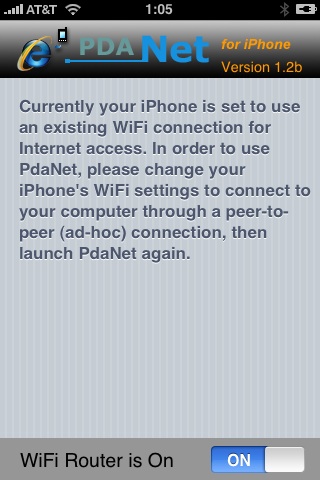
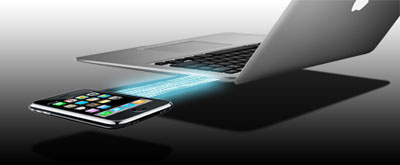
Thanks to and the porting work of as well as the authors of , it is now possible to “tether” your iPhone 3G and use its Internet connection on your laptop.
Warning – Tethering your iPhone is against the iPhone data plan terms. AT&T could slap you with huge fees if you overuse this. I recommend only using it during emergencies.
Here is a basic plan (by the way, this should work for old IPhone also):
Later we’ll discuss it with more details.
Step 1: Jailbreak your iPhone