айфон | Jailbreak iPhone, iPod Touch, iPad - Part 6 Skip to content

Jailbreak iPhone, iPod Touch, iPad

новости про джейлбрейк iPhone, iPod Touch и iPad

Archive

Tag: айфон

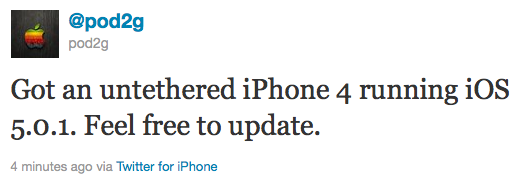
Pod2g has recently announced that he has successfully performed an untethered jailbreak on an iPhone 4 running iOS 5.0.1.

Got an untethered iPhone 4 running iOS 5.0.1. Feel free to update.

Of course, if you want to SIM unlock, don’t update using Apple’s original FW nor update OTA.

This means jailbreakers can update to iOS 5.0.1. Previously it was recommended to stay on iOS 5. Unlockers as usual should stay away from Apple’s firmwares and from iOS 5.0.1.

We strongly recommend that everyone use TinyUmbrella to save their iOS 5.0.1 SHSH Blobs.

Pod2g writes in his blog, that next devices he will try to untehter jailbreak are iPod 3G, iPod 4G and iPad 1.
iphone4-untethered-jailbreak

Chronic Dev Team is almost done with a much anticipated untethered jailbreak for iOS 5 and iOS 5.0.1. Team member and French hacker pod2g just released a video showing off the jailbreak. It looks to be near-complete and functioning properly. Take a look:

pod2g even created a blog, where he plans to post the most recent news about his progress:


Read the rest of this entry »

crashreporter

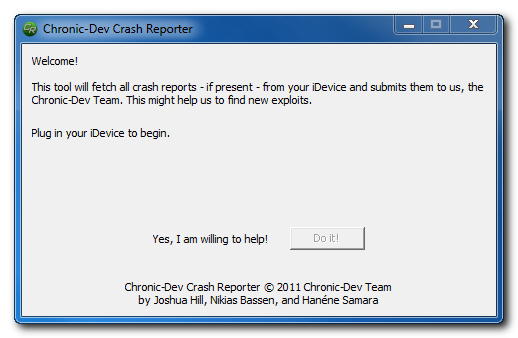
The Chronic Dev-Team has released CDevReporter, their new tool that lets you help find jailbreak vulnerabilities, for Windows.

You can download the Mac and Windows versions of CDevReporter here:

More information is available in our recent post “Want untethered iOS 5 jailbreak? Help hackers to find new exploits!“.

ipad2-jailbreak

Right after the announcement earlier today that DevTeam has successfully made first steps towards iPhone 4S jailbreak, here is more news.

iPad 2 iOS 5 jailbreak is possible and done and to prove it MuscleNerd published a quick video:


Read the rest of this entry »

iphone-4s-jailbreak

iPhone DevTeam member MuscleNerd recently tweeted that iPhone 4S jailbreak was finally made:

MuscleNerd
VERY preliminary 4S JB: http://twitpic.com/76vcp4 http://twitpic.com/76vct2 (Huge missing pieces prevent public release. LOTS of work left)

This is just a first step, and as MuscleNerd said there’s a lot of work left to do. So don’t expect to see new utility anytime soon. But this is still great news.

Take a look at the screenshots with terminal and Cydia running on iPhone 4S:


Read the rest of this entry »

redsn0w-099b6

The iPhone Dev-Team released jailbreak utility RedSn0w 0.9.9b6 for both Windows and Mac users. The new version offers full iOS 5 jailbreak support for Windows and fixes Location Services issue for iPhone 3GS devices running the 06.15 baseband. This is still a tethered jailbreak for iPhone 4, iPhone 3GS, iPad 1, iPod Touch 3G and iPod Touch 4G:

We’ve released version 0.9.9b6 of redsn0w, with both a functional fix and cosmetic fix for iOS5 jailbreakers. For iPhone3GS owners with the 06.15 baseband, this redsn0w eliminates the network crash you saw when using Location Services in iOS5 (in fact, you don’t even need to disable Location Services anymore during the initial setup). The cosmetic fix is to the visual countdown you see when going into DFU mode.

It’s okay to re-run this redsn0w over an existing device jailbroken at iOS5. Just choose “Jailbreak” again and de-select Cydia (in other words, all the checkboxes will be unchecked). If you are lucky enough to have an old-bootrom iPhone3GS, please pre-select the IPSW first (redsn0w can’t yet auto-detect the FW version of your old-bootrom 3GS if it’s already been jailbroken).

Just as redsnow 0.9.9b5 the new version supports creating custom firmwares with preserving baseband (modem) version for unlock. Unfortunately right now custom firmware functionality works only with Mac version.

You can download the latest RedSn0w version here.

UPDATE:
Here are links to our RedSn0w 0.9.9 iOS 5 jailbreak tutorials:

ios5tweakcomp

iOS 5 is currently jailbreakable using redsn0w 0.9.9b5 or sn0wbreeze 2.8b8. So developers are working hard to update their apps and tweaks to work with iOS 5. Here is a useful spreadsheet, where you can find information, whether or not your favorite Cydia tweak or app is compatible with iOS 5:


Read the rest of this entry »

sn0wbreeze28b8-2 sn0wbreeze28b8-1

If for some reason you don’t want to use redsn0w 0.9.9 to jailbreak your iOS 5, here is a good alternative utility – Sn0wBreeze 2.8b8. It can perform a tethered jailbreak for iPhone 3GS, iPhone 4, iPad 1, iPod Touch 3G and iPod Touch 4G.

As usual it will preserve your baseband (modem) version for unlock with ultrasn0w 1.2.4 or Gevey Sim.

You can download Sn0wBreeze 2.8b8 here.

UPDATE: Sn0wBreeze 2.8b8 step-by-step jailbreak and unlock tutorials:

jailbreak

UPDATE: Apple latest firmware is iOS 5.1.1. Apple has stopped signing all other firmwares, including iOS 5.0.1, iOS 4.3.3 and iOS 4.3.5. This means you can NOT restore to 5.0.1/4.3.3/4.3.5 any more (both original and custom), unless you have saved your SHSH keys for it.

If you have decided to perform an untethered jailbreak and unlock, you need to get the following information:

  1. What type of device do you have (iPhone 3G/3GS/4, iPod Touch 3G/4G, iPad 1/2, Apple TV)?
  2. Do you need unlock (if your iPhone locked to one carrier and you want to use it with another)?
    The answer is NO, if the device is not iPhone, if it was purchased as factory unlocked and can be used with any cellular carrier (f.e. in Canada, France, etc).
    If the answer is YES, you need to find out your modem version (Setting-General-About-Modem).
  3. What firmware version do you have? Take a look at Setting-General-About-Version. For example it could be iOS 4.3.3.
  4. What operating system do you use on your desktop (Windows, Mac OS)?

How to perform jailbreak, when you do NOT need an unlock

For iPhone 3G the latest is iOS 4.2.1. You can perform jailbreak with any utility. For iOS 4.2.1 you can also use them or GreenPois0n (Windows, Mac OS).

iPad 2 jailbreak is available only for iOS 4.3.3 via JailbreakMe and and iOS 5.0.1 via Absenthe.

iPhone 4S jailbreak is available for iOS 5.0 / iOS 5.0.1 via Absenthe.

iOS 4.3.3

Apple stopped signing iOS 4.3.3, so you cannot update to iOS 4.3.3 without SHSH keys saved (in advance some time ago). If you have iPhone 4, iPhone 3GS, iPad 1, iPod Touch 3G or iPod Touch 4G that run iOS 4.3.3 – use JailbreakMe or RedSn0w to untether jailbreak your device.

If you have saved SHSH keys for iOS 4.3.3 you can use PwnageTool (Mac OS) or Sn0wBreeze (Windows).

iOS 4.3.4/4.3.5

For iOS 4.3.4/4.3.5 only tethered jailbreak is possible with redsn0w. Tethered means that each time you restart your device you will have to connect it to a computer and run redsn0w. The untethered iOS 4.3.5 jailbreak is possible only for iPhone 3GS with old bootrom. You can detect your bootrom version using this tutorial.

iOS 5

To jailbreak and unlock iOS 5 use latest version of redsn0w 0.9.9 or sn0wbreeze 2.8. You can jailbreak tethered or semi-tethered.

The untethered iOS 5 jailbreak is possible only for iPhone 3GS with old bootrom. You can detect your bootrom version using this tutorial.

iOS 5.0.1

For iPhone 4/3GS, iPad 1, iPod Touch 3G/4G an untethered jailbreak is available for iOS 5.0.1. For untethered jailbreak use the latest redsn0w 0.9.10 or Corona – package from Cydia to untether currently installed tethered jailbreak.

Tutorial how to untether installed tethered jailbreak is available here.

For iPhone 4S and iPad 2 use Absenthe.

For tethered iOS 5.0.1 jailbreak you an use redsn0w 0.9.9 and sn0wbreeze 2.8.

iOS 5.1 / iOS 5.1.1

For now only tethered jailbreak is available for iPhone 4/3GS, iPad 1 and iPod Touch 3G/4G for iOS 5.1 and iOS 5.1.1.

You can download all firmwares here.

Tutorials

Here are our step-by-step tutorials that will guide you through the jailbreak process:

iphone4s iPhone 4S

UnTethered jailbreak iOS 5.0 / iOS 5.0.1:

iphone-4 iPhone 4

Tethered jailbreak iOS 5.1.1:

Tethered jailbreak iOS 5.1:

UnTethered jailbreak iOS 5.0.1:

Semi-Tethered jailbreak iOS 5:

Tethered jailbreak iOS 4.3.5:

UnTethered jailbreak iOS 4.3.3:


Read the rest of this entry »

We are receiving more and more questions about JailbreakMe supporting particular iOS version and device. Here is a useful table that shows which firmwares can be jailbroken by JailbreakMe and which are not supported. Take a look:

Device JailbreakMe firmware support.
4.2.6 4.2.7 4.2.8 4.3 4.3.1 4.3.2 4.3.3 4.3.4 4.3.5
iPad N/A Yes No No
iPad 2 N/A No Yes No No
iPhone 3GS N/A Yes No No
iPhone 4 (GSM) N/A Yes No No
iPhone 4 (CDMA) Yes N/A
iPod touch 3G N/A Yes No Yes No No
iPod touch 4G N/A Yes No No

Here our step by step JailbreakMe tutorials:

Other jailbreak tutorials including iOS 4.3.5 jailbreak can be found here.