3GS | Jailbreak iPhone, iPod Touch, iPad - Part 20 Skip to content

Jailbreak iPhone, iPod Touch, iPad

новости про джейлбрейк iPhone, iPod Touch и iPad

Archive

Tag: 3GS

iphone3gs-jailbreak-2 iphone3gs-jailbreak1

These are the first images of a Jailbroken iPhone 3GS. GeoHotz published them in his blog. DevTeam will publish an updated release of the tool only after the release of firmware 3.0.1. The reason is simple: Given that the Firmware 3.0 is full of bugs, it is clear that Apple will release an update soon. If the DevTeam release new tool, Apple will probably be able to block them with the next update. Tomorrow afternoon we will find more details on the official DevTeam blog. By the way firmware 3.0.1 is scheduled to be released in July.

hack-iphone3gs

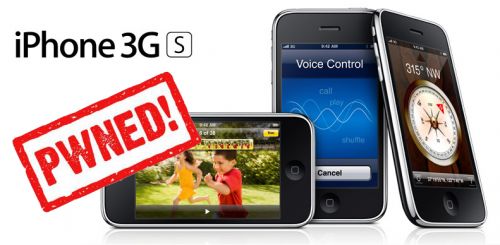
And after the various Key and provocations made by GeoHotz, the DevTeam has decided to write a new article on the official blog with good news for all owners of an iPhone 3GS! The DevTeam has verified that the exploit called 24Kpwn (used for the first time to unlock the iPod Touch 2G) is still valid and it works wonderfully for iPhone 3GS.

It seems the new version of bootrom used by Apple in 3GS dates back in August, a few months before the release of 24Kpwn, so there was no time to solve the problem.

In addition, the new daemon released by the team under the name of ultrasn0w (unlock for iPhone 3G) will work with iPhone 3GS.

New versions of redsn0w (jailbreak) and ultrasn0w (unlock) with iPhone 3GS support will be released soon.

Here’s an extremely easy way to enable tethering on your iPhone 3G and 3GS (even on AT&T!) by just visiting a site on your iPhone’s Safari. No jailbreaking needed. Here’s where you go:

http://help.benm.at/help.php

Then scroll down to the Tethering & Internet Settings, then choosing your country and provider. This works for both AT&T and T-Mobile, and will let you install the appropriate configuration. Just be careful though, that AT&T doesn’t officially sponsor this and might charge you extra for using tethering while you’re not supposed to.

And if this disables visual voicemail on your phone, just go and reset your network settings, and it should be fixed. If that doesn’t work, try updating your phone with an older version of the AT&T carrier settings.

via gizmodo

iphone3gs-jailbreak

GeoHotz published the codes of the RAM Disk for the new iPhone 3GS.  It seems the Jailbreak of this device is possible.

Ramdisk Key
KEY: 44514633CE2AEAD62BCFA8836CDA4A3C KEY: 44514633CE2AEAD62BCFA8836CDA4A3C

and a little more…

7BDE483F8B1E9F19D22F9D8FDF753E02 7BDE483F8B1E9F19D22F9D8FDF753E02

redsn0w

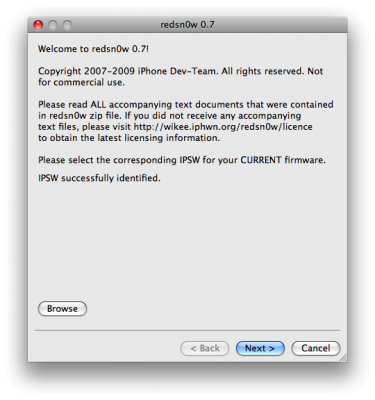
RedSn0w is an easy to use, multi-platform, multi-device jailbreaking and unlocking (iPhone 2G only) tool from DevTeam. It supports firmware 3.0 and iPhone 2G (original iPhone), the iPhone 3G (but not the 3GS) and also the iPod touch (first and second generation):

  • iPhone 2G – jailbreak and unlock
  • iPhone 3G – only jailbreak, use only with official unlocked iPhones (UPDATE: unlock is avaliable)
  • iPod Touch – jailbreak
  • iPod Touch 2G – jailbreak
  • iPod Touch 3GS – not supported (UPDATE: is supported by version 0.8)

Currently it is available for Windows and Mac OS X. The tool works just like QuickPwn. If you want to build custom firmware files with more flexibility it is suggested that you use PwnageTool on Mac OS X.

  1. GOLDEN RULE: If you are using a 3G iPhone with yellowsn0w and rely on yellowsn0w to obtain cellular service, then you should NOT use redsn0w right now. Ultrasn0w (the 3G carrier unlock) is not included with this release and therefore your baseband will be locked and unable to use an operator other than the official one it was bought for. UltraSn0w will be released via APT (cydia and icy) soon. If you have an original iPhone (1st generation) then 3.0 carrier unlock works with this redsn0w release.
  2. Yellowsn0w in its current form will NOT work with the baseband version that is present in the 3.0 update, you will need Ultrasn0w, which will be released sometime soon (update: released), Ultrasn0w will work with all iPhone 3G models (but not 3GS), even ones that were previously unlockable, Ultrasn0w will be released via APT (this means you will be able to get it via Cydia or Icy).
  3. Please read all parts of this post before downloading and using these tools.
  4. Read items 1, 2 and 3 again and again.
  5. At the bottom of this post are the bittorrent files for the latest version of redsn0w.
  6. This app is suitable for the recent 3.0 release
  7. redsn0w will NOT work for the iPhone 3GS.
  8. redsn0w WILL work for Original iPhone (1st Generation), Original iPod touch, iPod touch 2G and the iPhone 3G (not the iPhone 3GS).

To use redsn0w simply upgrade the device in iTunes to firmware version 3.0 and run redsn0w to activate and jailbreak the device (and if you are using an original iPhone 2G, it will unlock it too!)

You can donwload RedSn0w 0.7 here.

pwnage 20

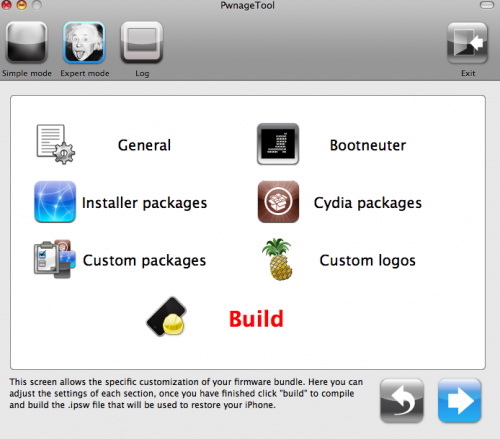
DevTeam released PwnageTool for firmware 3.0. Here is the list of supported deviced:

  • iPhone 2G – jailbreak and unlock
  • iPhone 3G – only jailbreak, use only with official unlocked iPhones
  • iPod Touch – jailbreak
  • iPod Touch 2G – not supported, use redsn0w
  • iPod Touch 3GS – not supported

If you are using a 3G iPhone with yellowsn0w and rely on yellowsn0w to obtain cellular service, then you should NOT use PwnageTool right now. Ultrasn0w is not included with this release and therefore your baseband will be locked and unable to use an operator other than the official one it was bought for. Ultrasn0w will be release via APT (cydia and icy) soon (update: Ultrasn0w released). If you have an original iPhone (1st generation) then 3.0 unlock works with this PwnageTool release.

Yellowsn0w in its current form will NOT work with the baseband version that is present in the 3.0 update, you will need Ultrasn0w, which will be released sometime soon, Ultrasn0w will work with all iPhone 3G models (but not 3GS), even ones that were previously unlockable, Ultrasn0w will be released via APT (this means you can get it via Cydia or Icy).

PwnageTool will NOT work for the iPhone 3GS. PwnageTool WILL work for Original iPhone (1st Generation), Original iPod touch (1st Generation) and the iPhone 3G.

You can donwload PwnageTool 3.0 here.

30

iPhone OS 3.0 is now available. Update via iTunes (you need 8.2) or download here. Firmwares are avaliable for all devices: iPhone, iPhone 3G, iPhone 3GS, iPod Touch and iPod Touch 2G. Here is a link to official Apple site about this upgrade.

Do not upgrade if you want jailbreak and/or unlock. Just wait for DevTeam to release their software.

pwnage 20

Now older IPhone users users can upgrade to firmware 2.0 and IPhone 3G users have a possibility to have jailbreaked IPhones. That is because PwnageTool 2.0 is released today. Download links are: mirror1, mirror2, mirror3.

Just a reminder: this tool jailbreaks and unlocks older iPhones, and jailbreaks iPhone 3Gs and iPod Touches. No unlock for Iphone 3G yet. The supported firmware is 2.0 only. Platform is Mac OS.

If you get Error 1600 from iTunes (or if you see in your log a failure to repare x12220000_4_Recovery.ipsw), try: mkdir “~/Library/iTunes/Device Support” ;  if that directory already exists, remove any files in it.  Then re-run PwnageTool.

Reminder: as of right now, there are no apps out for 2.0. Over the next few days some will come out. So do not update yet if you have some favorite 1.1.x apps you are using! 2.0 will not run 1.1.4 apps

UPDATE: version 2.0.1 is avaliable