Quickpwn | Jailbreak iPhone, iPod Touch, iPad Skip to content

Jailbreak iPhone, iPod Touch, iPad

новости про джейлбрейк iPhone, iPod Touch и iPad

Archive

Tag: quickpwn

redsn0w

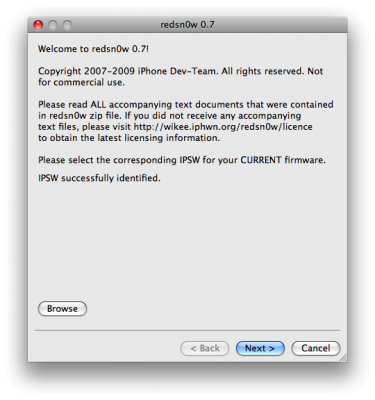
RedSn0w is an easy to use, multi-platform, multi-device jailbreaking and unlocking (iPhone 2G only) tool from DevTeam. It supports firmware 3.0 and iPhone 2G (original iPhone), the iPhone 3G (but not the 3GS) and also the iPod touch (first and second generation):

  • iPhone 2G – jailbreak and unlock
  • iPhone 3G – only jailbreak, use only with official unlocked iPhones (UPDATE: unlock is avaliable)
  • iPod Touch – jailbreak
  • iPod Touch 2G – jailbreak
  • iPod Touch 3GS – not supported (UPDATE: is supported by version 0.8)

Currently it is available for Windows and Mac OS X. The tool works just like QuickPwn. If you want to build custom firmware files with more flexibility it is suggested that you use PwnageTool on Mac OS X.

  1. GOLDEN RULE: If you are using a 3G iPhone with yellowsn0w and rely on yellowsn0w to obtain cellular service, then you should NOT use redsn0w right now. Ultrasn0w (the 3G carrier unlock) is not included with this release and therefore your baseband will be locked and unable to use an operator other than the official one it was bought for. UltraSn0w will be released via APT (cydia and icy) soon. If you have an original iPhone (1st generation) then 3.0 carrier unlock works with this redsn0w release.
  2. Yellowsn0w in its current form will NOT work with the baseband version that is present in the 3.0 update, you will need Ultrasn0w, which will be released sometime soon (update: released), Ultrasn0w will work with all iPhone 3G models (but not 3GS), even ones that were previously unlockable, Ultrasn0w will be released via APT (this means you will be able to get it via Cydia or Icy).
  3. Please read all parts of this post before downloading and using these tools.
  4. Read items 1, 2 and 3 again and again.
  5. At the bottom of this post are the bittorrent files for the latest version of redsn0w.
  6. This app is suitable for the recent 3.0 release
  7. redsn0w will NOT work for the iPhone 3GS.
  8. redsn0w WILL work for Original iPhone (1st Generation), Original iPod touch, iPod touch 2G and the iPhone 3G (not the iPhone 3GS).

To use redsn0w simply upgrade the device in iTunes to firmware version 3.0 and run redsn0w to activate and jailbreak the device (and if you are using an original iPhone 2G, it will unlock it too!)

You can donwload RedSn0w 0.7 here.

itunes

Apple released iTunes 8.2. You can download it here.

This update breaks your ability to use QuickPwn, PwnageTool, and iPhone Tunneling Suite (ssh over usb). Many file managers do not work with iTunes 8.2 installed. We don’t think this is a deliberate breakage of these tools.  It’s just that Apple has updated a low-level USB protocol. It may also break Palm Pre’s connection to the device.

So if you jailbreak, we recommend you not to update.

x

DevTeam has announced that iPod Touch 2G is finally jailbreaked.

The raw patch to the firmware that transforms the “tethered” jailbreak into an untethered one was released here but it’s not yet packaged up into the PwnageTool or QuickPwn flows. But other threads there are pulling together tutorials and other tips for those of you anxious to try this out now.  For the curious, the hole itself is explained here.

Yes, DevTeam released new version of their software. First of all, please, do NOT use unofficial software from unknows sites (f.e. quickpwm.com). We recommend to download from torrent or official mirors.

We regulary publish latets software and firmware links. Use them or the same ones from DevTeam site.

So:

  • iPhone 2G and iPod Touch: update to 2.2.1 with iTunes and run QuickPwn to jailbreak, activate and unlock you device.
  • iPod Touch 2G: sorry, you need to wait a bit more
  • iPhone 3G + NO UNLOCK: If you do not need unlock, you are using your iPhone with one carrier or you hae factory unlcoked iPhone, just restore or upgrade to 2.2.1 using iTunes and use QuickPwn to jailbreak and add Cydia and Installer.
  • iPhone 3G + UNLOCK: you need to preserve current baseband software. Preserving the baseband will ensure that you can still use “yellowsn0w” the iPhone 3G unlock application. To upgrade your phone to 2.2.1 and preserve the state of the baseband you need to create a custom .ipsw with PwnageTool. This custom .ipsw will not contain the baseband update but of course will still allow all the cool new stuff from 2.2.1. PwnageTool is only available for Mac OS X.

DevTeam updated yellowsn0w to version 0.9.7 to work with modified (!!!) firmware 2.2.1, in which you preserve old baseband from firmware 2.2.

Do you want to jailbreak firmware 2.2? There are many tutorials, guides and howto’s came out recently. But I recommend you to stay away from these advices and wait for an official utility with 2.2 support QuickPwn or Pwnage tool.

DevTeam says that 2.2 update SHOULD NOT be applied using iTunes if you want the chance of a soft-unlock in the near future. Use new version of PwnageTool (not avaliable yet, but will be soon).

Some fact:

  • The 2.2 firmware for 3G contains a baseband update for the 3G iPhone
  • The 2.2 firmware for 2G (1st gen iPhones) doesn’t contain a baseband update and the baseband is still at 04.05.04
  • Pwnage technique (and therefore the Jailbreak) isn’t affected, but PwnageTool and QuickPwn do not support this release as yet, so DO NOT install 2.2 using iTunes as you will lose your jailbreak


Read the rest of this entry »

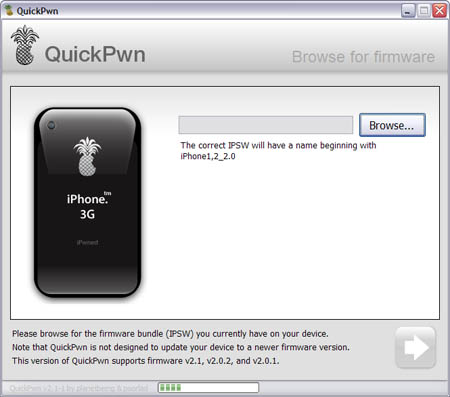
This is a step-by-step tutorial. If you have iPhone 3G this guide will help you jailbreak and activate the device. For iPhone 2G it will also perform the unlock.

I recommend using 2.2 firmware, because iPhone 3G unlock is avaliable now. But you can use it with old v2.1, v2.0.1 and v2.0.2.


Read the rest of this entry »

Firmware 2.2 beta 1 appeared just a day ago. It seems that DevTeam never sleeps 🙂 They published a screenshot of jailbreaked iPhone 2G with this new firmware:

It runs Terminal.app (non-apple application) running on 2.2b1 firmware. Thay say that version 2.2 is still vulnerable to pwnage and quickpwn on everything but iPod Touch 2G.

No news about software unlock for iPhone 3G or jailbreak for iPod Touch 2G.

Congratulations, Windows users. The support for new firmware 2.1 is added. So here is what you can do:

  • Support for FW v2.0.1, v2.0.2, v2.1.0
  • Jailbreaking and Pwning iPhone 2G, iPhone 3G and iPod Touch
  • Adding Cydia and Installer
  • Replacing boot logos
  • Unlocking iPhone 2G

Changes from QuickPwn RC3

  • Support for firmware 2.1
  • Auto-detection of firmware version, insistence on correct firmware bundle to prevent user epic fail.
  • Use of iASign to activate to prevent bspatch epic fail.
  • Removed buggy and never really tested 2.0 support

Sorry, no jailbreak for new iPod Touch and no unlock for iPhone 3G.

Here are download links:

Firmwares v2.1: 2g firmware, 3g firmware

Related posts:

There are so many tools, some for Mac OS, others for Windows, different versions… Complicated. So let’s summerize a little bit.

If you have iPhone 3G, you’ll be able to install 3-rd party non AppStore applications (through separate applications called Cydia and Installer) and run these applications. If you have old iPhone, in addition to that you’ll be able to unlock the device (use with any carrier).

There are two methods: quickpwn and custom firmware method. First one is for quikly pwning and jailbreaking  the device without restore. You should use it if you have unlocked device or an AT&T contract.

If you are Windows user:

  • Go for WinPwn. The current version is 2.5.0.2 (also called 2.5 beta-2). Download here. It supports both iPhone and iPhone 3G, firmwares 2.0, 2.0.1, 2.0.2. You can use either quickpwn or custom firmware method.
  • There is a separate QuickPwn tool for Windows. The current version is RC3. Download here. Do you need it? Yes, if you want to quick pwn and you do not like WinPwn (or you had problems with it).

If you’re using Mac OS:

  • Go for PwnageTool. The current version is 2.0.3.1. Download here. Works with 2.0, 2.0.1, 2.0.2 firmwares using custom-firmware method.
  • There is a version of QuickPwn tool for MAC OS. The current version is 1.0.0. Download here. It works only with firmware 2.0.2. Do you need it? Yes, if you want to quick pwn.
    QuickPwn is not a replacement for PwnageTool, they are different tools and provide different features, QuickPwn is for quickly pwning a device, whereas PwnageTool is designed to custom build and tailor the ipsw production process, both tools will be actively developed in the future.
    • Page 1 of 2
    • 1
    • 2
    • >