IOS 4.1 | Jailbreak iPhone, iPod Touch, iPad Skip to content

Jailbreak iPhone, iPod Touch, iPad

новости про джейлбрейк iPhone, iPod Touch и iPad

Archive

Tag: iOS 4.1

sn0wbreeze-29

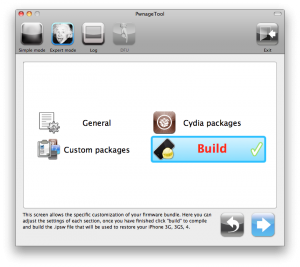
iH8sn0w has released new version of popular jailbreak utility Sn0wBreeze 2.9. Sn0wbreeze is used to create a custom firmware with jailbreak and preserve iPhone modem (baseband) version for unlock. New version 2.9 adds support for untethered iOS 5.0.1 jailbreak as well as support for all firmwares supported by previous versions of sn0wbreeze.

For now Sn0wBreeze 2.9 supports untethered jailbreak for iOS 3.1.3, 3.2.x, 4.0.x, 4.1, 4.2.1 – 4.2.8, 4.3 – 4.3.3 and 5.0.1. Supported devices are: iPhone 2G, iPhone 3G, iPhone 3GS, iPhone 4, iPad 1, iPod Touch 2G, iPod Touch 3G, iPod Touch 4G.

Read the rest of this entry »

gp_web_win

These are step-by-step instructions on how to jailbreak iOS 4.2.1 on iPhone 3GS, iPhone 4, iPad, iPod Touch 2G, iPod Touch 3G, iPod Touch 4G using Greenpois0n for Windows. Tutorial for Mac OS X users is available here. All the steps are the same for all devices, we will cover iPhone.

Greenpois0n has been updated to support the iOS 4.1 and iOS 4.2.1 firmware. Use Limera1n if you want to jailbreak iOS 4.0, iOS 4.0.1, iOS 4.0.2.

Remember: Greenpois0n recommends a clean restore before continuing.

Unlockers: do not update to iOS 4.1 or iOS 4.2.1 if you need the unlock. Ultrasn0w does not support that baseband yet. The only exception is the iPhone 4. Experienced users can also try update to iOS 4.2.1 without upgrading your baseband by using TinyUmbrella. Start TSS Server->Start iTunes->Plug in your iPhone->Restore 4.2.1->Error 1013->Put phone into DFU Mode->Launch Greenpois0n.

We are not authors of this app. We do not promise that everything will go well, use this tutorial at your own risk.

Read the rest >>>>

gp_web_win

These are step-by-step instructions on how to jailbreak iOS 4.2.1 on iPhone 3GS, iPhone 4, iPad, iPod Touch 2G, iPod Touch 3G, iPod Touch 4G using Greenpois0n for Windows. Tutorial for Mac OS X users is available here. All the steps are the same for all devices, we will cover iPhone.

Greenpois0n has been updated to support the iOS 4.1 and iOS 4.2.1 firmware. Use Limera1n if you want to jailbreak iOS 4.0, iOS 4.0.1, iOS 4.0.2.

Remember: Greenpois0n recommends a clean restore before continuing.

Unlockers: do not update to iOS 4.1 or iOS 4.2.1 if you need the unlock. Ultrasn0w does not support that baseband yet. The only exception is the iPhone 4. Experienced users can also try update to iOS 4.2.1 without upgrading your baseband by using TinyUmbrella. Start TSS Server->Start iTunes->Plug in your iPhone->Restore 4.2.1->Error 1013->Put phone into DFU Mode->Launch Greenpois0n.

We are not authors of this app. We do not promise that everything will go well, use this tutorial at your own risk.

Step One
Open your web browser and download the latest Windows version of GreenPois0n from here.


Read the rest of this entry »

gp_web

These are step-by-step instructions on how to jailbreak iOS 4.2.1 on iPhone 3GS, iPhone 4, iPad, iPod Touch 2G, iPod Touch 3G, iPod Touch 4G using Greenpois0n for Mac OS X. Tutorial for Windows users is available here. All the steps are the same for all devices.

Greenpois0n has been updated to support the iOS 4.1 and iOS 4.2.1 firmware. Use Limera1n if you want to jailbreak iOS 4.0, iOS 4.0.1, iOS 4.0.2.

Remember: Greenpois0n recommends a clean restore before continuing.

Unlockers: do not update to iOS 4.1 or iOS 4.2.1 if you need the unlock. Ultrasn0w does not support that baseband yet. The only exception is the iPhone 4. You can unlock iPhone 4 with iOS 4.1 using ultrasn0w. Experienced users can also try update to iOS 4.2.1 without upgrading your baseband by using TinyUmbrella. Start TSS Server->Start iTunes->Plug in your iPhone->Restore 4.2.1->Error 1013->Put phone into DFU Mode->Launch Greenpois0n.

We are not authors of this app. We do not promise that everything will go well, use this tutorial at your own risk.

Read the rest >>>>

gp_web

These are step-by-step instructions on how to jailbreak iOS 4.2.1 on iPhone 3GS, iPhone 4, iPad, iPod Touch 2G, iPod Touch 3G, iPod Touch 4G using Greenpois0n for Mac OS X. Tutorial for Windows users is available here. All the steps are the same for all devices, we will cover iPhone.

Greenpois0n has been updated to support the iOS 4.1 and iOS 4.2.1 firmware. Use Limera1n if you want to jailbreak iOS 4.0, iOS 4.0.1, iOS 4.0.2.

Remember: Greenpois0n recommends a clean restore before continuing.

Unlockers: do not update to iOS 4.1 or iOS 4.2.1 if you need the unlock. Ultrasn0w does not support that baseband yet. The only exception is the iPhone 4. Experienced users can also try update to iOS 4.2.1 without upgrading your baseband by using TinyUmbrella. Start TSS Server->Start iTunes->Plug in your iPhone->Restore 4.2.1->Error 1013->Put phone into DFU Mode->Launch Greenpois0n.

We are not authors of this app. We do not promise that everything will go well, use this tutorial at your own risk.

Step One
Open your web browser and download the latest Mac version of GreenPois0n from here.


Read the rest of this entry »

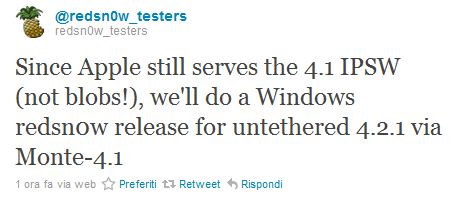
Good news everyone. DevTeam recently posted a tweet where they inform us that they will soon release a new version of Redsn0w utility for Windows. It will be an untethered jailbreak for iOS 4.2.1 using the Monte iOS 4.1 technique.


Read the rest of this entry »

rubyra1n

May be soon we will jailbreak our devices with a new tool from George Hotz (better known as Geohot) called Rubyra1n. On March 27, 2010 George Hotz registered two domains limera1n.com and blackra1n.com, another jailbreak tool Hotz released last year. The new rubyra1n, however, doesn’t share the same data with limera1n.com — an app released in October to jailbreak iOS 4.1. Geohot doesn’t comment these rumors anyhow, but we, obviously, wouldn’t be surprised at all to see him coming out with his own iOS 4.2.1 jailbreak for all devices.

redsn0w-096b5-top

UPDATE: Please think first, before you do something.

UPDATE2: If you have 05.13 baseband or lower – do not update to 4.2.1, use PwnageTool to create custom firmware!

This is step-by-step instructions on how to jailbreak and unlock your iPhone 3GS on iOS 4.2.1 firmware using RedSn0w 0.9.6b5 for Windows.

For iPhone 3G use this tutorial.

If you have an iPhone 3GS with the new bootrom you will only be able to perform a tethered jailbreak at this time. This means you will need Redsn0w’s assistance to boot into your jailbroken device.

IMPORTANT FOR UNLOCKERS
During this process you can update your baseband to the 06.15 version. If you are on 05.14 or 05.15 or higher you will need to do this to unlock. You do not need to do this for jailbreak only. Please read the following very carefully before deciding whether to do this.

Read the rest >>>

pwnagetool413-3gs-3

These are instructions on how to jailbreak and unlock your iPhone 3GS on iOS 4.1 using PwnageTool 4.1.3 for Mac OS X. This tutorial will explain how to upgrade your baseband if needed for an unlock.

For iPhone 3G use this tutorial.

There is no unthethered jailbreak for new iPhone 3GS bootroms and iOS 4.2.1 yet, so you should stay at iOS 4.1.

Important: iPhone3GS users with old bootroms who want to go to 4.2.1 and unlock should not use this PwnageTool! Update to stock 4.2.1 first, then use new redsn0w to update your baseband.

Step One
Make a folder called “Pwnage” on the desktop. Download a couple of things:

Read the rest >>>

ultrasn0w-421-2

MuscleNerd has recently announced via tweeter that ultrasn0w unlock for iPhone is now fully working on iOS 4.2.1

Finally got ultrasn0w working fully on 4.2.1. Apple inadvertently(!) broke ultrasn0w via aggressive compiler optimization

MuscleNerd previously announced that the ultrasn0w unlock should be available by Sunday for the iPhone 3G and iPhone 3GS. The unlock for the iPhone 4 will take much more time.

UPDATE: this is not a reason for update to iOS 4.2.1, wait for utilities.


Read the rest of this entry »