Browser | Jailbreak iPhone, iPod Touch, iPad Skip to content

Jailbreak iPhone, iPod Touch, iPad

новости про джейлбрейк iPhone, iPod Touch и iPad

Archive

Tag: browser

gp_web_win

These are step-by-step instructions on how to jailbreak iOS 4.2.1 on iPhone 3GS, iPhone 4, iPad, iPod Touch 2G, iPod Touch 3G, iPod Touch 4G using Greenpois0n for Windows. Tutorial for Mac OS X users is available here. All the steps are the same for all devices, we will cover iPhone.

Greenpois0n has been updated to support the iOS 4.1 and iOS 4.2.1 firmware. Use Limera1n if you want to jailbreak iOS 4.0, iOS 4.0.1, iOS 4.0.2.

Remember: Greenpois0n recommends a clean restore before continuing.

Unlockers: do not update to iOS 4.1 or iOS 4.2.1 if you need the unlock. Ultrasn0w does not support that baseband yet. The only exception is the iPhone 4. Experienced users can also try update to iOS 4.2.1 without upgrading your baseband by using TinyUmbrella. Start TSS Server->Start iTunes->Plug in your iPhone->Restore 4.2.1->Error 1013->Put phone into DFU Mode->Launch Greenpois0n.

We are not authors of this app. We do not promise that everything will go well, use this tutorial at your own risk.

Step One
Open your web browser and download the latest Windows version of GreenPois0n from here.


Read the rest of this entry »

gp_web

These are step-by-step instructions on how to jailbreak iOS 4.2.1 on iPhone 3GS, iPhone 4, iPad, iPod Touch 2G, iPod Touch 3G, iPod Touch 4G using Greenpois0n for Mac OS X. Tutorial for Windows users is available here. All the steps are the same for all devices, we will cover iPhone.

Greenpois0n has been updated to support the iOS 4.1 and iOS 4.2.1 firmware. Use Limera1n if you want to jailbreak iOS 4.0, iOS 4.0.1, iOS 4.0.2.

Remember: Greenpois0n recommends a clean restore before continuing.

Unlockers: do not update to iOS 4.1 or iOS 4.2.1 if you need the unlock. Ultrasn0w does not support that baseband yet. The only exception is the iPhone 4. Experienced users can also try update to iOS 4.2.1 without upgrading your baseband by using TinyUmbrella. Start TSS Server->Start iTunes->Plug in your iPhone->Restore 4.2.1->Error 1013->Put phone into DFU Mode->Launch Greenpois0n.

We are not authors of this app. We do not promise that everything will go well, use this tutorial at your own risk.

Step One
Open your web browser and download the latest Mac version of GreenPois0n from here.


Read the rest of this entry »

Here is the video of recently released universal safari jailbreak called JailBreakMe working on an iPhone 3G:

BrowserJailbreak

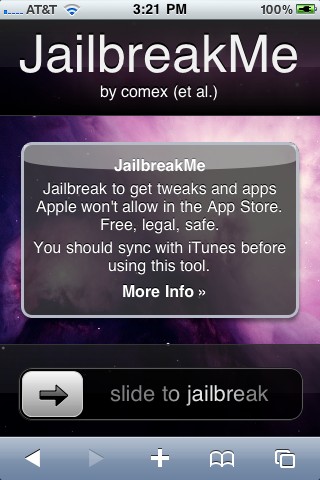
Starting today every owner of iPad, iPhone or iPod can easily jailbreak his device via browser on http://jailbreakme.com/

The site was created in a week after decision of the Library of Congress (that operates the Copyright Office), which states that jailbreaking isn’t illegal, though Apple claims it actually represents a threat to the stability and security of the company’s devices. Apple also says that jailbreaking voids the warranty, but such an action can be easily undone by resetting a device to the default factory settings.

Site JailbreakMe.com easily became a trending topic in Twitter after its announcement on RedmondPie.com. The jailbreak itself was created by hacker comex, and the website was done by chpwn and westbaer.

MuscleNerd tweeted today that the recent redsn0w utility is able to jailbreak the iOS 4.1 beta2 on iPhone 3G and iPod Touch 2G. This is useful for developers only, however good news for everyone.

Here’s some info from the DevTeam wiki page:


Read the rest of this entry »

ImaSafari allows iPhone users to turn off image downloading in Safari browser. This is very useful for GRPS, EGDE and 3G connectins. First of all webpages will be downloaded faster. Second – you will save money if you pay for inernet traffic.

This utility is avaliable for free via Cydia (for jailbreaked iPhones only).

To turn images on or off just install this software and go to Settings – Safari.

via spazio

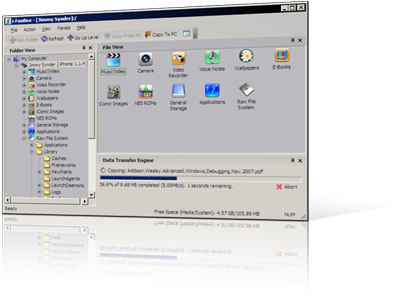
I use iFunBox a lot. This is a very useful utility for jailbreaked iPhones. Recently it was updated to version 0.7.224.86. Here is a download link.
What’s New:
1. Thumbnail view supported for wallpapers, camera and all other folders.
2. Support Symlink for the filesystem of firmware 2.0. All .app can be listed in Application folder.
3. Downloading music and movie from iPhone with filename encoded with album name and artist name.
4. Support E-Books, converting plain text to UTF-16 automatically.
5. Support Book Shelf, converting plain text to UTF-8 automatically.

Limitations:
Uploading music and movie to iPhone is now disabled on devices with firmware 2.x.

Thanks to Dev Team and the porting work of Jay Freeman as well as the authors of 3Proxy, it is now possible to “tether” your iPhone 3G and use its Internet connection on your laptop.

WarningTethering your iPhone is against the iPhone data plan terms. AT&T could slap you with huge fees if you overuse this. I recommend only using it during emergencies.

Here is a basic plan (by the way, this should work for old IPhone also):

  • Jailbreak your iPhone 3G
  • Install 3Proxy and Terminal
  • Create an ad-hoc Wi-fi network using your laptop
  • Join the network with your iPhone
  • Find the iPhone’s IP address
  • Open Terminal and run the proxy program
  • Open Safari on your iPhone and open a web page
  • Configure your browser to use the proxy

Later we’ll discuss it with more details.

Step 1: Jailbreak your iPhone


Read the rest of this entry »

Run

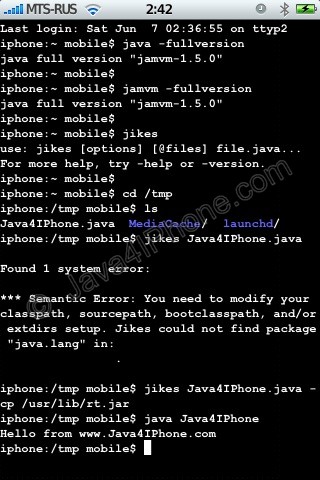
This is a tutorial, that shows step by step how to use installed Java on the IPhone. Just in case you do not have Java installed on your IPhone there is a tutorial how to do it.

What we need is a working jailbraked IPhone with Java Installed. I used latest firmware 1.1.4, unlocked, jailbreaked and customized by winpwn.

Step 1: Create simple Java application, compile and run.


Read the rest of this entry »