EDGE | Jailbreak iPhone, iPod Touch, iPad Skip to content

Jailbreak iPhone, iPod Touch, iPad

новости про джейлбрейк iPhone, iPod Touch и iPad

Archive

Tag: EDGE

redsn0w-099b1 redsn0w-099b1-extra

MuscleNerd has announced via Twitter that jailbreak utility RedSn0w 0.9.9b1 is released with major update and numerous new features:

Major improvements and features added to redsn0w 0.9.9b1! See update #9 at http://is.gd/6eek4Y Feedback: @redsn0w_testers

Indeed the list of new features is quite high. There are two main ones:

  • There is no need to download firmware any more. There is no need to push Browse IPWS button any more (but you still can).
  • Developers added lots of functionality to work with SHSH keys (extract, submit, download, verify, stitch etc)

However this new version does not bring features like untethered jailbreak for iOS 4.3.5 or iOS 5.

Due to some possible bugs we still recommend to use the old RedSn0w 0.9.8b7b, but the new 0.9.9b1 is worth seeing and playing with.

Here are links to our RedSn0w 0.9.8b7b iOS 4.3.5 jailbreak tutorials:

You can download RedSn0w 0.9.9b1 here:

Here is the full list of features from DevTeam:

Read the rest of this entry »

ios432

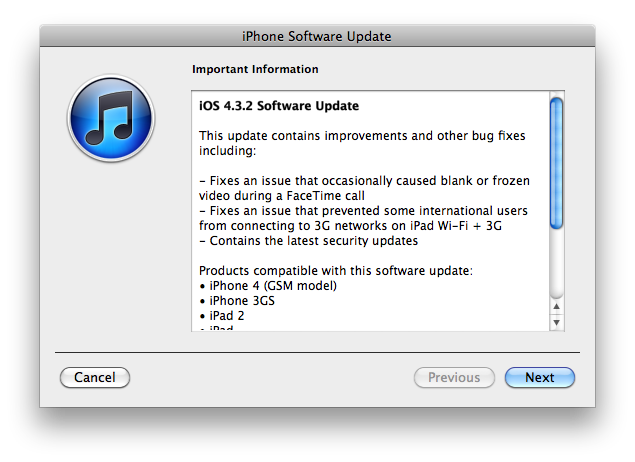
Apple has released iOS 4.3.2 for the iPhone, iPad, and iPod touch.

This update contains improvements and other bug fixes including:

  • Fixes an issue that occasionally caused blank or frozen video during a FaceTime call
  • Fixes an issue that prvented some international users from connecting to 3G networks on iPad W-Fi + 3G
  • Contains the latest security updates

Products compatible with this software update:

  • iPhone 4 (GSM model)
  • iPhone 3GS
  • iPad 2
  • iPad
  • iPod touch (4th generation)
  • iPod touch (3rd generation)

For information on the security content of this update, please visit http://support.apple.com/kb/HT1222.

Apple has also updated the firmware for the Verizon iPhone to 4.2.7 although this wasn’t listed in the release notes.

Current jailbreak tools work with iOS 4.3.2 in tethered mode only. Please save your SHSH keys for iOS 4.3.1 asap.

Here are direct download links for the latest firmwares:


Read the rest of this entry »

gp_web_win

These are step-by-step instructions on how to jailbreak iOS 4.2.1 on iPhone 3GS, iPhone 4, iPad, iPod Touch 2G, iPod Touch 3G, iPod Touch 4G using Greenpois0n for Windows. Tutorial for Mac OS X users is available here. All the steps are the same for all devices, we will cover iPhone.

Greenpois0n has been updated to support the iOS 4.1 and iOS 4.2.1 firmware. Use Limera1n if you want to jailbreak iOS 4.0, iOS 4.0.1, iOS 4.0.2.

Remember: Greenpois0n recommends a clean restore before continuing.

Unlockers: do not update to iOS 4.1 or iOS 4.2.1 if you need the unlock. Ultrasn0w does not support that baseband yet. The only exception is the iPhone 4. Experienced users can also try update to iOS 4.2.1 without upgrading your baseband by using TinyUmbrella. Start TSS Server->Start iTunes->Plug in your iPhone->Restore 4.2.1->Error 1013->Put phone into DFU Mode->Launch Greenpois0n.

We are not authors of this app. We do not promise that everything will go well, use this tutorial at your own risk.

Step One
Open your web browser and download the latest Windows version of GreenPois0n from here.


Read the rest of this entry »

gp_web

These are step-by-step instructions on how to jailbreak iOS 4.2.1 on iPhone 3GS, iPhone 4, iPad, iPod Touch 2G, iPod Touch 3G, iPod Touch 4G using Greenpois0n for Mac OS X. Tutorial for Windows users is available here. All the steps are the same for all devices.

Greenpois0n has been updated to support the iOS 4.1 and iOS 4.2.1 firmware. Use Limera1n if you want to jailbreak iOS 4.0, iOS 4.0.1, iOS 4.0.2.

Remember: Greenpois0n recommends a clean restore before continuing.

Unlockers: do not update to iOS 4.1 or iOS 4.2.1 if you need the unlock. Ultrasn0w does not support that baseband yet. The only exception is the iPhone 4. You can unlock iPhone 4 with iOS 4.1 using ultrasn0w. Experienced users can also try update to iOS 4.2.1 without upgrading your baseband by using TinyUmbrella. Start TSS Server->Start iTunes->Plug in your iPhone->Restore 4.2.1->Error 1013->Put phone into DFU Mode->Launch Greenpois0n.

We are not authors of this app. We do not promise that everything will go well, use this tutorial at your own risk.

Read the rest >>>>

gp_web

These are step-by-step instructions on how to jailbreak iOS 4.2.1 on iPhone 3GS, iPhone 4, iPad, iPod Touch 2G, iPod Touch 3G, iPod Touch 4G using Greenpois0n for Mac OS X. Tutorial for Windows users is available here. All the steps are the same for all devices, we will cover iPhone.

Greenpois0n has been updated to support the iOS 4.1 and iOS 4.2.1 firmware. Use Limera1n if you want to jailbreak iOS 4.0, iOS 4.0.1, iOS 4.0.2.

Remember: Greenpois0n recommends a clean restore before continuing.

Unlockers: do not update to iOS 4.1 or iOS 4.2.1 if you need the unlock. Ultrasn0w does not support that baseband yet. The only exception is the iPhone 4. Experienced users can also try update to iOS 4.2.1 without upgrading your baseband by using TinyUmbrella. Start TSS Server->Start iTunes->Plug in your iPhone->Restore 4.2.1->Error 1013->Put phone into DFU Mode->Launch Greenpois0n.

We are not authors of this app. We do not promise that everything will go well, use this tutorial at your own risk.

Step One
Open your web browser and download the latest Mac version of GreenPois0n from here.


Read the rest of this entry »

iDongle is a new device that lets you to jailbreak your iPhone/iPod Touch or reboot it on the go. It is very easy to use -- just plug it in and wait. The only problem is that it supports only iPod Touch 2G/3G and 3.1.2 iPhone 3GS.

At the moment there is only a dozen of this devices, but the developer says he collects money at the moment to build up a full-fledged production.

sn0wbreeze

H8sn0w has just released the new version of Sn0wbreeze 1.4. Sn0wbreeze is a jailbreak utility with functionality similar to PwnageTool. The new version supports firmware 3.1.3 jailbreak for the following devices:

Sn0wbreeze is a Windows application, so Mac users have to wait for the upcoming release of PwnageTool by the DevTeam. Alternatively, both Mac and Windows users can use Redsn0w to run jailbreak (no custom firmware though).

You can download the new version of sn0wbreeze here.

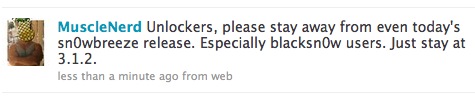
MuscleNerd continues to argue that we should not use sn0wbreeze. Especially users who have unlocked their iPhone with blacksn0w utility:
sn0wbreeze

pwnage

The DevTeam has just released Pwnage Tool 3.1-3, the new version of the tool for Mac OS that lets you run the jailbreak on iPhones and iPod Touch with firmware 3.1. The new version adds limited support for iPhone 3GS and iPod Touch 2G. It still works with iPhone 2G (EDGE), iPhone 3G and iPod Touch 1G.

The iPhone 3GS is now supported in PwnageTool 3.1.3, assuming the phone was pwned at 3.0 or 3.0.1 – PwnageTool does not support the 3GS out of the box. If your iPhone 3GS has 3.1 preinstalled and is not Pwned then there is no tested jailbreak solution at the moment.

The iPod 2G is now supported in PwnageTool 3.1.3, assuming the iPod 2G was pwned at 3.0 or 3.0.1 – PwnageTool does not support the iPod 2G with 3.1 software out of the box.

You can download in Pwnage Tool 3.1-3 here.

firmware-31

Playing with the latest beta software for iPhone, one of iH8sn0w employees (firmware 3.1 beta 3 jailbreak utility), found that the expiry date for latest firmware is September 18.

Firmware 3.1 will be probably released 1 or 2 days before the expiration of the beta. This means that Apple might perform a release during the Apple event in September. However this event is dedicated to the music, so we cannot be sure.

The only certain knowledge is that by the middle of next month we will see either 3.1 beta 4 or 3.1 release.

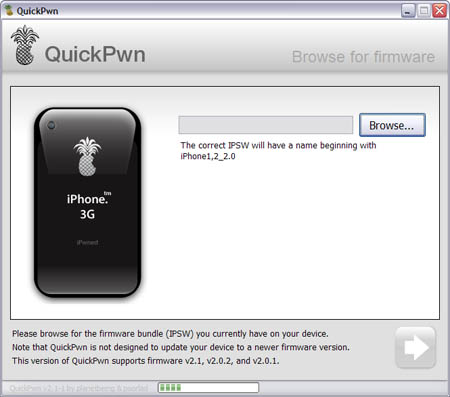
Congratulations, Windows users. The support for new firmware 2.1 is added. So here is what you can do:

  • Support for FW v2.0.1, v2.0.2, v2.1.0
  • Jailbreaking and Pwning iPhone 2G, iPhone 3G and iPod Touch
  • Adding Cydia and Installer
  • Replacing boot logos
  • Unlocking iPhone 2G

Changes from QuickPwn RC3

  • Support for firmware 2.1
  • Auto-detection of firmware version, insistence on correct firmware bundle to prevent user epic fail.
  • Use of iASign to activate to prevent bspatch epic fail.
  • Removed buggy and never really tested 2.0 support

Sorry, no jailbreak for new iPod Touch and no unlock for iPhone 3G.

Here are download links:

Firmwares v2.1: 2g firmware, 3g firmware

Related posts:

  • Page 1 of 2
  • 1
  • 2
  • >