Ipsw | Jailbreak iPhone, iPod Touch, iPad - Part 7 Skip to content

Jailbreak iPhone, iPod Touch, iPad

новости про джейлбрейк iPhone, iPod Touch и iPad

Archive

Tag: ipsw

iphone-os-3.1.3

Apple has just released new firmware 3.1.3 (7E18) for iPhone 3GS, iPhone 3G, iPhone 2G, iPod touch, iPod touch 2G and iPod touch 3G.

The update includes:

  • Improves accuracy of reported battery level on iPhone 3GS
  • Resolves issue where third-party apps would not launch in some instances
  • Fixes bug that may cause an app to crash when using the Japanese Kana keyboard
  • Other security updates (more info)

So this is a minor update, which fixing only the accuracy of the 3GS battery meter and the stability of some third-party app launches. This update is avaliable via iTunes.

New firmware 3.1.3 also introduces a new version of the baseband, the 05.12.01. So if you need unlock do not update! DevTeam also warns us:

If you care about your jailbreak and unlock, don’t update your device – 3G and 3G(S) owners should pay particular attention to this warning.
PwnageTool and redsn0w are not yet compatible with 3.1.3

Experimenters show that the latest version of redsn0w 0.9.2 is able to jailbreak iPhone 2G, iPhone 3G and iPod touch 1G. Just point it at the 3.1.2 IPSW (download here) after doing update or restore to firmware 3.1.3. Sounds like DevTeam will release an updated version of redsn0w that will handle firmware 3.1.3 officially. They say iPod touch 2G with firmware 3.1.3 is also jailbreakable.

Users report that unlock software, blacksn0w and ultrasn0w, doesn;t work with the new baseband.
sn0wbreeze

iH8Sn0w has released a beta of Sn0wbreeze a software utility which jailbreaks the iPod Touch 1G, 2G and iPhone 2G, 3G, and 3GS (old bootrom & non MC). The software runs on Windows XP, Vista, 7 (32 or 64 bit). Sn0wbreeze is similar to PwnageTool for Mac. It will allow you to create custom ipsws which can be built to include Cydia applications and personalized boot logos.

At this time BlackRa1n is still recommended for Windows users with firmware 3.1.2 and RedSn0w for earlier firmwares.

3.0.1-jailbreak

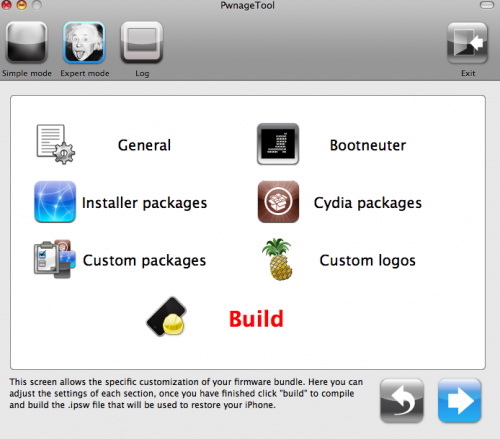
DevTeam just released PwnageTool 3.1.4. It allows users to jailbreak firmware 3.1.2 on iPhone 2G/3G/3GS and iPod Tocuh 1G/2G. It also supports OTB iPhone 3GS with firmware 3.1.x. We remind you that if you need unlock, do not update on regular 3.1.x firmware, use Pwnagetool to create custom firmware to preserve old baseband.

Here is a quick howto:

  • Factory Unlocked iPhone 3G and iPhone 3GS: You do not need unlock, just use PwnageTool to create an ipsw and then use this to update and jailbreak your phone.
  • iPhone 3G and iPhone 3GS: if you need unlock, use PwnageTool to create a custom firmware with an old baseband. Then update using created custom firmware and install ultrasw0w via Cydia to unlock.
  • iPhone 2G: Use PwnageTool to do the magic and then restore with iTunes using your newly created .ipsw.The baseband will be unlocked, the phone jailbroken.
  • iPod Touch 1G: Use PwnageTool to create a firmware image and restore with that .ipsw using iTunes.
  • iPod Tocuh 2G: You must already be jailbroken in order to use PwnageTool. If so, create a firmware image and restore with that .ipsw using iTunes.
  • iPod Tocuh 3G: No support yet.

You can download PwnageTool 3.1.4 here.

There is only a MAC version of PwnageTool. DevTeam doesn’t plan to create Windows version.

pwnage 20

DevTeam released PwnageTool 3.1. This utility will allow users of iPhone 2G, iPhone 3G, iPod Touch to run jailbreaked firmware 3.1. We still recommend staying on firmware 3.0/3.0.1 for as long as possible. The 3.1 firmware is not worth it. But if you really want 3.1. Here are the details:

  1. If you are using a 3G iPhone with ultrasn0w and rely on ultrasn0w to obtain cellular service, then you should only upgrade to 3.1 with a PwnageTool created .ipsw. Never update using Apple’s unmodified firmware. Stay away from Apple’s direct updates.
  2. This version of PwnageTool WILL NOT work for the iPhone 3GS and iPod Touch 2G/3G.
  3. PwnageTool WILL work for Original iPhone (1st Generation), Original iPod touch (1st Generation) and the iPhone 3G.
  4. It works only with Mac OS X.
  5. Future releases of PwnageTool and RedSn0w will be soon with more functionality.

Here is per device info:

iPhone 3G (unlocked): This model of iPhone 3G doesn’t have an Service Provider lock (aka factory unlocked) and you are able to put any SIM card into the phone and get service. Your phone is already unlocked so you do not need to worry about baseband updates, simply upgrade to 3.1 using iTunes and then use PwnageTool to create an ipsw and then use this to jailbreak your phone.

iPhone 3G (locked): You need to preserve 3.0 baseband. Create a custom firmware.

iPhone 2G (1st Generation): Use PwnageTool to do the magic and then restore with iTunes using your newly created .ipsw, you don’t need to worry about anything, the baseband will be unlocked, the phone jailbroken.

iPod touch 1G (Original iPod Touch): Use PwnageTool to create a firmware image and restore with that .ipsw using iTunes.

iPod touch 2G: Sorry, no support at this time within PwnageTool, use Redsn0w for an earlier (pre 3.1) firmware release instead.

iPod touch 3G (New iPod Touch): Sorry, no support at this time within PwnageTool.

You can download PwnageTool 3.1 in our utilities page.

3.0.1-jailbreak

Good news is that you can still use redsn0w 0.8 to jailbreak firmware 3.0.1. Here’s the step-by-step plan:

  1. Download both firmware 3.0 and firmware 3.0.1 (link).
  2. Download redsn0w 0.8 (link).
  3. Update or restore to official 3.0.1 in iTunes.
  4. Run redsn0w.
  5. When redsn0w asks you to identify the IPSW used, point it at the 3.0 IPSW instead of the 3.0.1 one.
  6. Follow the instructions.
  7. After the jailbreak, reinstall ultrasn0w 0.9 if you need the unlock.

jailbreak30

News from DevTeam:

iPhone 3.0 OS is jailbreakable on all devices. It’s just those using 3G yellowsn0w that have to show some restraint and wait for PwnageTool to create a custom IPSW that avoids the baseband update. If you are using yellowsn0w, do not update or restore to iPhone 3.0 firmware.  You will lose yellowsn0w and find yourself unable to revert the baseband to get it back.

Yes, DevTeam released new version of their software. First of all, please, do NOT use unofficial software from unknows sites (f.e. quickpwm.com). We recommend to download from torrent or official mirors.

We regulary publish latets software and firmware links. Use them or the same ones from DevTeam site.

So:

  • iPhone 2G and iPod Touch: update to 2.2.1 with iTunes and run QuickPwn to jailbreak, activate and unlock you device.
  • iPod Touch 2G: sorry, you need to wait a bit more
  • iPhone 3G + NO UNLOCK: If you do not need unlock, you are using your iPhone with one carrier or you hae factory unlcoked iPhone, just restore or upgrade to 2.2.1 using iTunes and use QuickPwn to jailbreak and add Cydia and Installer.
  • iPhone 3G + UNLOCK: you need to preserve current baseband software. Preserving the baseband will ensure that you can still use “yellowsn0w” the iPhone 3G unlock application. To upgrade your phone to 2.2.1 and preserve the state of the baseband you need to create a custom .ipsw with PwnageTool. This custom .ipsw will not contain the baseband update but of course will still allow all the cool new stuff from 2.2.1. PwnageTool is only available for Mac OS X.

DevTeam updated yellowsn0w to version 0.9.7 to work with modified (!!!) firmware 2.2.1, in which you preserve old baseband from firmware 2.2.

Congratulations, Windows users. The support for new firmware 2.1 is added. So here is what you can do:

  • Support for FW v2.0.1, v2.0.2, v2.1.0
  • Jailbreaking and Pwning iPhone 2G, iPhone 3G and iPod Touch
  • Adding Cydia and Installer
  • Replacing boot logos
  • Unlocking iPhone 2G

Changes from QuickPwn RC3

  • Support for firmware 2.1
  • Auto-detection of firmware version, insistence on correct firmware bundle to prevent user epic fail.
  • Use of iASign to activate to prevent bspatch epic fail.
  • Removed buggy and never really tested 2.0 support

Sorry, no jailbreak for new iPod Touch and no unlock for iPhone 3G.

Here are download links:

Firmwares v2.1: 2g firmware, 3g firmware

Related posts:

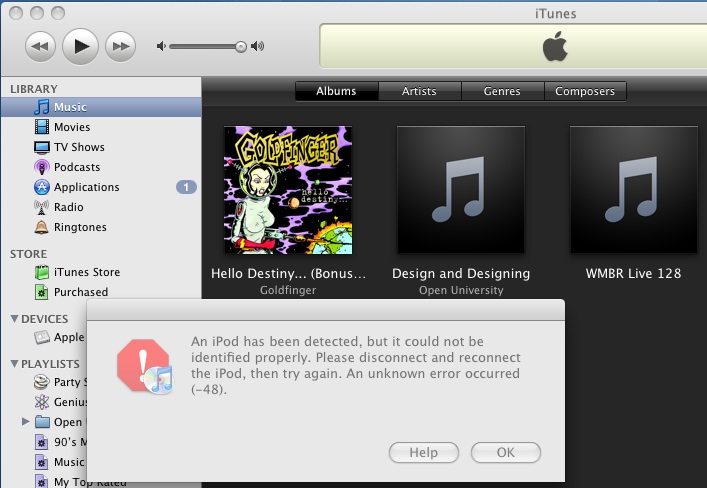
The only way Apple can fix the exploit that the iPhone Dev Team has been using to Jailbreak iPhone’s and iPod Touch’s is to fix their hardware, but it seems Apple has figured out a way to program iTunes 8 to detect and prevent the Pwnage exploit. The screenshot below from iTunes 8 using a Pwned ipsw (with an unPwned device attached) is one example.

The Dev Team reacted promptly:

“The nice thing about iTunes decisions is that we can provide you with patches to counter them. We have one such patch already for Mac iTunes 8 for iPod touch. We’ll be working out the full suite of patches for all the combinations over the next week.”

Dev Team also published two interesting screenshots:

There are so many tools, some for Mac OS, others for Windows, different versions… Complicated. So let’s summerize a little bit.

If you have iPhone 3G, you’ll be able to install 3-rd party non AppStore applications (through separate applications called Cydia and Installer) and run these applications. If you have old iPhone, in addition to that you’ll be able to unlock the device (use with any carrier).

There are two methods: quickpwn and custom firmware method. First one is for quikly pwning and jailbreaking  the device without restore. You should use it if you have unlocked device or an AT&T contract.

If you are Windows user:

  • Go for WinPwn. The current version is 2.5.0.2 (also called 2.5 beta-2). Download here. It supports both iPhone and iPhone 3G, firmwares 2.0, 2.0.1, 2.0.2. You can use either quickpwn or custom firmware method.
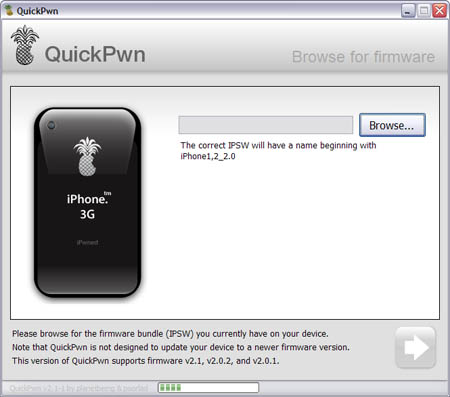
  • There is a separate QuickPwn tool for Windows. The current version is RC3. Download here. Do you need it? Yes, if you want to quick pwn and you do not like WinPwn (or you had problems with it).

If you’re using Mac OS:

  • Go for PwnageTool. The current version is 2.0.3.1. Download here. Works with 2.0, 2.0.1, 2.0.2 firmwares using custom-firmware method.
  • There is a version of QuickPwn tool for MAC OS. The current version is 1.0.0. Download here. It works only with firmware 2.0.2. Do you need it? Yes, if you want to quick pwn.
    QuickPwn is not a replacement for PwnageTool, they are different tools and provide different features, QuickPwn is for quickly pwning a device, whereas PwnageTool is designed to custom build and tailor the ipsw production process, both tools will be actively developed in the future.