Jailbreak | Jailbreak iPhone, iPod Touch, iPad - Part 33 Skip to content

Jailbreak iPhone, iPod Touch, iPad

новости про джейлбрейк iPhone, iPod Touch и iPad

Archive

Tag: jailbreak

betatest

The iPhone Dev team has just released the second beta of their untethered RedSn0w jailbreak (the first beta has been released few hours ago and has more bugs).

New jailbreak is called “Jailbreak Monte”, as it uses new “backup method”. The iPhone Dev Team warns that their beta-version is not a general release and you should back up all your media before using it. There are also other limitations and bugs:

Read the rest of this entry »

MuscleNerd from iPhone DevTeam tweeted that an untethered jailbreak solution for iOS 4.2.1 will be released soon, probably next week.

scotty6kids78: @MuscleNerd are we any closer to the unteathered #jailbreak for the new #ios4.2 on #iphone4 ?

MuscleNerd: @scotty6kids78 it’ll be here by Xmas (not because we’re sitting waiting for Xmas, but because it’s achievable deadline)

This untethered solution will be applicable to all current iOS 4.2.1 devices, including iPhone 4, iPhone 3GS, iPad, Apple TV 2G and iPod touch 4G. We will keep you updated.

android market

This week Google has released a new version of its client app for Android Market, which will work on any smartphone running Android OS 1.6 or higher.

The company aims to facilitate the process of discovering new software and its purchase. That’s why new Android Market will have a Cover Flow-like style of app listings and include new categories like Widgets and Live Wallpapers, as currently the catalog is filled pretty much with these kinds of software. Besides that, app pages will now have more info and links to related content.

Read the rest of this entry »

jailbreak API

Apple has reportedly disabled its jailbreak detection API through iOS 4.2 software update. The API helped third-party mobile device management (MDM) applications to check for unauthorized modifications of system files. Apple’s jailbreak detection API provided MDM applications direct access to iOS system information and was able to ask the operating system directly if it had been jailbroken. Jailbreak exploits typically change a number of operating system files, and exploit one or another low-level OS features to let users directly load their own or third-party applications.


Read the rest of this entry »

untethered

Currently iOS 4.2.1 jailbreak for iPhone 4, iPhone 3GS new bootrom, iPad, iPod 3G/4G is a tethered jailbreak. That means if you have to reboot your device, it will show a “connect to itunes” logo until you run the jailbreak software again. Musclenerd from iPhone DevTeam has announced that untethered jailbreak for iPhone iOS 4.2.1 is ready. Unfortunately this will be only for those who saved 4.2b3 SHSH keys via Cydia or tinyumbrella.

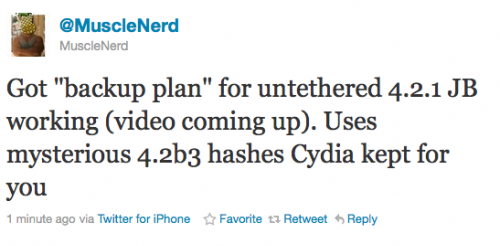
Got “backup plan” for untethered 4.2.1 JB working (video coming up). Uses mysterious 4.2b3 hashes Cydia kept for you.

“Backup plan” because hacker comex is working on a more extensible jailbreak. We’ll keep you up to date with more information as it develops. For now you can watch the proof video:


Read the rest of this entry »

Graviboard is an upcoming interesting iOS jailbreak application, which will be soon available in the Cydia Store for $2.99. The application allows iDevice owners to set their icons free by abolishing the gravity that holds them on their places on the Springboard. You may drag these “floating” icons around the screen, and there still might open the apps by touching.

Everybody knows that the iPhone Springboard can’t be turned in landscape mode. Apple wants you to hold the device in portrait mode only. But some apps, like Mail, support the horizontal orientation. So, Cydia developers offer us the alternative solution, a new hack available in Cydia called “SBRotator” ($1.99). If you change your iPhone’s orientation, using the app, the Springboard will just follow it. But Springboard orientation change requires a proper layout change too. SBRotator puts an extra tab which enables you find the configuration that best suits your needs. Moreover, the program allows you to resize icons for landscape mode.

redsn0w-096b5-top

UPDATE: Please think first, before you do something.

UPDATE2: If you have 05.13 baseband or lower – do not update to 4.2.1, use PwnageTool to create custom firmware!

This is step-by-step instructions on how to jailbreak and unlock your iPhone 3GS on iOS 4.2.1 firmware using RedSn0w 0.9.6b5 for Windows.

For iPhone 3G use this tutorial.

If you have an iPhone 3GS with the new bootrom you will only be able to perform a tethered jailbreak at this time. This means you will need Redsn0w’s assistance to boot into your jailbroken device.

IMPORTANT FOR UNLOCKERS
During this process you can update your baseband to the 06.15 version. If you are on 05.14 or 05.15 or higher you will need to do this to unlock. You do not need to do this for jailbreak only. Please read the following very carefully before deciding whether to do this.

Read the rest >>>

redsn0w-096b5-top

UPDATE: Please think first, before you do something.

UPDATE2: If you have 05.13 baseband or lower – do not update to 4.2.1, use PwnageTool to create custom firmware!

This is step-by-step instructions on how to jailbreak and unlock your iPhone 3G on iOS 4.2.1 firmware using RedSn0w 0.9.6b5 for Windows.

For iPhone 3GS use this tutorial.

IMPORTANT FOR UNLOCKERS
During this process you can update your baseband to the 06.15 version. If you are on 05.14 or 05.15 or higher you will need to do this to unlock. You do not need to do this for jailbreak only. Please read the following very carefully before deciding whether to do this.

Read the rest >>>

pwnagetool413-3gs-3

These are instructions on how to jailbreak and unlock your iPhone 3GS on iOS 4.1 using PwnageTool 4.1.3 for Mac OS X. This tutorial will explain how to upgrade your baseband if needed for an unlock.

For iPhone 3G use this tutorial.

There is no unthethered jailbreak for new iPhone 3GS bootroms and iOS 4.2.1 yet, so you should stay at iOS 4.1.

Important: iPhone3GS users with old bootroms who want to go to 4.2.1 and unlock should not use this PwnageTool! Update to stock 4.2.1 first, then use new redsn0w to update your baseband.

Step One
Make a folder called “Pwnage” on the desktop. Download a couple of things:

Read the rest >>>