Wallpaper | Jailbreak iPhone, iPod Touch, iPad Skip to content

Jailbreak iPhone, iPod Touch, iPad

новости про джейлбрейк iPhone, iPod Touch и iPad

Archive

Tag: wallpaper

Here is a nice video overview of popular Cydia apps.

My personal top 30 Cydia tweaks of 2011. The tweaks chosen are both new and old, popular and unpopular. 30 is a big number so, I hope that most of you are able to find a tweak that you will enjoy having on your iPhone, iPod Touch, or iPad. The tweaks are my personal picks and we all will have our opinion. I know that there are allot of other awesome Cydia tweaks that I was unable to mention but, feel free to tell us about them in a video response or comment.

Cydia tweaks include: Tab+, Multiconmover, Infiniboard, Infinidock, SBSettings, Alphacon, Android Delete, Graviboard, Grid Lock, Animate Battery, Winterboard, Flipover, List Launcher, Cy Delete, Folder Enhancer, Pull to Refresh Safari, RetinaPad, Barrel, Camera Wallpaper, icon renamer, double tap to open, Pagenames, iSwipe, Stayopened, iTypeappleicon, retina app, icons, page pusher, Bytafont, AndroidLock XT, Insomnia

If you have never done jailbreak, you might want to try 🙂
pwnagetool413-3gs-3

UPDate: save your iOS 4.2.1 SHSH blobs now!

UPDate 2: Attention! We’ve received info, that Apple stopped signing iOS 4.2 for devices for which iOS 4.3 is available. This means you will not be able to restore to 4.2.1 without saved SHSH keys.

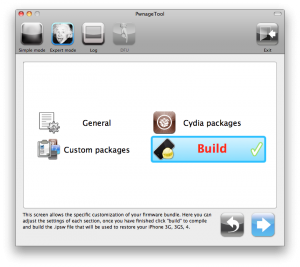
Using this tutorial you will be able to jailbreak iOS 4.2.1 running on iPhone 3G, iPhone 3GS, iPhone 4, iPod Touch 3G, iPod Touch 4G and iPad. Pwnagetool will also preserve baseband version if you need carrier unlock. If you have updated the baseband to version 06.15, you can use this tutorial. This tutorial uses PwnageTool 4.2 for Mac OS X.

We are not developers of jailbreak utilities, so we cannot assure that everything will work just fine. However we tried this tutorial on several devices and succeeded.

We will use iPhone 4 in our jailbreak tutorial. The process is the same for all devices.

Step One
Make a folder called “Pwnage” on the desktop. Download a couple of things:

Read the rest >>>

Apple stopped to support original iPhone 2G and iPod touch 1G starting from iOS 4.0. Their decision was justified because of the low RAM and sow CPU in these first-gen devices released back in 2007.

iPhone jailbreak community has now come up with a mod, which brings the complete look and feel of iOS 4.2.1 for iPhone 2G, 3G and iPod touch 1G and 2G. The mod is basically based on the iPhone OS 3.1.3, to replicate the experience of iOS 4 on the first and second generation iPhone and iPod touch.

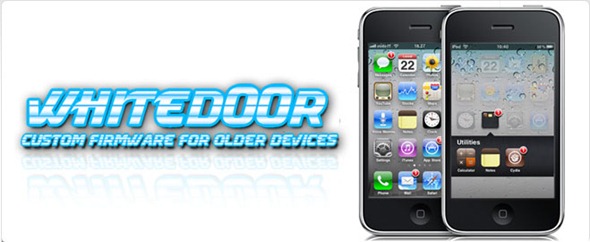
This custom firmware, named WhiteD00r, includes everything from iOS 4.x: wallpapers, new semi transparent dock (and UI), backgrounds, all new icons from iOS 4.x, Voice Control, multitasking, video recording, and more. Full list of features can be found here.

Moreover WhiteD00r was also relased for iPhone 3G and iPod touch 2G. Regular iOS 4.х works really slow, on these devices, while modified 3.1.3 has much more chances.

WhiteD00r custom 4.2.1 firmware for iPhone 2G, iPhone 3G, iPod touch 1G and iPod touch 2G can be downloaded from here.

Here is a video of it in action:


Read the rest of this entry »

android market

This week Google has released a new version of its client app for Android Market, which will work on any smartphone running Android OS 1.6 or higher.

The company aims to facilitate the process of discovering new software and its purchase. That’s why new Android Market will have a Cover Flow-like style of app listings and include new categories like Widgets and Live Wallpapers, as currently the catalog is filled pretty much with these kinds of software. Besides that, app pages will now have more info and links to related content.

Read the rest of this entry »

iphonepaper

Wallpaper Labeler (AppStore link) and gCalWall Lite (AppStore link) let you add appointments and notes to the home screen. With Wallpaper Labeler, you can enter any text you want to your wallpaper, so you can leave yourself (or whoever finds your phone) notes. The other app, gCalWall, pulls down upcoming appointments from your default Google Calendar and splays them all over your home screen. You have to update it manually, which is kind of a drag, but the dev says that iPhone API won’t allow for automatic updating. Both apps are free 🙂

In the past you could only use Intelliscreen paid app on a jailbreaked iPhone.

via gizmodo, lifehacker

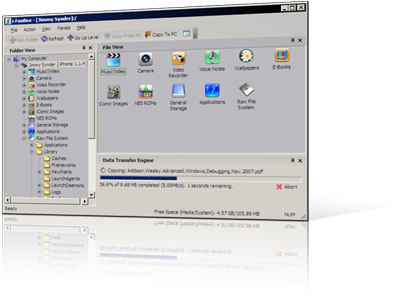
I use iFunBox a lot. This is a very useful utility for jailbreaked iPhones. Recently it was updated to version 0.7.224.86. Here is a download link.
What’s New:
1. Thumbnail view supported for wallpapers, camera and all other folders.
2. Support Symlink for the filesystem of firmware 2.0. All .app can be listed in Application folder.
3. Downloading music and movie from iPhone with filename encoded with album name and artist name.
4. Support E-Books, converting plain text to UTF-16 automatically.
5. Support Book Shelf, converting plain text to UTF-8 automatically.

Limitations:
Uploading music and movie to iPhone is now disabled on devices with firmware 2.x.

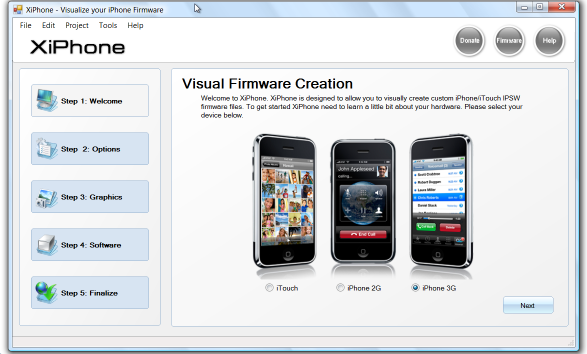
Recently a new project has been started, called XiPhone. It will be based on XPWN. So functionality similar to WinPwn and Pwnage will be present (jailbreak, unlock, etc). In addition to that developers plan to include:

  • Auto downloading of stock firmware files from apple’s site (no need to hunt for it then select it)
  • Wizard based modern GUI (created with .net 2.0), and Vista Style UI.
  • Export of firmware settings so users can pass around an XML file which contains a configuration that works for them.
  • Auto updates to the XiPhone software.
  • Community based wallpapers used for Bootscreen, Restore screen and others
  • Enabling / Disabling of options available based on the device you select.

Unfortunately, only Windows platform users will be able to use XiPhone.