джейлбрейк | Jailbreak iPhone, iPod Touch, iPad - Part 25 Skip to content

Jailbreak iPhone, iPod Touch, iPad

новости про джейлбрейк iPhone, iPod Touch и iPad

Archive

Tag: джейлбрейк

Here is a nice video overview of popular Cydia apps.

My personal top 30 Cydia tweaks of 2011. The tweaks chosen are both new and old, popular and unpopular. 30 is a big number so, I hope that most of you are able to find a tweak that you will enjoy having on your iPhone, iPod Touch, or iPad. The tweaks are my personal picks and we all will have our opinion. I know that there are allot of other awesome Cydia tweaks that I was unable to mention but, feel free to tell us about them in a video response or comment.

Cydia tweaks include: Tab+, Multiconmover, Infiniboard, Infinidock, SBSettings, Alphacon, Android Delete, Graviboard, Grid Lock, Animate Battery, Winterboard, Flipover, List Launcher, Cy Delete, Folder Enhancer, Pull to Refresh Safari, RetinaPad, Barrel, Camera Wallpaper, icon renamer, double tap to open, Pagenames, iSwipe, Stayopened, iTypeappleicon, retina app, icons, page pusher, Bytafont, AndroidLock XT, Insomnia

If you have never done jailbreak, you might want to try 🙂

iphone-hacker-

The founder of Jailbreakme.com Comex has said on Twitter that he is joining Apple as an intern. Site JailbreakMe.com greatly facilitates jailbreaking for users. He said about the hiring on Twitter:

“It’s been really, really fun, but it’s also been a while and I’ve been getting bored. So, the week after next I will be starting an internship with Apple”.


Read the rest of this entry »

sn0wbreeze-28b6

iH8Sn0w released Sn0wBreeze 2.8b6, which adds support for the latest iOS 5 beta 6 firmware.

Sn0wBreeze is a quite useful jailbreak utility. It creates custom firmware and allows users to preserve baseband for unlock. This new version also adds hacktivation and removes UDID developer check. This means that you can try iOS 5 without developer account from Apple.

You can download Sn0wBreeze 2.8b6 for Windows here.


Read the rest of this entry »

Seas0nPass

Apple TV 2G jailbreak utility Seas0nPass has been updated to support an un-tethered jailbreak of the latest firmware 4.3 build 8F455. Seas0nPass is one of the simplest jailbreaking tools available for the AppleTV, and is the first to support the new 4.3 build 8F455 software version.

You can download Seas0nPass here: Mac [10.6 or later] | Windows [XP or later].

You can read our step-by-step tutorial for Apple TV 2G jailbreak using Seas0nPass here.

ios-5-beta-6-jailbreak

The iPhone Dev-Team released RedSn0w 0.9.8b6 that supports tethered jailbreak for the most recent iOS 5 beta 6:

We’ve released redsn0w 0.9.8b6 to jailbreak iOS5 beta6 (point it directly at the beta6 IPSW).

Two important notes about this version:
(1) Please let your device boot normally to IOS5b6 and do a clean shutdown (slide to power off) before jailbreaking.

(2) Boot logos have intentionally been disabled for now, so you’ll see a black screen on tethered boots (you can re-enable logos or verbose boot with command-line options if you really want them back).

Due increased sensitivity to abrupt filesystem shutdowns in IOS5b6, it’s very important that you do a clean shutdown before running redsn0w.

RedSn0w 0.9.8b6 supports tethered jailbreak for iPhone 4, iPhone 3GS, iPod Touch 3G, iPod Touch 4G and iPad 1.

You can download RedSn0w 0.9.8b6 for Windows and Mac OS here.


Read the rest of this entry »

redsn0w-ios5b5-jailbreak

The iPhone Dev-Team released RedSn0w 0.9.8b5 that supports tethered jailbreak for the most recent iOS 5 beta 5:

redsn0w has been updated to 0.9.8b5, adding support for Apple’s new iOS5 beta5 (point it directly at the beta5 IPSW). Please use this only if you’re a jailbreak app developer with a legit Apple dev account, and remember it’s a tethered jailbreak for now!

You can download RedSn0w 0.9.8b5 for Windows and Mac OS here.

jailbreak-ios-435

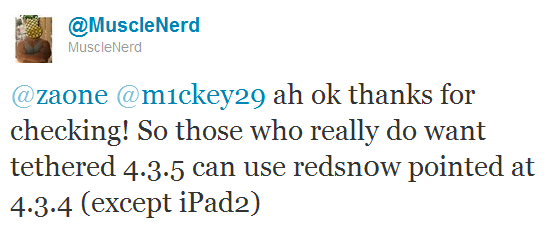
RedSn0w can perform a tethered jailbreak on iOS 4.3.5 for all devices except the iPad 2, according to MuscleNerd’s tweet:

So those who really do want tethered 4.3.5 can use redsn0w pointed at 4.3.4 (except iPad2)

We strongly recommend NOT to update to iOS 4.3.4 or iOS 4.3.5 to preserve untethered jailbreak. We will soon post step-by-step tutorials on how to perform iOS 4.3.5 tethered jailbreak.

You can download the latest redsn0w here.

UPDATE: Here are latest step-by-step tutorials to jailbreak iOS 4.3.5:

iphone3gs_s iPhone 3GS

Tethered jailbreak iOS 4.3.5:

iphone-4 iPhone 4

Tethered jailbreak iOS 4.3.5:

redsn0w-098b3

The iPhone Dev-Team has released RedSn0w 0.9.8b3 which can perform a tethered jailbreak on iOS 4.3.4. This means that you will have to connect your device to a computer and run redsn0w each time you restart.

For the convenience of kernel hackers like @comex and @i0n1c, we have a new redsn0w 0.9.8b3 that supports a TETHERED jailbreak for iOS 4.3.4 on all devices that have 4.3.4 except the iPad2. The vast majority of people will want to stay back at 4.3.3 because that’s where the untethered jailbreak is! There are no new features in 4.3.4 – only fixes for jailbreak exploits.

Also, this is a good time to remind everyone (since we’re still seeing confusion about this): iPad2 owners with a baseband (3G or CDMA) cannot currently use saved blobs to go back to 4.3.3 once the signing window is closed. This is unlike every other device, so don’t be confused! iPad2 owners with basebands should stay away from all updates to maintain your jailbreak!

This jailbreak works with iPhone 3GS, iPhone 4, iPad 1, iPod Touch 3G and iPod Touch 4G. It does not work with iPad 2.

You can download RedSn0w 0.9.8b3 from here: (Mac, Windows)

ios-4.3.4

Apple have recently released iOS 4.3.4 for iPhone 4, iPhone 3GS, iPad 1, iPad 2, iPod Touch 3G and iPod Touch 4G. Here are the direct links for each device that is supported by the update:

434-untether

Famous iPhone hacker Stefan Esser, also known as i0n1c, recently wrote on twitter that we should not expect untether jailbreak for iOS 4.3.4 anytime soon. i0n1c was the one who created untether for iOS 4.3.3 firmware.

Our advice is simple – save your 4.3.3 SHSH keys asap. With these SHSH keys you will be able to restore to iOS 4.3.3 anytime, without – only iOS 4.3.4. Here are tutorials for you.