джейлбрейк | Jailbreak iPhone, iPod Touch, iPad - Part 52 Skip to content

Jailbreak iPhone, iPod Touch, iPad

новости про джейлбрейк iPhone, iPod Touch и iPad

Archive

Tag: джейлбрейк

5-Row Keyboard is a new add-on to iPhone that is part of the project iKeyEx. It allows users to use a new 5 lines keyboard, where there are numbers in addition to the letters. Clicking the 123 button will display all the additional symbols.

5row1 5row2 5row3

To see the keyboard you must click on the globe. If the keyboard does not appear, you must activate it via the Settings > General > Keyboards > International Keyboards > 5 Row QWERTY.

This keyboard as avaliable in Cydia for jailbroken iPhones.

isutra1

iSutra, this nice application. Thanks to jailbreaking and Cydia we can run and use. It updated to vesrion 1.1. Just in time for Valentines Day. Several bugs fixed. It is also translated into Russiand and Portugese. If you’re not familiar, watch the video here.

emojifun

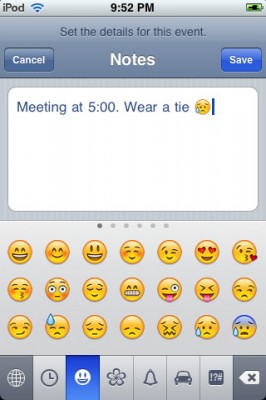
Emoji, emoticons and pictorial characters popular in the Japanese instant messaging culture, were introduced to Japanese customers as part of the iPhone 2.2 Firmware update, but have required workarounds to be enabled for non-Japanese users. There are many solutins to turn Emiji Icons (Get Emoji Icons for free), but the easy one required jailbreaking. Recently Apple approved an application that simplifies this process. App is called EmotiFun and it is free (AppStore link).

Everything is simple: get app, run it, exit and go to Settings -> General -> Keyboard -> International Keyboards -> Japanese and enable.

emmoji

Apple rejected iPhone application called iSutra. So it is avaliable via Cydia for jailbreaked iPhones for FREE.

ReflectiveDock is updated to version 1.4 ReflectiveDock is an extention to Winterboard, that makes dock look reflective:

Avaliable via Cydia (ModMyi repository) for jailbreaked iPhones.

Crackulous is an application that cracks AppStore apps. It is avaliable through Cydia for jailbreaked iPhones. Repository is http://cydia.hackulo.us

We have not tried it yet. So use it at your own risk.

via hackulo.us

Yes, DevTeam released new version of their software. First of all, please, do NOT use unofficial software from unknows sites (f.e. quickpwm.com). We recommend to download from torrent or official mirors.

We regulary publish latets software and firmware links. Use them or the same ones from DevTeam site.

So:

  • iPhone 2G and iPod Touch: update to 2.2.1 with iTunes and run QuickPwn to jailbreak, activate and unlock you device.
  • iPod Touch 2G: sorry, you need to wait a bit more
  • iPhone 3G + NO UNLOCK: If you do not need unlock, you are using your iPhone with one carrier or you hae factory unlcoked iPhone, just restore or upgrade to 2.2.1 using iTunes and use QuickPwn to jailbreak and add Cydia and Installer.
  • iPhone 3G + UNLOCK: you need to preserve current baseband software. Preserving the baseband will ensure that you can still use “yellowsn0w” the iPhone 3G unlock application. To upgrade your phone to 2.2.1 and preserve the state of the baseband you need to create a custom .ipsw with PwnageTool. This custom .ipsw will not contain the baseband update but of course will still allow all the cool new stuff from 2.2.1. PwnageTool is only available for Mac OS X.

DevTeam updated yellowsn0w to version 0.9.7 to work with modified (!!!) firmware 2.2.1, in which you preserve old baseband from firmware 2.2.

Here is an anouncement from DevTeam. They suggest to not update to the new firmware 2.2.1 yet. You can loose the ability to jailbreak and unlock. Just wait for them to check everything and release new software.

This is one more solution to add copy/paste functionality to iPhone. Couple days ago we wrote about Clippy. This one is called hClipboard. Avaliable via Cydia (bigboss repository) for jailbreaked iPhones.

Here is a quick tutorial how to use it:

After installing just enable it in Settings → General → Keyboard → International.

Copy:

When the keyboard appears, switch to ℏClipboard by clicking the International button (the Globe) repeatedly. Then hit the Copy button. The entire content of the text field should now appear in the top of the clipboard.

To select portion of a text:


Read the rest of this entry »

ImaSafari allows iPhone users to turn off image downloading in Safari browser. This is very useful for GRPS, EGDE and 3G connectins. First of all webpages will be downloaded faster. Second – you will save money if you pay for inernet traffic.

This utility is avaliable for free via Cydia (for jailbreaked iPhones only).

To turn images on or off just install this software and go to Settings – Safari.

via spazio