Numbers | Jailbreak iPhone, iPod Touch, iPad Skip to content

Jailbreak iPhone, iPod Touch, iPad

новости про джейлбрейк iPhone, iPod Touch и iPad

Archive

Tag: Numbers

I0n1c confirmed that it is safe to update to iOS 7.0.5 if you have a jailbroken device. This version of Apple’s mobile operating system is still vulnerable to the evasi0n7 jailbreak exploits. Here’s what the hacker posted on Twitter:

Okay #evasi0n7 still works in iPhone 5s at 7.0.5

Read the rest of this entry »

Saurik reports that about 18 million devices were counted by Cydia in the last six weeks, between untethered jailbreak release and iOS 6.1.3 which blocks this jailbreak. According to Forbes:

In the six weeks since evasi0n was released, however, close to 18 million devices have already been jailbroken, according to data from Jay Freeman, the administrator of the Cydia app store for jailbroken devices. He says he’s counted 18.2 million unique devices running iOS 6 visiting Cydia, including 13.8 million iPhones, 3.4 million iPads, and 1.1 million iPod Touches. Those numbers vastly exceed previous jailbreaks such as Jailbreakme 3, a popular hacking tool for iOS released in the summer of 2011 that was used on around 2 million devices, according to a count at the time by creator Nicholas Allegra.


Read the rest of this entry »

pwnagetool-42

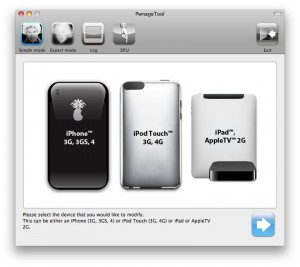
The iPhone Dev team has just released PwnageTool 4.3.2 which adds support for iOS 4.3.2. The jailbreak uses i0n1c’s untether, which Apple did not fix in 4.3.2. Ultrasn0w has also been updated to 1.2.2 adding support for the new firmware.

You can download PwnageTool 4.3.2 here. Ultrasn0w 1.2.2 is available in Cydia.


Read the rest of this entry »

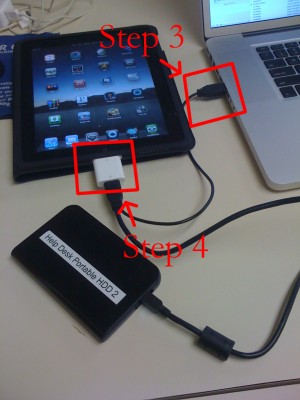
iPad USB Camera Connection Kit is much more useful as it seems. Max Sha, an experienced user, was able to access external hard drive with this kit. All you need is a jailbroken iPad, an external drive, a split-USB cable to give the drive some power and a terminal of some sort (f.e. MacBook) to mount the external storage. While it is a little unwieldy, it shows that Terabytes of external storage for iPad is possible.

Here is a complete step-by-step guide from Max Sha:


Read the rest of this entry »

Action Menu is a new utility that extends traditional Copy / Paste functionality. You can now “Copy All” or add text to a stack (“Favorites”) that allows you to paste phrases frequently at any time and in any application.

IMG_0038 IMG_0039 IMG_0040

The application is free but you can also buy an extension pack (costs $2.99) which will add new features, such as:

  • History: keep the history of all copied sentences / words / numbers;
  • Lookup: find online matches for phone numbers and words, using Google Search, Wikipedia, Dictionary, and Google Translate;
  • Tweet: send selected text through a Twitter client installed on your iPhone (currently support Tweetie, Twitterific, Twittelator and TwitterFon).

We found this utility quite useful. It can be installed via Cydia on a jailbreaked iPhone (iPod Touch).

firmare-3.1

Apple released new iPhone 3.1 and iPod Touch 3.1.1 firmwares. Here is a quick changelog:

– Improved syncing for music, movies, TV shows, podcasts, and photos
– iTunes U content organization
– Redeem iTunes Gift Cards, codes, and certificates in the App Store
– Display available iTunes account credits in the App Store and iTunes Store
– Save video from Mail and MMS into Camera Roll
– Option to “Save as new clip” when trimming a video on iPhone 3GS
– Better iPhone 3G Wi-Fi performance when Bluetooth is turned on
– Remotely lock iPhone with a passcode via MobileMe
– Use Voice Control on iPhone 3GS with Bluetooth headsets
– Paste phone numbers into the keypad
– Option to use Home button to turn on accessibility features on iPhone 3GS
– Warn when visiting fraudulent websites in Safari (anti-phishing)
– Improved Exchange calendar syncing and invitation handling
– Fixes issue that cause some app icons to display incorrectly

iPhone OS 3.1 is available and is a free download for iPhone customers. iPod Touch users already running iPhone OS 3.0 can update to 3.1.1 for free. iPod Touch users running earlier firmware versions can upgrade to OS 3.1.1 for $4.95.

Users of jailbreaked and unlocked devices – do not update, wait for utilities updates!!

skype_icon

Skype, the iPhone and iPod Touch application through which you can call and chat with your Skype contacts, has been updated to version 1.2. There are many updates and new features.

What’s new in version 1.2:

  • Set up call forwarding from your iPhone – forward Skype calls to a phone number when you’re not signed in.
  • Improved performance and better audio quality on Skype-to-Skype calls.
  • Even easier to send text messages (SMS) – Send SMS from the Call tab.
  • Calls are connected much faster.
  • Status of your contacts is updated more often.
  • You can now decide whether you want to stay online/offline when the iPhone is  locked. We’ve added this into settings.
  • Contact groups are now supported, making it easier to see who is online and separate your saved phone numbers.
  • You can now edit the name of your saved phone numbers.
  • Added support for skype: URL schemes in Safari.
  • When creating a new account the country in your Skype profile is taken from the language used on your iPhone.
  • Group chat profile pictures are now shown.
  • You can now remove your profile picture.
  • Added a ‘Help’ link to ‘Forgot your password’.
  • Improved support for proxy configurations.

If you have done jailbreak, don’t worry. During first launch Skype will pop up a message showing that it works only on unmodified iPhones and iPods. But it is not true. It works just fine.

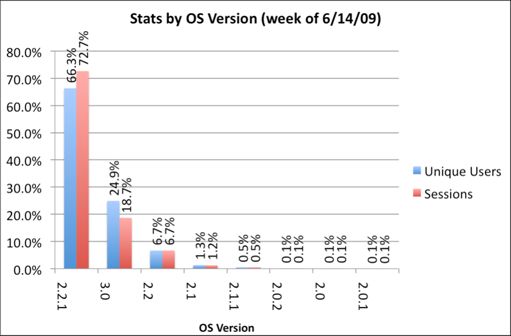
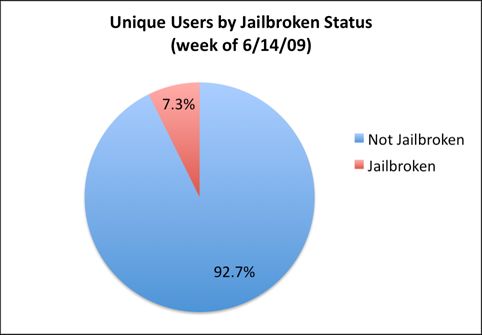
We just posted statistics from AdMob about firmwares on iPhones and iPods. Here are the numbers from another company – PinchMedia. This company deals with monitoring the use of applications.

The results below show that:

  • most users (66%) use firmware 2.2.1,
  • only 1 of 4 users installed the new 3.0 firmware,
  • 7.3% of iPhone and iPod Touch owners performed jailbreak.

pinchmedia-stats

pinchmedia-stats-jailbreak

5-Row Keyboard is a new add-on to iPhone that is part of the project iKeyEx. It allows users to use a new 5 lines keyboard, where there are numbers in addition to the letters. Clicking the 123 button will display all the additional symbols.

5row1 5row2 5row3

To see the keyboard you must click on the globe. If the keyboard does not appear, you must activate it via the Settings > General > Keyboards > International Keyboards > 5 Row QWERTY.

This keyboard as avaliable in Cydia for jailbroken iPhones.