приложения | Jailbreak iPhone, iPod Touch, iPad - Part 5 Skip to content

Jailbreak iPhone, iPod Touch, iPad

новости про джейлбрейк iPhone, iPod Touch и iPad

Archive

Tag: приложения

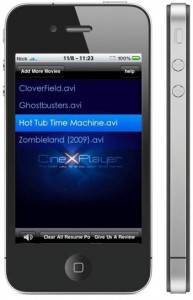
VerizoniPhone4Can not wait for the official release? Do you want to get CineXPlayer for iPad on your iPhone and iPod touch right now? For those of you who do not know, CineXPlayer is an iPad application that allows you to download Xvid AVI files using iTunes, so you can easily reproduce the format that Apple won’t. Because the developer has not invented version of the application for the iPhone, the hacker decided to do everything by himself.

It is a complete step by step tutorial on how to install it on your iPhone or iPod touch available here. You just need to jailbreak these devices, because the process involves SSH (SSH program for secure file sharing on the network) to access the iPhone, but it’s worth it if you want to get it right now!

PhotoshopExpressforiPadToday Adobe has announced a new Photoshop application for the devices based on iOS while giving a new image to its previous limited functional application Photoshop.com Mobile for the Apple iPhone. Now it has got a new name Adobe Photoshop Express. Here you’ll find a great number of new features for the iPad sporting the larger screen space, support for the device and improved user interface (UI).
Does it have pros and cons?

Yes! There is no support for the Retina Display of the new iPhone 4. It is quite disappointing for many users.

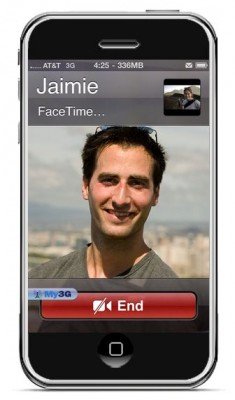
FaceTime feature gives users the possibility to make  voice calls. Apple restricted this feature to Wi-Fi only. Today it became possible to use it over 3G!

Setup Instructions:

  1. Jailbreak your iPhone 4 via www.jailbreakme.com.
  2. Download and upgrade to the latest Cydia package.
  3. Open Cydia, Go to Manage then Sources.
  4. Click Sources, Edit then add: http://apt.modmyi.com
  5. Search for “My3G” — download, and install it. It costs $2.79. My3G makes Apps believe that they are on WiFi instead of 3G.
  6. Go through the Rock setup process with a username and password. Open My3G and leave all settings on the default.
  7. FaceTime should now work over 3G! — Make sure to “Forget” the WiFi network you are on (via iOS settings) if you want to test it.

We haven’t seen any difference between the 3G FaceTime call and a WiFi FaceTime call. The quality is very good.

Here’s a video demo:


Read the rest of this entry »

MuscleNerd, hacker from DevTeam, commented via twitter on recent rumors that universal jailbreak (all iPhones and all firmwares, including iPhone 4 and iOS 4.0.1) will be released today. The basic answer is no, there will be no jailbreak today.

Not to make it a daily thing, but since somehow people thought it would be today: the new JB+unlock won’t be out today

(there are issues with important apps like Facetime that need to be figured out…no sense releasing a half-broken JB)

Apple recentrly released new version of iPhone OS 4. it is called iOS 4.0 GM. Here is an update from DevTeam about iOS 4 jailbreak:

For those who can legitimately activate to the iPhone3G 4.0GM seed, the “point to previous IPSW” redsn0w trick works and will jailbreak your 4.0GM. The “trick” is to point redsn0w at the 4.0beta4 IPSW instead of 4.0GM (do this after you’ve updated to 4.0GM and activated through the new iTunes 9.2 on your Mac). Since the carrier unlocks aren’t yet supported at 4.0, don’t do this if you use yellowsn0w/ultrasn0w/blacksn0w. Many JB apps are still pretty buggy in 4.0, so again this is mostly useful only for developers of those JB apps.

Note: If you’re experiencing MobileSafari crashes, double check that you’re running the version at the bottom of this page.

For those without legit iPhone3G 4.0GM seed access, please wait until the full public 4.0 release for updates to the jailbreak tools.

You can download redsn0w 0.9.5.b4 here.

Last week Apple has released its iPhone Os 4.0 beta 4 and redsn0w is finally updated to support this as well as beta 1. New version of jailbreak is 0.9.5.b4 and it can be applied on iPhone 3G only(!).

Redsn0w 0.9.5.b4 is targeted at developers who make jailbroken apps, and will not work if you are already using blacksn0w, ultrasn0w or yellowsn0w.

iPhone Dev-Team warns:

“You should stay clear of this beta software if you rely on a carrier unlock.”

To use the jailbreak, follow the guide below:

  1. Download redsn0w 0.9.5.b4 here. (Only Mac OS X version since app are developed on this OS).
  2. Make sure you have already activated your iPhone 3G with iTunes and your own developer ID.
  3. Launch the jailbreak.
  4. Select your stock iPhone1,2_4.0_8A274b_Restore.ipsw (beta4) or iPhone1,2_4.0_8A230m_Restore.ipsw (beta1) file that you used to update your firmware.
  5. Choose “Install Cydia” and then click “Next”. Use DFU mode to install the redsn0w.
  6. When your iPhone 3G comes back up, you will notice Cydia has a blank white icon. It also has no sources so you should go to the Sources panel and add this repo: http://apt.saurik.com/cydia-3.7 (make sure you are connected to the Internet before). When Cydia restarts, you should see its real logo now, and the standard sources should be ready to use.

spirit_jailbreak

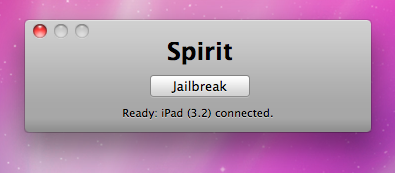
Finally the jailbreak for iPad, iPhone and iPod Touch from the Dev Team is available for download. It’s free and untethered and it’s called “Spirit”. The jailbreak supports every iDevice with firmware version 3.1.2, 3.1.3 or 3.2.


Read the rest of this entry »

sn0wbreeze

iH8sn0w has just released a new version of Sn0wbreeze, the Windows tool that allows you to jailbreak Firmware 3.1.3. This is a small update that fixes a problem that occurs only on 64bit operating system.

You can download the new sn0wbreeze 1.5.2 here.

We still recommend to use DevTeam utilities – RedSn0w (Windows and MAC OS) and PwnageTool (MAC OS only).

The iPhone OS is a great operating system and is also one of the safest. That’s why Apple rejected the anti-virus application developed by Kaspersky Lab. Such app will never make it to AppStore, just because users don’t need it.

Some users who run the jailbreak might catch a virus. However if they do everything right – there will be no troubles and no viruses.

This is good news for for those who use Cydia, an alternative to Apple’s AppStore for jailbreaked iPhones and iPod Touches. Saurik has uploaded a new version of APT that has an optimized cache generator and greatly improves Cydia performance:

“I also uploaded a new version of APT I’ve been working on: it has an optimized cache generator and more error tolerant repository parsing.”

When launching Cydia the next time you will find updates for some APT packages (up to 3 depending on what you have installed). Perform the install and enjoy the speed improvements!