приложения | Jailbreak iPhone, iPod Touch, iPad - Part 4 Skip to content

Jailbreak iPhone, iPod Touch, iPad

новости про джейлбрейк iPhone, iPod Touch и iPad

Archive

Tag: приложения

These are instructions on how to jailbreak your iPhone using PwnageTool 4.1 for Mac OS X. If you need unlock and you have not updated to iOS 4 you will be able to preserve baseband and unlock iPhone using ultrasn0w.

This guide will work for iPhone 4, iPhone 3GS, iPhone 3G, iPod Touch 3G, iPod Touch 4G, iPad and AppleTV. Just use the right firmware and select the right device (step four).

Step One
Make a folder called “Pwnage” on the desktop. Now you need to download there PwnageTool 4.1 from here and iOS 4.1 firmware from here.

When downloading the IPSW file, it is best to download it with Firefox since Safari often auto extracts it!

pwnagetool-41-1

Step Two
Double click to mount PwnageTool then drag the PwnageTool icon into the Pwnage folder.
Read the rest of this entry

The iPhone DevTeam has just released jailbreak utility PwnageTool 4.1 for Mac OS X.

PwnageTool allows you to restore to a custom IPSW file. The main advantage of PwnageTool is for unlockers. It gives the ability to keep current baseband and preserve ultrasn0w unlock. This is only for those, who have not updated to iOS 4.1 by themseleves.

You can also add whatever packages you want in the “Expert” mode of PwnageTool, if you wish to pre-install something from Cydia.

Here is a list of supported devices:

  • iPhone4
  • iPhone 3GS
  • iPhone 3G
  • iPad (firmware 3.2.2)
  • AppleTV 2G
  • iPod touch 4G
  • iPod touch 3G

You can download PwnageTool 4.1 here.

These are instructions on how to jailbreak your iPad with latest iOS 3.2.2 using Limera1n for Mac. You can find the Windows version of this tutorial here.

Step 1
Open your browaer and navigate to www.limera1n.com and download LimeRa1n for Mac by clicking on the Mac logo.


Read the rest of this entry »

These are instructions on how to jailbreak your iPhone 3GS (all bootroms) or iPhone 4 using Limera1n for Mac OS X. Limera1n supports iOS 4.0, iOS 4.0.1, iOS 4.0.2 and iOS 4.1. Use the same steps to jailbreak iPod Touch 4G and iPod Touch 3G and even iPad. You can find the Windows version of this tutorial here.

Remember: Do not update to iOS 4.1 if you need the unlock. Ultrasn0w does not support that baseband yet.

Step 1
Open your browaer and navigate to www.limera1n.com and download LimeRa1n for Mac by clicking on the Mac logo.


Read the rest of this entry »

These are instructions on how to jailbreak your iPad with latest iOS 3.2.2 using Limera1n for Windows. You can find the Mac OS version of this tutorial here.

Step 1
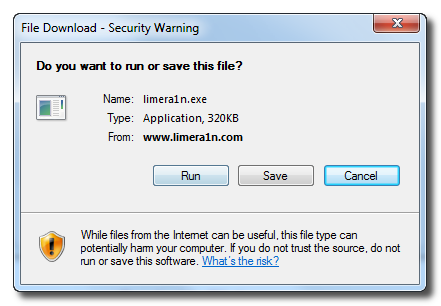
Open your browaer and navigate to www.limera1n.com and download LimeRa1n for Windows by clicking on the Windows.

When prompted save the download to your desktop


Read the rest of this entry »

These are instructions on how to jailbreak your iPhone 3GS (all bootroms) and iPhone 4 using Limera1n for Windows. Limera1n supports iOS 4.0, iOS 4.0.1, iOS 4.0.2 and iOS 4.1.

Remember: Do not update to iOS 4.1 if you need the unlock. Ultrasn0w does not support that baseband yet.

Step 1
Download LimeRa1n here. If you have problems downloading go directly to www.limera1n.com and use link at the bottom of the screen.

When prompted save the download to your desktop


Read the rest of this entry »

1

Developer Steven Troughton-Smith found out that iOS applications can installed on the new Apple TV. You only need to slightly modify the applications to identify them as Apple TV-compatible. Of course, Steven’s discovery is an important step in developers’ quest to run applications on the device, but the applications are not yet usable, as the Apple TV doesn’t have any application launcher that would be required for an app to function.


Read the rest of this entry »

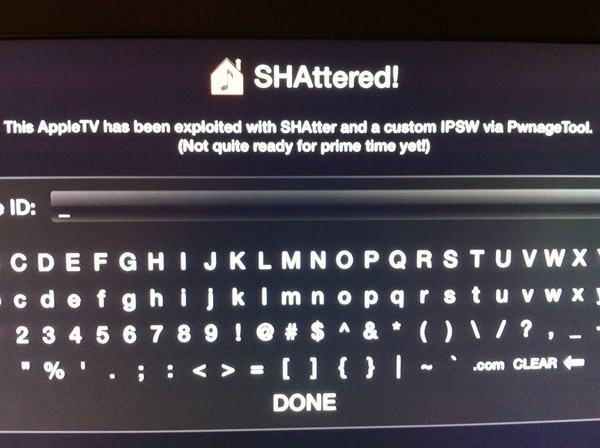
Today the new Apple TV has been jailbroken by hacker MuscleNerd from DevTeam. He used the SHAtter exploit. This means that hackers were able to gain full access to the device. Here is MuscleNerd’s comment on twitter:

AppleTV 2G SHAttered and jailbroken (not quite sure how to run apps yet!)

MuscleNerd and the rest of the Dev-Team will probably create a public release of some utility soon. Here is a youtube video showing off the jailbroken device:


Read the rest of this entry »

1

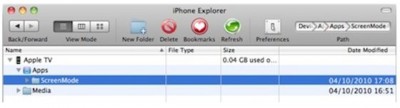
If you’re interested in theming your iPhone/iPod touch, but don’t want to jailbreak your device, there is now a solution. Using iPhone Explorer, you can now change an app’s icon to something you like better. Best of all, the software is free!


Read the rest of this entry »

ipad

Cydia, the jailbreak App Store, is without a doubt the symbol of jailbreaking.  Rock, a second App Store, has had some success of its own over its 18 months of existence. Well, times have changed. Saurik, Cydia’s creator, has now acquired Rock and will merge it into Cydia. As a result, all apps, licenses and so on will be moved from Rock to Cydia over the next couple of days. This will bring the total number of available jailbreak apps, themes and extensions to over 20,000. As for Rock, it will be shut down.


Read the rest of this entry »