A4 | Jailbreak iPhone, iPod Touch, iPad - Part 3 Skip to content

Jailbreak iPhone, iPod Touch, iPad

новости про джейлбрейк iPhone, iPod Touch и iPad

Archive

Tag: A4

Famous hacker Geohot is back and today he released the latest iOS 4.1 jailbreak. It is called LimeRa1n and supports iPhone 3GS, iPod Touch 3G, iPad, iPhone 4, iPod Touch 4G with iOS firmwares 4.0-4.1 and beyond. It can also hacktivate your device, so there is no need in phone SIM-cards and other tricks.

This software is still in beta and was updated 3 times in last several hours. So use with caution.

There is Windows version only for now. Geohot plans to release LimeRa1n for Mac and Linux soon. You can Download it here.

Some users report that they have jailbroken their iOS 3.2.2 iPads successfully with limera1n, while others report that they tried, but failed.

Do not forget to backup.

For many users of iPhone 3GS and iPhone 4 with iOS 4.0.2 now there is a hope to perform jailbreak using LimeRa1n and unlock using ultrasn0w. We recommend NOT to do it if you have not saved your SHSH keys. You can try, but if something goes wrong without SHSH keys you’ll have to restore to iOS 4.1, and there is no unlock for iOS 4.1 (possibly forever). Just wait for PwnageTool utility.

DevTeam reported that Limera1n uses a different exploit than SHAtter, so they will not release SHAtter utility, they don’t want let Apple fix both security holes. However they plan to release PwnageTool using the same exploit.


Read the rest of this entry »

4.0.2 3.2.2

Today Apple released patches for its iOS that address a security hole in Mobile Safari, which allowed users to jailbreak their iDevices. The PDF exploit they used also allowed hackers to gain remote control over the device with an iOS.

iOS 4.0.2 is available for:

Apple did NOT release the patch for the first generation iPhones.

iOS 3.2.2 is intended to use on the iPad and iPad 3G.

You can update your device via the links above or simply by connecting your device to iTunes and clicking Update. But note, if you want to continue using jailbreak you should not update your handset/tablet and don’t forget to backup your SHSH blobs.

Apple recentrly released new version of iPhone OS 4. it is called iOS 4.0 GM. Here is an update from DevTeam about iOS 4 jailbreak:

For those who can legitimately activate to the iPhone3G 4.0GM seed, the “point to previous IPSW” redsn0w trick works and will jailbreak your 4.0GM. The “trick” is to point redsn0w at the 4.0beta4 IPSW instead of 4.0GM (do this after you’ve updated to 4.0GM and activated through the new iTunes 9.2 on your Mac). Since the carrier unlocks aren’t yet supported at 4.0, don’t do this if you use yellowsn0w/ultrasn0w/blacksn0w. Many JB apps are still pretty buggy in 4.0, so again this is mostly useful only for developers of those JB apps.

Note: If you’re experiencing MobileSafari crashes, double check that you’re running the version at the bottom of this page.

For those without legit iPhone3G 4.0GM seed access, please wait until the full public 4.0 release for updates to the jailbreak tools.

You can download redsn0w 0.9.5.b4 here.

Last week Apple has released its iPhone Os 4.0 beta 4 and redsn0w is finally updated to support this as well as beta 1. New version of jailbreak is 0.9.5.b4 and it can be applied on iPhone 3G only(!).

Redsn0w 0.9.5.b4 is targeted at developers who make jailbroken apps, and will not work if you are already using blacksn0w, ultrasn0w or yellowsn0w.

iPhone Dev-Team warns:

“You should stay clear of this beta software if you rely on a carrier unlock.”

To use the jailbreak, follow the guide below:

  1. Download redsn0w 0.9.5.b4 here. (Only Mac OS X version since app are developed on this OS).
  2. Make sure you have already activated your iPhone 3G with iTunes and your own developer ID.
  3. Launch the jailbreak.
  4. Select your stock iPhone1,2_4.0_8A274b_Restore.ipsw (beta4) or iPhone1,2_4.0_8A230m_Restore.ipsw (beta1) file that you used to update your firmware.
  5. Choose “Install Cydia” and then click “Next”. Use DFU mode to install the redsn0w.
  6. When your iPhone 3G comes back up, you will notice Cydia has a blank white icon. It also has no sources so you should go to the Sources panel and add this repo: http://apt.saurik.com/cydia-3.7 (make sure you are connected to the Internet before). When Cydia restarts, you should see its real logo now, and the standard sources should be ready to use.

apple_worm

A second iPhone worm virus has been found by security company F-Secure. It is specifically targeting people in the Netherlands who are using their iPhones for internet banking with Dutch online bank ING.

It redirects the bank’s customers to a site with a log-in screen (phishing). The worm attacks “jailbroken” phones – a modification which enables the user to run non-Apple approved software on their handset. Only handsets with installed SSH (secure shell) are at risk. SSH is a file-transfer program that enables users to remotely connect to their phones. It comes with a default password, ‘alpine’ which should be changed.

Here is a tutorial how to change the default SSH password and minimize the risk.

iphone3gs-jailbreak

GeoHotz published the codes of the RAM Disk for the new iPhone 3GS.  It seems the Jailbreak of this device is possible.

Ramdisk Key
KEY: 44514633CE2AEAD62BCFA8836CDA4A3C KEY: 44514633CE2AEAD62BCFA8836CDA4A3C

and a little more…

7BDE483F8B1E9F19D22F9D8FDF753E02 7BDE483F8B1E9F19D22F9D8FDF753E02

isutra1

iSutra, this nice application. Thanks to jailbreaking and Cydia we can run and use. It updated to vesrion 1.1. Just in time for Valentines Day. Several bugs fixed. It is also translated into Russiand and Portugese. If you’re not familiar, watch the video here.

xgps

xGPS uses Google’s map data and driving directions, adding a real-time navigation readout and a voice engine. You can also select a map area to download ahead of time, just in case you expect to lose your data connection during the drive. There is also a night mode for those who hate bright white screen shining at night.

xGPS without vocalization in already available in Cydia for jailbreaked iPhones. The new version 1.2 will be ready in a week or so.

Sounds like one more reason to jailbreak. Watch the video, how this nice app works:

Run

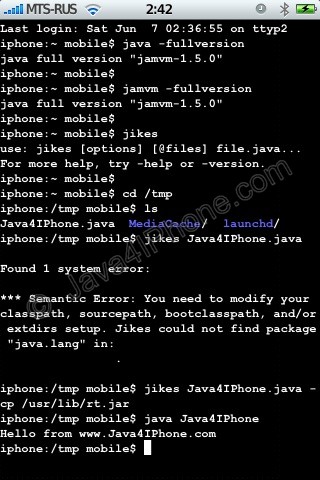
This is a tutorial, that shows step by step how to use installed Java on the IPhone. Just in case you do not have Java installed on your IPhone there is a tutorial how to do it.

What we need is a working jailbraked IPhone with Java Installed. I used latest firmware 1.1.4, unlocked, jailbreaked and customized by winpwn.

Step 1: Create simple Java application, compile and run.


Read the rest of this entry »