Application | Jailbreak iPhone, iPod Touch, iPad - Part 8 Skip to content

Jailbreak iPhone, iPod Touch, iPad

новости про джейлбрейк iPhone, iPod Touch и iPad

Archive

Tag: application

unlock

DevTeam released Ultrasn0w – application that will unlock your iPhone 3G with firmware 3.0. Here are the instructions:

  1. Ensure you have upgraded to iPhone OS 3.0
  2. Jailbreak your iPhone using redsn0w (this will also install Cydia)
  3. Run Cydia
  4. Please add the repo repo666.ultrasn0w.com to Cydia. That last “o” is actually the number zero “0”! If you use the letter “o” you’ll get an error.
  5. Search for ‘ultrasn0w’ in cydia or icy and install ultrasn0w
  6. Reboot your iPhone 3G
  7. T-Mobile USA users should disable 3G before using ultrasn0w
  8. Enjoy

Here is a demonstration of ultrasn0wsoftware jailbreak and unlock for new firmware 3.0.

sbsettings_icon1

SBSettings is a very useful and interesting application for jailbreaked iPhones. Th edeveloper is working hard on a new version of this app. It will be compartible with new firmware 3.0. Several features will be also added to the this new release.

AppStore and iTunes are great. But when we want other useful apps we jailbreak and run Cydia. Some use Installer, others prefer Icy. Here is a demonstration of new app to install 3-rd party apps called Kryptes:

pe

iSpazio reported a very strange AppStore applicatin called Photo Effects. There are clear references to Jailbreak due to the presence of 4 icons: “Installer” “launcher”, “Terminal” and “DockSwap”. Furthermore, the screenshot is quite old, was shot by the application “Dock” and portrays the 1.1.1 firmware. Open bets: How fast it will be eliminated from AppStore?

ants1

Once again we have the ability to have ants running on our iPhone. This little toy was available on firmware 1.1.x. Now the developer has update the code to support firmware 2.x. If you don’t remember ants take a look at the video below. This toy is easy to use. As you might remember you open the app and activate the ants. Then open your notes and watch the ants fill the screen. You can smash them or shake your iPhone to remove them. Ants is available in Cydia for jailbreaked iPhones.

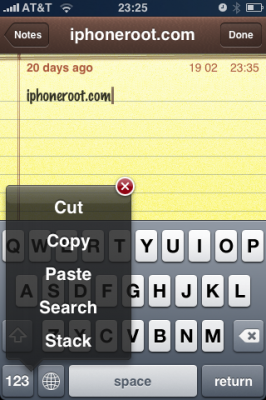
Clippy is an iPhone addition for copy/paste functionality. It was updated to version 0.98. There are significant improvements that make the application much more stable, and moreover it is important to note that starting from now, Clippit becomes a completely free.

Avaliable via Cydia and Icy for jailbreaked iPhones.

Changelog for 0.98: March 29, 2009:


Read the rest of this entry »

keyboard

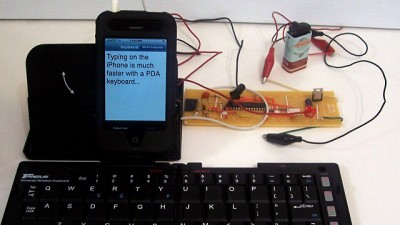
Perceptive Development developed a hardware and software solution that allows infrared keyboards to be used for typing on the iPhone, using less than $20 of electronics. They have managed to get an external keyboard working via a custom connection built for the headphone jack. Headphone jack in/out hardware is one of the few interfaces that’s open in the official SDK.

They have built a microcontroller that converts input from an external Targus IR keyboard into a format the iPhone’s headphone jack can understand, which is then fed to a terminal app that doesn’t require jailbreak. Nice!


Read the rest of this entry »

Clippy is an iPhone addition from Cydia for copy/paste functionality. It was updated to version 0.97-2. The main bug that was fixes is a crash of different applications such as Notes, Safari, Mail and others where the animation was drawn. New version also added a language pack, improved the animation of the menu, full support for selecting editable text in web views, themes support and a lot more.

Avaliable via Cydia for jailbreaked iPhones.

Full changelog for 0.97 updates:


Read the rest of this entry »

Clippy is an iPhone addition from Cydia for copy/paste functionality. It was updated to version 0.96-1. Many issues are resolved and a lot of bugs fixed. Among these are: the ability to copy text from Safari, the ability to copy text from messages or biteSMS and Fix for the Mail application, many different crashes, etc.

Instructions:

  • Press-and-hold on list items to invoke Clippy on static text
  • Press-and-hold on the keyboard’s “123” button to invoke Clippy on editable text
  • Tap-pause-and-drag to highlight portions of editable text (except in web pages)

Install from Cydia on a jailbreaked iPhone or iPod Touch.

Here are several photos that show how Clippy works:

img_0154 img_0155

img_0156 img_0157


Read the rest of this entry »