прошивка | Jailbreak iPhone, iPod Touch, iPad - Part 2 Skip to content

Jailbreak iPhone, iPod Touch, iPad

новости про джейлбрейк iPhone, iPod Touch и iPad

Archive

Tag: прошивка

ultrasn0w-0-8

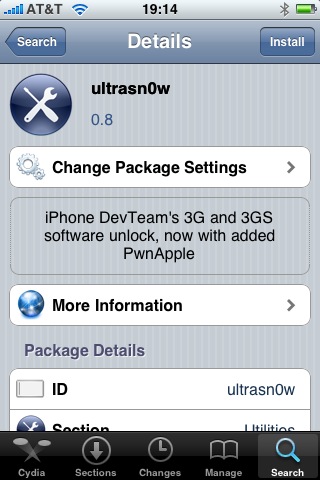
Great news for all iPhone 3GS users. DevTeam updated ultrasn0w, software that unlocks iPhone with firmware 3.0. Now it supports iPhone 3GS!

Avaliable in Cydia, repo: repo666.ultrasn0w.com

Here are quick instructions:

  1. Ensure you have firmware 3.0
  2. Jailbreak your iPhone using redsn0w (this will also install Cydia)
  3. Run Cydia
  4. Please add the repo repo666.ultrasn0w.com to Cydia. That last “o” is actually the number zero “0”! If you use the letter “o” you’ll get an error.
  5. Search for ‘ultrasn0w’ in cydia or icy and install ultrasn0w
  6. Reboot your iPhone 3G
  7. T-Mobile USA users should disable 3G before using ultrasn0w
  8. Enjoy
  9. If you have any problems reset your network settings (it helped many users): Settings->General->Reset->Reset Network Settings

iphone3gs-jailbreak-2 iphone3gs-jailbreak1

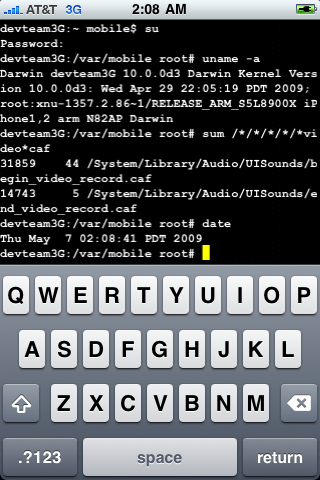
These are the first images of a Jailbroken iPhone 3GS. GeoHotz published them in his blog. DevTeam will publish an updated release of the tool only after the release of firmware 3.0.1. The reason is simple: Given that the Firmware 3.0 is full of bugs, it is clear that Apple will release an update soon. If the DevTeam release new tool, Apple will probably be able to block them with the next update. Tomorrow afternoon we will find more details on the official DevTeam blog. By the way firmware 3.0.1 is scheduled to be released in July.

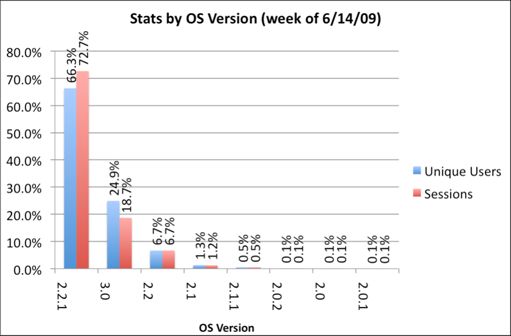
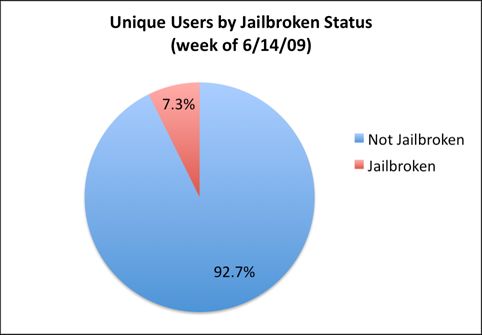
We just posted statistics from AdMob about firmwares on iPhones and iPods. Here are the numbers from another company – PinchMedia. This company deals with monitoring the use of applications.

The results below show that:

  • most users (66%) use firmware 2.2.1,
  • only 1 of 4 users installed the new 3.0 firmware,
  • 7.3% of iPhone and iPod Touch owners performed jailbreak.

pinchmedia-stats

pinchmedia-stats-jailbreak

redsn0w

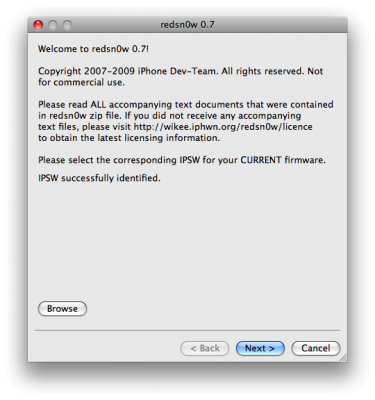
RedSn0w is an easy to use, multi-platform, multi-device jailbreaking and unlocking (iPhone 2G only) tool from DevTeam. It supports firmware 3.0 and iPhone 2G (original iPhone), the iPhone 3G (but not the 3GS) and also the iPod touch (first and second generation):

  • iPhone 2G – jailbreak and unlock
  • iPhone 3G – only jailbreak, use only with official unlocked iPhones (UPDATE: unlock is avaliable)
  • iPod Touch – jailbreak
  • iPod Touch 2G – jailbreak
  • iPod Touch 3GS – not supported (UPDATE: is supported by version 0.8)

Currently it is available for Windows and Mac OS X. The tool works just like QuickPwn. If you want to build custom firmware files with more flexibility it is suggested that you use PwnageTool on Mac OS X.

  1. GOLDEN RULE: If you are using a 3G iPhone with yellowsn0w and rely on yellowsn0w to obtain cellular service, then you should NOT use redsn0w right now. Ultrasn0w (the 3G carrier unlock) is not included with this release and therefore your baseband will be locked and unable to use an operator other than the official one it was bought for. UltraSn0w will be released via APT (cydia and icy) soon. If you have an original iPhone (1st generation) then 3.0 carrier unlock works with this redsn0w release.
  2. Yellowsn0w in its current form will NOT work with the baseband version that is present in the 3.0 update, you will need Ultrasn0w, which will be released sometime soon (update: released), Ultrasn0w will work with all iPhone 3G models (but not 3GS), even ones that were previously unlockable, Ultrasn0w will be released via APT (this means you will be able to get it via Cydia or Icy).
  3. Please read all parts of this post before downloading and using these tools.
  4. Read items 1, 2 and 3 again and again.
  5. At the bottom of this post are the bittorrent files for the latest version of redsn0w.
  6. This app is suitable for the recent 3.0 release
  7. redsn0w will NOT work for the iPhone 3GS.
  8. redsn0w WILL work for Original iPhone (1st Generation), Original iPod touch, iPod touch 2G and the iPhone 3G (not the iPhone 3GS).

To use redsn0w simply upgrade the device in iTunes to firmware version 3.0 and run redsn0w to activate and jailbreak the device (and if you are using an original iPhone 2G, it will unlock it too!)

You can donwload RedSn0w 0.7 here.

ants1

Once again we have the ability to have ants running on our iPhone. This little toy was available on firmware 1.1.x. Now the developer has update the code to support firmware 2.x. If you don’t remember ants take a look at the video below. This toy is easy to use. As you might remember you open the app and activate the ants. Then open your notes and watch the ants fill the screen. You can smash them or shake your iPhone to remove them. Ants is available in Cydia for jailbreaked iPhones.

The iPhone DevTeam confirms that jailbreak on OS 3.0 is working. Nothing can be done about it since in order for apple to stop jailbreak they have to remplace the hardware. As soon as OS 3.0 will be released we can expect to have jailbreak app available.

30b5

Dev Team finally made it. They created software called yellowsn0w, that unlocked iPhone 3G. Now you can use any carrier you want. I successfully unlocked my US version.It works much more stable than sim proxy method.

Please, back up everything on your iPhone before you start, just in case. Everything you do is your responsibility. I had to go through all 4 steps to make my iPhone 3G work. I used only my new sim without sim proxy.

Here are the steps:


Read the rest of this entry »

DevTeam says that 2.2 update SHOULD NOT be applied using iTunes if you want the chance of a soft-unlock in the near future. Use new version of PwnageTool (not avaliable yet, but will be soon).

Some fact:

  • The 2.2 firmware for 3G contains a baseband update for the 3G iPhone
  • The 2.2 firmware for 2G (1st gen iPhones) doesn’t contain a baseband update and the baseband is still at 04.05.04
  • Pwnage technique (and therefore the Jailbreak) isn’t affected, but PwnageTool and QuickPwn do not support this release as yet, so DO NOT install 2.2 using iTunes as you will lose your jailbreak


Read the rest of this entry »

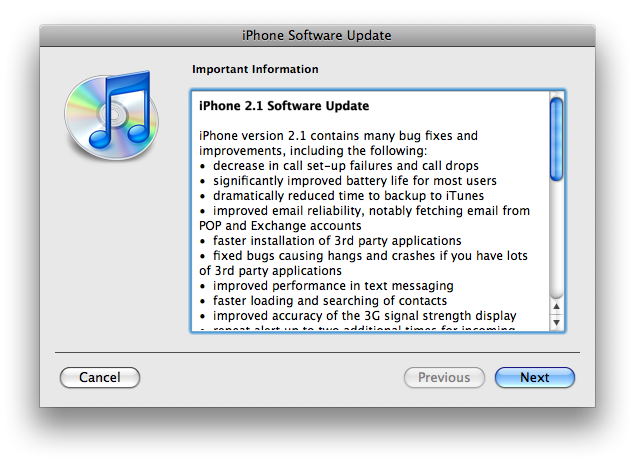
The iPhone 2.1 is out. It contains the following updates as listed by Apple:

– decrease in call set-up failures andcall drops
– significantly improve battery life for most users
– dramatically reduced time to backup to iTunes
– improve email reliability, notable fetching email from POP and Exchange accounts
– faster installation of 3rd party applications
– fixed bugs causing hangs and crashes if you have lots of 3rd party applications
– improved performance of text messaging
– faster loading and searching of contacts
– improved accuracy of the 3G signal strength display
– repeat alert up to two additional times for incoming text messages
– option to wipe data after ten failed passcode attempts
– Genius playlist creation

The 2.1 firmware is build 5F136 (weighing in at 237.8MB) and can be directly downloaded through iTunes. The new firmware also contains a number of security fixes including the well publicized passcode flaw.

Jailbreak for 2.1 is not avaliable yet.

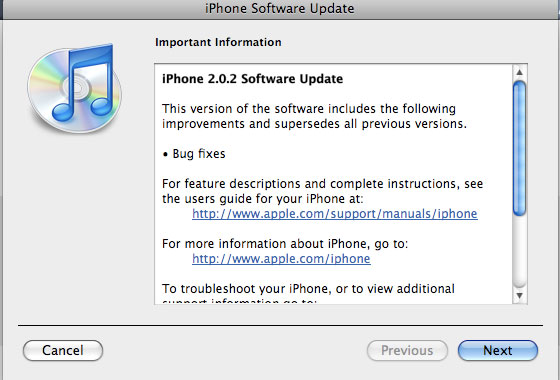
Apple just released new firmware for iPhone – version 2.0.2. As usual, all the company mentioned was that the update includes “Bug fixes.”

Notes on the release follow:

  • No new settings appear to have been included.
  • Some users report faster browsing, though this may be due to cleared cache.
  • Typing lag may be reduced.
  • No consensus on improved 3G connectivity.
  • iPod Touch firmware 2.0.2 also released.

But as always, do not update until we get word on a jailbreak.

Links for firmware downloads: iPhone 3G 2.0.2old iPhone 2.0.2.