Linux | Jailbreak iPhone, iPod Touch, iPad - Part 2 Skip to content

Jailbreak iPhone, iPod Touch, iPad

новости про джейлбрейк iPhone, iPod Touch и iPad

Archive

Tag: Linux

greenpois0n

Greenpois0n for Windows and Linux was released a few days ago. Today Chronic Dev Team created a Mac OS version.

Greenpois0n does jailbreak of firmware iOS 4.1 on the following devices:

iPhone 4
– iPhone 3G S
iPod touch 4G
iPod touch 3G
– iPad (iOS 3.2.2)

Greenpois0n uses that same exploit as limera1n.

You can download GreenPois0n from here.

Today the Chronic Dev-Team released their jailbreak utility called Greenpois0n. There are currently two versions – for Windows and for Linux users. The team is working on a Mac version, so it will be released soon. Greenpois0n supports only firmware iOS 4.1, so use Limera1n if you want to jailbreak iOS 4.0, iOS 4.0.1 or iOS 4.0.2.

Remember: Do not update to iOS 4.1 if you need the unlock. Ultrasn0w does not support that baseband yet.

Hackers used the bootrom exploit found by Geohot and used in limera1n.


Read the rest of this entry »

Famous hacker Geohot is back and today he released the latest iOS 4.1 jailbreak. It is called LimeRa1n and supports iPhone 3GS, iPod Touch 3G, iPad, iPhone 4, iPod Touch 4G with iOS firmwares 4.0-4.1 and beyond. It can also hacktivate your device, so there is no need in phone SIM-cards and other tricks.

This software is still in beta and was updated 3 times in last several hours. So use with caution.

There is Windows version only for now. Geohot plans to release LimeRa1n for Mac and Linux soon. You can Download it here.

Some users report that they have jailbroken their iOS 3.2.2 iPads successfully with limera1n, while others report that they tried, but failed.

Do not forget to backup.

For many users of iPhone 3GS and iPhone 4 with iOS 4.0.2 now there is a hope to perform jailbreak using LimeRa1n and unlock using ultrasn0w. We recommend NOT to do it if you have not saved your SHSH keys. You can try, but if something goes wrong without SHSH keys you’ll have to restore to iOS 4.1, and there is no unlock for iOS 4.1 (possibly forever). Just wait for PwnageTool utility.

DevTeam reported that Limera1n uses a different exploit than SHAtter, so they will not release SHAtter utility, they don’t want let Apple fix both security holes. However they plan to release PwnageTool using the same exploit.


Read the rest of this entry »

redsn0w-092

Redsn0w is a cross-platform jailbreaking tool for iPhone and iPod Touch. New version redsn0w 0.9.2 supports the latest firmware 3.1.2.

redsn0w 0.9.2 supports:

  • All iPhones and iPod touches
  • Windows and Mac OSX (x86)
  • Apple firmwares 3.0 and 3.1.2

We expect to see Linux version quite soon.

If you need a carrier unlock, redsn0w will handle iPhone 2G by itself (by installing the BootNeuter utility). For the iPhone 3G and iPhone 3GS use Cydia after you’re jailbroken to install ultrasn0w (baseband 04.26) or blacksn0w (baseband 05.11).

If you have a late-model iPhone 3GS, or if you have an iPod touch 2G whose serial number begins with “MC” (newer than week 40 of last year), or any iPod touch 3G, you can use redsn0w to jailbreak but you are currently restricted to “tethered” rebooting. That means you need to connect your device to a computer each time you boot it – so just try no to reboot.

You can download the latest version of redsn0w here.

redsn0w-09b3

Redsn0w is a cross-platform jailbreaking, unlocking, and customizing tool for iPhone and iPod Touch. New version redsn0w 0.9b3 supports the latest firmware 3.1.2. The most recent release before this one was redsn0w 0.8, which targeted Apple firmware 3.0/3.0.1.

redsn0w 0.9 beta3 supports:

  • All iPhones and iPod touches except the iPod touch 3G
  • Windows and Mac OSX (x86)
  • Apple firmwares 3.0-3.1.2

When it’s out of beta, it will support the iPod touch 3G, PPC OSX, and Linux.

If you need a carrier unlock, redsn0w will handle iPhone 2G by itself (by installing the BootNeuter utility). For the iPhone 3G and iPhone 3GS use Cydia after you’re jailbroken to install ultrasn0w (baseband 04.26) or blacksn0w (baseband 05.11).

If you have a late-model iPhone 3GS, or if you have an iPod touch 2G whose serial number begins with “MC” (newer than week 40 of last year), you can use redsn0w to jailbreak but you are currently restricted to “tethered” rebooting. That means you need to connect your device to a computer each time you boot it – so just try no to reboot.

You can download redsn0w 0.9b3 here.

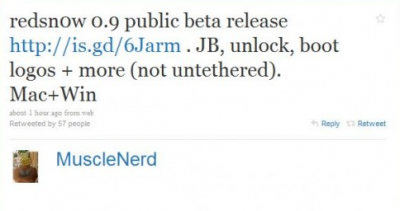
MuscleNerd, the member of DevTeam, started working on a new version of redsn0w. The update will add support of the latest firmware 3.1.2:

redsn0w-09

Redsn0w is an easy to use, multi-platform, multi-device jailbreaking tool for the iPhone 2G, iPhone 3G, iPhone 3GS (old iBoot) and iPod touch (first and second generation). It is available for Linux, Mac OS X and Windows. You can download redsn0w utility here.

redsn0w-0-8

Redsn0w, jailbreak tool from DevTeam, is updated to version 0.8. This is for firmware 3.0 and now it supports:

You should use it instead of purplera1n tool to jailbreak and activate iPhones and iPods.

Download here.

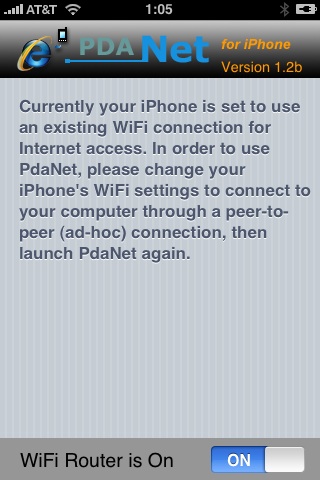
Many iPhone 3G users would like to use internet on a desktop or notebook through their phone. There were several solutions: iPhoneModem, NetShare, 3Proxy.. they all used SSH and SOCKS proxy. One of the working ones was described here get internet on a desktop or notebook through IPhone 3G.

Couple days ago PdaNet (fullname is PdaNet WiFi Router) was ported to iPhone. Now our life is much much easier.


Read the rest of this entry »

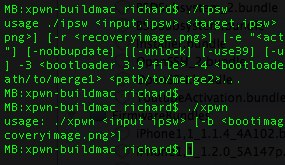
The development sources for xpwn 0.3, the firmware 2.0 version of our cross-platform jailbreaking library/command-line utility have been pushed onto github. DevTeam tested it on Linux, Windows XP, and Windows Vista for both the iPhone 2G and iPhone 3G thus far, but since it uses the same FirmwareBundles files as PwnageTool, and we know those work for the iPod touch, there ought not be any problems.

Being a suite of command-line utilities, this release is meant primarily for developers. While you can certainly jailbreak (both 3G and first-gen) and unlock (first-gen) with it, it’s not really something you want to try without reading the lengthy, detailed README. If you don’t have the patience to do that, this release is not for you.

For users this news mean that quite soon there will be a new version of winpwn, supporting 2.0.

  • Page 2 of 2
  • <
  • 1
  • 2