This week Gareth Wright that Facebook’s app for iOS has a security vulnerability through which malicious users can access login credentials saved in a .plist file of the app. With a copy of that .plist file malicious users could automatically log into the affected user’s Facebook account on another device. Reportedly, the vulnerability also exists on Android devices.
Archive
Tag: ebook Facebook for iPhone 3.2 was released last night and now it supports the newly created function “Places”, background downloading of photos and videos in iOS 4, together with other visual enhancements, such as “pull-to-refresh” for the iPhone. However, for many users, this new version was mostly broken, with the following error “Unable to load the page” on most of its pages. Yes, and if you try to uninstall and reinstall the application, it simply refuses to “Log in”.
As it turned out, this problem occurs on jailbroken iPhones for those users who have installed the application BiteSMS from Cydia. The new Facebook application for iPhone 3.2 is not compatible with the current version of BiteSMS. So if you have installed this application, removing it from Cydia, you’ll solve this problem, at least it really helped some of the users.
We hope that the new version of BiteSMS will be released pretty soon and will be compatible with this new version of Facebook for iPhone.
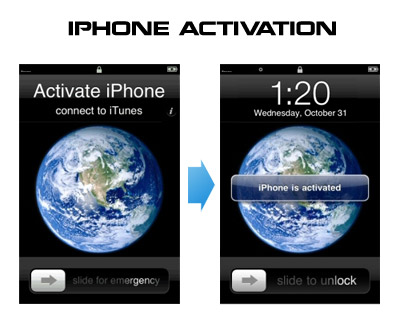
Having problems activating your iPhone? Don’t have original SIM-card? Cannot get passed emergency unlock screen? We have a solution:
If you have iPhone 3G, just use redsn0w to jailbreak and hactivate. If you have iPhone 3GS or follow these instructions:
If you are already Jailbroken:
So you have an iPhone with iOS 4.0, but don’t have the original SIM and stuck on the Emergency Call Screen:
- Download ifunbox software ()
- Run ifunbox software and sync with phone
- Go to /private/var/root/Library/, delete original lockdown folder and put this folder after you extract it from the zip file
- Restart phone
If you are not jailbroken
, utility that extends traditional Copy / Paste functionality, is updated to version 1.0.1.
Here is an official changelog:
- No longer allow copying secure text fields
- Add option to disable extended menu support
- Support for launching Birdfeed via the Tweet action
- Remember language in Translate service
- Allow carriage returns in Lookup (for supported services)
- Option to sort Favorites alphabetically
- Translations now work (Italian, German, Japanese, French)
- Additional Support for more apps
- Fix for Facebook crash
- Fix for copying song or album name in iPod app
- Fix biteSMS-button related crashes
- Fix crash when Lookup action is used inside SpringBoard
- Fix Copy All breaking copy in the Photos app
- Fix crash in iTunes password dialog
- Fix for freeze in Fast Notes
- Fix annoying popup on Wifi network/ringtone cells in Preferences
- Revert 1Password to value-only copying
- Prevent Safari freeze when invoking inside a window.prompt (temporary fix)
Action Menu can be installed or updated via Cydia on a jailbreaked iPhone (iPod Touch).

updated to version 1.33. This tool allows you to . Here is a changelog:
This application is avaliable via Cydia Installer for jailbreaked iPhones.
Many iPhone 3G users would like to use internet on a desktop or notebook through their phone. There were several solutions: iPhoneModem, NetShare, 3Proxy.. they all used SSH and SOCKS proxy. One of the working ones was described here .
Couple days ago PdaNet (fullname is PdaNet WiFi Router) was ported to iPhone. Now our life is much much easier.
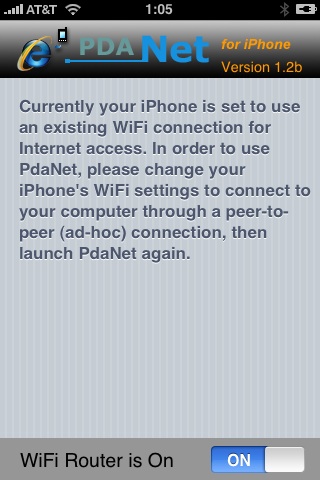

Thanks to and the porting work of as well as the authors of , it is now possible to “tether” your iPhone 3G and use its Internet connection on your laptop.
Warning – Tethering your iPhone is against the iPhone data plan terms. AT&T could slap you with huge fees if you overuse this. I recommend only using it during emergencies.
Here is a basic plan (by the way, this should work for old IPhone also):
- Jailbreak your iPhone 3G
- Install 3Proxy and Terminal
- Create an ad-hoc Wi-fi network using your laptop
- Join the network with your iPhone
- Find the iPhone’s IP address
- Open Terminal and run the proxy program
- Open Safari on your iPhone and open a web page
- Configure your browser to use the proxy
Later we’ll discuss it with more details.
Step 1: Jailbreak your iPhone
Our comments:
5. No voice dialing
There is do such feature. But.. There is an application called . For old jailbreaked IPhones it is possible to install via Installer. For the new IPhone 3G VoiceDial is avaliable through AppStore. By the way it is not free, cost is about $30.
4. No cut and paste
Indeed, not in IPhone or IPhone 3G for now. But, read .
3. Can’t use as a modem
That is a problem. No such feature. And there will be no such feature in the future.
UODATE:
2. No multimedia messaging
There is an application called – works well. Costs $8, works well on old IPhones.
1. Locked up
Not only this. It is not possible to buy IPhone 3G without a contract. We’ll wait for an unlock and sells without a contract.