
Discover is an application that allows you to transfer files and documents from one iPhone to another, or to a computer. It uses WiFi connection on both devices. Might be quite useful.
Avaliable via Cydia for jailbreaked iPhones.


Discover is an application that allows you to transfer files and documents from one iPhone to another, or to a computer. It uses WiFi connection on both devices. Might be quite useful.
Avaliable via Cydia for jailbreaked iPhones.

SouthPark app was rejected by Apple. The developers found the solution. Now it is avaliable via Cydia for jailbreaked iPhones. It is called SouthPark Mobile.
5-Row Keyboard is a new add-on to iPhone that is part of the project iKeyEx. It allows users to use a new 5 lines keyboard, where there are numbers in addition to the letters. Clicking the 123 button will display all the additional symbols.
To see the keyboard you must click on the globe. If the keyboard does not appear, you must activate it via the Settings > General > Keyboards > International Keyboards > 5 Row QWERTY.
This keyboard as avaliable in Cydia for jailbroken iPhones.

xGPS uses Google’s map data and driving directions, adding a real-time navigation readout and a voice engine. You can also select a map area to download ahead of time, just in case you expect to lose your data connection during the drive. There is also a night mode for those who hate bright white screen shining at night.
xGPS without vocalization in already available in Cydia for jailbreaked iPhones. The new version 1.2 will be ready in a week or so.
Sounds like one more reason to jailbreak. Watch the video, how this nice app works:
Apple rejected iPhone application called iSutra. So it is avaliable via Cydia for jailbreaked iPhones for FREE.


ReflectiveDock is updated to version 1.4 ReflectiveDock is an extention to Winterboard, that makes dock look reflective:
Avaliable via Cydia (ModMyi repository) for iPhones.

Yes, DevTeam released new version of their software. First of all, please, do NOT use unofficial software from unknows sites (f.e. quickpwm.com). We recommend to download from torrent or official mirors.
We regulary publish latets and links. Use them or the same ones from DevTeam .
So:
DevTeam updated to version 0.9.7 to work with modified (!!!) firmware 2.2.1, in which you preserve old baseband from firmware 2.2.
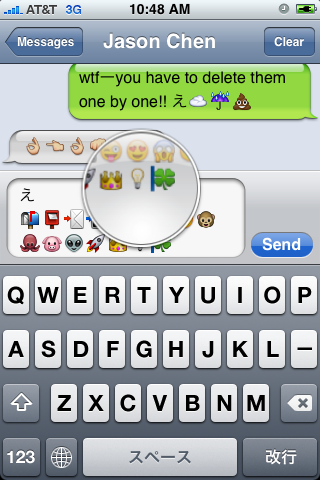
First of all these icons can be viewed on any iPhone with 2.2 firmware. But to be able to send these icons users need to perform additional actions. There are 4 ways to turn them on and 2 of them are free:
Solution N1 for $5.99:
In AppStore buy and install . Goto Settings -> Touch Dial -> Enable Smiley icon ON. Launch Touch Dial. Go to Settings -> General -> Keyboard -> International Keyboards -> Japanese and enable “Emoji.”
Solution N2 for $0.99:
In AppStore buy and install . Play with the app for a minute to activate, click on a story, etc. Go to Settings -> General -> Keyboard -> International Keyboards -> Japanese and enable “Emoji.”
Solution N3 for Free:
Jailbreak your iPhone. Run Cydia and install Emoji application (iSpazio repository). Go to Settings -> General -> Keyboard -> International Keyboards -> Japanese and enable “Emoji.”
This application adds boolean ‘true’ key KeyboardEmojiEverywhere edits in /User/Library/Preferences/com.apple.Preferences.plist. You can do it manually if you want.
Solution N3 for Free:
Step 1. Download the vcard.vcf .
Step 2. Import it to your address book program. If you are using Windows, you may want to do it on iPhone directly. Send the vcard.vcf file to yourself. Open in on iPhone’s Email.app, click the vcf file and import all the contacts.
Step 3. Go into “Settings” > “General” > “Keyboard” > “Japanese Keyboard”. Enable the QWERTY keyboard.
Step 4. In notes or any other program you want. Type “emojia”, “emojii” or “emojiu” to select those 🙂 icons.
I like Solution N3. It is free and simple. You do not need to play with contacts and etc. But you need to jailbreak an iPhone.
This is one more solution to add copy/paste functionality to iPhone. Couple days ago we wrote about . This one is called . Avaliable via Cydia (bigboss repository) for jailbreaked iPhones.
Here is a quick tutorial how to use it:
After installing just enable it in Settings → General → Keyboard → International.

Copy:
When the keyboard appears, switch to ℏClipboard by clicking the International button (the Globe) repeatedly. Then hit the Copy button. The entire content of the text field should now appear in the top of the clipboard.
To select portion of a text: