Plist | Jailbreak iPhone, iPod Touch, iPad Skip to content

Jailbreak iPhone, iPod Touch, iPad

новости про джейлбрейк iPhone, iPod Touch и iPad

Archive

Tag: plist

The team behind the Pangu untethered jailbreak of iOS 7.1-7.1.2 has released a Pangu8 untethered jailbreak for iOS 8 – 8.1.

Currently a jailbreak utility is only available for Windows and at this time Cydia and Mobile Substrate are not working.

Here’s the translated details via reddit user zsm1703:

Read the rest of this entry »

The Evad3rs have released fixes for the those experiencing problems with the Weather app or long reboots after performing the Evasi0n jailbreak.

The fixes can be applied easily by updating the evasi0n 6.x untether and uikittools packages in Cydia, reports planetbeing:

Fixes for the long reboot issue and Weather app issue are now available on Cydia with an update to the untether and uikittools.

Update:

Read the rest of this entry »

redsn0w-0912b1 redsn0w-0912b1-extras

The iPhone Dev-Team has released updates to RedSn0w and PwnageTool that bring support for the iOS 5.1.1 untethered jailbreak.

RedSn0w 0.9.12b1 supports untethered iOS 5.1.1 jailbreak for all devices:

  • iPhone 3GS
  • iPhone 4
  • iPhone 4S
  • iPad 1
  • iPad 2
  • new iPad 3
  • iPod Touch 3G
  • iPod Touch 4G

PwnageTool 5.1.1 allows to create custom firmware and preserve modem version for unlock with ultrasn0w or Gevey. PwnageTool 5.1.1 supports all A4 devices:

  • iPhone 3GS
  • iPhone 4
  • iPad 1
  • iPod Touch 3G
  • iPod Touch 4G
  • Apple TV 2G

You can download RedSn0w 0.9.12b1 here and PwnageTool 5.1.1 here.

iOS 5.1.1 untethered jailbreak tutorial using Redsn0w is available here.

Official DevTeam comments:


Read the rest of this entry »

iphonefb

This week Gareth Wright reported that Facebook’s app for iOS has a security vulnerability through which malicious users can access login credentials saved in a .plist file of the app. With a copy of that .plist file malicious users could automatically log into the affected user’s Facebook account on another device. Reportedly, the vulnerability also exists on Android devices.


Read the rest of this entry »

redsn0w-099b1 redsn0w-099b1-extra

MuscleNerd has announced via Twitter that jailbreak utility RedSn0w 0.9.9b1 is released with major update and numerous new features:

Major improvements and features added to redsn0w 0.9.9b1! See update #9 at http://is.gd/6eek4Y Feedback: @redsn0w_testers

Indeed the list of new features is quite high. There are two main ones:

  • There is no need to download firmware any more. There is no need to push Browse IPWS button any more (but you still can).
  • Developers added lots of functionality to work with SHSH keys (extract, submit, download, verify, stitch etc)

However this new version does not bring features like untethered jailbreak for iOS 4.3.5 or iOS 5.

Due to some possible bugs we still recommend to use the old RedSn0w 0.9.8b7b, but the new 0.9.9b1 is worth seeing and playing with.

Here are links to our RedSn0w 0.9.8b7b iOS 4.3.5 jailbreak tutorials:

You can download RedSn0w 0.9.9b1 here:

Here is the full list of features from DevTeam:


Read the rest of this entry »

Mike Pan has successfully modified his iPhone 3GS and now it can record HD video at 1080x800px with 30 frames per second and up to 20Mbps! The original ability of this handset is 640x480px at 3 Mbps. Mike used the non-standard resolution so the video could be kept at the right aspect ratio.

So here is a short instruction how to enable HD-video recording on your iPhone 3GS with firmware 4.1 (as other firmwares haven’t been tested yet):


Read the rest of this entry »

HDR-iPhone-3-3GS

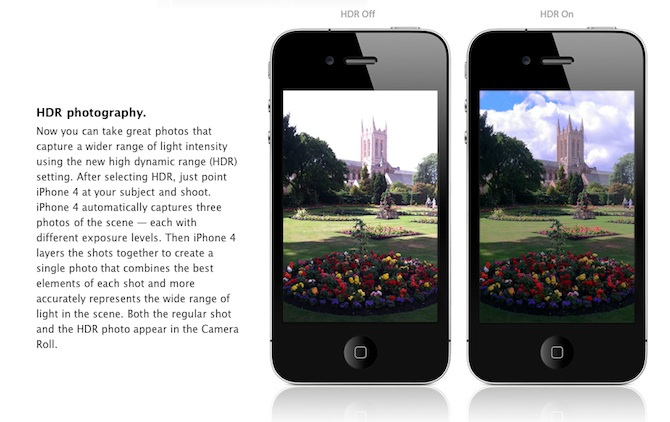
Are you looking forward to add a very popular HDR feature to your old iPhone? Do not worry! If you have a jailbroken (or ready to jailbreak) iPhone 3GS or 3G that runs on iOS 4.1, you can enable HDR photos. Here is a quick tutorial:


Read the rest of this entry »

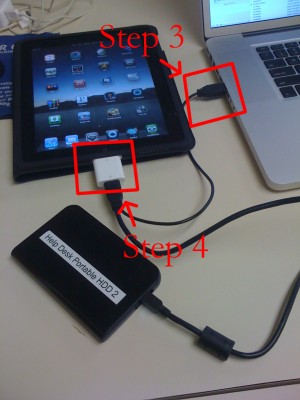
iPad USB Camera Connection Kit is much more useful as it seems. Max Sha, an experienced user, was able to access external hard drive with this kit. All you need is a jailbroken iPad, an external drive, a split-USB cable to give the drive some power and a terminal of some sort (f.e. MacBook) to mount the external storage. While it is a little unwieldy, it shows that Terabytes of external storage for iPad is possible.

Here is a complete step-by-step guide from Max Sha:


Read the rest of this entry »

iPhoneFolders

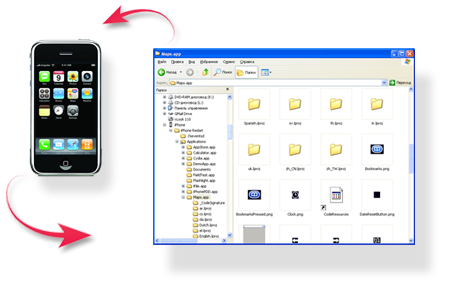
iPhone Folders is a Windows Explorer extension that allows you to browse contents of your iPhone or iPod Touch like a regular removable drive. After installation you’ll find it in My Computer folder.

Using this extension you can browse your phone filesystem, copy files to and from it, open files directly from iPhone, create shortcuts to folders on iPhone. In thumbnail mode program will display previews of png and jpg files on phone, application icons for installed applications (.app folders).

Compatible with x86 editions of Windows XP, Vista, 7 and x64 editions of Windows XP and Vista. Requires iTunes 8 or 9 for normal operation. Supports jailbroken and non-jailbroken phones (in the later case filesystem access is limited to Media folder).

You can download iPhone Folders version 1.0.31 here.
Read the rest of this entry »

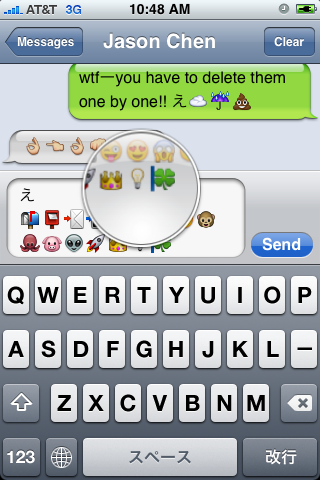
First of all these icons can be viewed on any iPhone with 2.2 firmware. But to be able to send these icons users need to perform additional actions. There are 4 ways to turn them on and 2 of them are free:

Solution N1 for $5.99:

In AppStore buy and install Touch Dial Emoji. Goto Settings -> Touch Dial -> Enable Smiley icon ON. Launch Touch Dial. Go to Settings -> General -> Keyboard -> International Keyboards -> Japanese and enable “Emoji.”

Solution N2 for $0.99:

In AppStore buy and install FrostyPlace. Play with the app for a minute to activate, click on a story, etc. Go to Settings -> General -> Keyboard -> International Keyboards -> Japanese and enable “Emoji.”

Solution N3 for Free:

Jailbreak your iPhone. Run Cydia and install Emoji application (iSpazio repository). Go to Settings -> General -> Keyboard -> International Keyboards -> Japanese and enable “Emoji.”

This application adds boolean ‘true’ key KeyboardEmojiEverywhere edits in /User/Library/Preferences/com.apple.Preferences.plist. You can do it manually if you want.

Solution N3 for Free:

Step 1. Download the vcard.vcf here.
Step 2. Import it to your address book program. If you are using Windows, you may want to do it on iPhone directly. Send the vcard.vcf file to yourself. Open in on iPhone’s Email.app, click the vcf file and import all the contacts.
Step 3. Go into “Settings” > “General” > “Keyboard” > “Japanese Keyboard”. Enable the QWERTY keyboard.
Step 4. In notes or any other program you want. Type “emojia”, “emojii” or “emojiu” to select those 🙂 icons.

I like Solution N3. It is free and simple. You do not need to play with contacts and etc. But you need to jailbreak an iPhone.