Unlock | Jailbreak iPhone, iPod Touch, iPad - Part 9 Skip to content

Jailbreak iPhone, iPod Touch, iPad

новости про джейлбрейк iPhone, iPod Touch и iPad

Archive

Tag: Unlock

pwnagetool413-3gs-3

These are instructions on how to jailbreak and unlock your iPhone 3GS on iOS 4.1 using PwnageTool 4.1.3 for Mac OS X. This tutorial will explain how to upgrade your baseband if needed for an unlock.

For iPhone 3G use this tutorial.

There is no unthethered jailbreak for new iPhone 3GS bootroms and iOS 4.2.1 yet, so you should stay at iOS 4.1.

Important: iPhone3GS users with old bootroms who want to go to 4.2.1 and unlock should not use this PwnageTool! Update to stock 4.2.1 first, then use new redsn0w to update your baseband.

Step One
Make a folder called “Pwnage” on the desktop. Download a couple of things:

Read the rest >>>

These are instructions on how to jailbreak and unlock your iPhone 3G on iOS 4.2.1 using PwnageTool 4.1.3 for Mac OS X. This tutorial will explain how to upgrade your baseband if needed for an unlock.

Step One
Make a folder called “Pwnage” on the desktop. Download a couple of things:

You will also need the 4.2.1 iPhone firmware.

If you are on the 05.14 or 05.15 baseband you will also need the iPad 3.2.2 firmware. You can find out your baseband version in Settings -> General -> About -> Modem Firmware.

When downloading the IPSW file, it is best to download it with Firefox since Safari often auto extracts it!
pwnagetool-413-1

Step Two
Double click to mount PwnageTool then drag the PwnageTool icon into the Pwnage folder.

Read More>>>

ultrasn0w-421-release

This is the tweet from MuscleNerd posted a minute ago. So it is just minutes to wait for new unlock utility ultrasn0w.

UPDATE: New ultrasn0w released! New PwnageTool released. Read carefully this post from DevTeam first, then reread again!

ultrasn0w-421-2

MuscleNerd has recently announced via tweeter that ultrasn0w unlock for iPhone is now fully working on iOS 4.2.1

Finally got ultrasn0w working fully on 4.2.1. Apple inadvertently(!) broke ultrasn0w via aggressive compiler optimization

MuscleNerd previously announced that the ultrasn0w unlock should be available by Sunday for the iPhone 3G and iPhone 3GS. The unlock for the iPhone 4 will take much more time.

UPDATE: this is not a reason for update to iOS 4.2.1, wait for utilities.


Read the rest of this entry »

DevTeam hacker MuscleNerd tweeted that they after releasing redsn0w jailbreak for 4.2 the team can start working on iPhone unlock. Users can expect the unlock for the iPhone 3G and iPhone 3GS this week. The iPhone 4 unlock will take more time and no concrete info is available about that yet.

unlcok-421

The unlock will be released for iOS 4.1 firmware. So is you need unlock, do not update to iOS 4.2.1.

Redsn0w-096B4

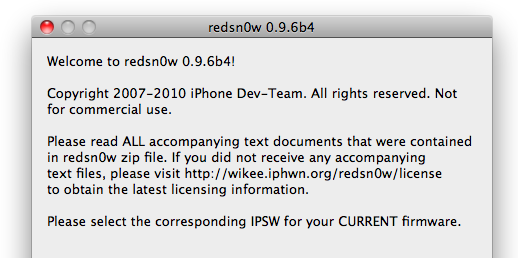
DevTeam worked hard for the last several hours and released jailbreak tool for iOS 4.2.1. It is redsn0w 0.9.6 b4.

As usual we remind all ultrasn0w unlockers please stay away from this official firmware. Wait for the ability to create custom 4.2.1 IPSWs that don’t update your baseband!

New redsn0w 0.9.6 b4 uses limera1n exploit and will successfully jailbreak all devices. The only problem is that it is a tethered jailbreak, which means you will have to plug it to a computer and rerun redsn0w on every reboot. This so called tethered or semi-tethered jailbreak. This condition applies to iPhone 3GS (new bootrom), iPhone 4, iPad, iPod touch 2G (MC model), iPod touch 3G and iPod touch 4G. Hackers are working hard to create untethered jailbreak for these devices. To use future untethered jailbreak you need to save SHSH keys for iOS 4.1 using TinyUmbrella utility or directly in Cydia.

Old devices like iPhone 3GS (old bootrom), iPhone 3G and iPod touch 2G (non-MC model) can be jailbroken-untethered right now using this latest version of RedSn0w.

You can download RedSn0w 0.9.6 b4 here.

Just a day after PwnageTool 4.1.1 release, DevTeam created one more update for popular jailbreak utility – PwnageTool 4.1.2 for Mac OS X. This release should solve some problems that users had. However there are still users reporting iTunes errors when restoring custom firmware. Anyway PwnageTool 4.1.2 is worth trying.

You can download PwnageTool 4.1.2 here.

Here is a step-by-step Tutorial: how to jailbreak and unlock your iPhone using PwnageTool.

Today DevTeam released new version of jailbreak utility PwnageTool 4.1.1 for Mac OS X. This release solves some of the problems with the previous version 4.1. Many users had errors with restore process, some had Cydia crashes. If you had any problems with PwnageTool 4.1 – we recommend you try to use the new version PwnageTool 4.1.1.

You can download PwnageTool 4.1.1 here.

Here is a step-by-step Tutorial: how to jailbreak and unlock your iPhone using PwnageTool 4.1.1.

These are instructions on how to jailbreak your iPhone using PwnageTool 4.1 for Mac OS X. If you need unlock and you have not updated to iOS 4 you will be able to preserve baseband and unlock iPhone using ultrasn0w.

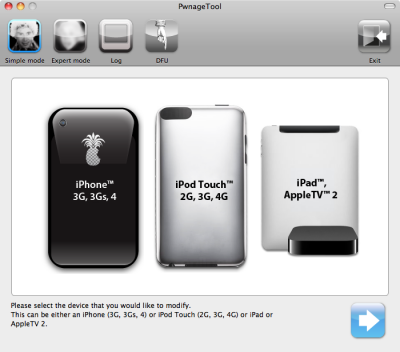
This guide will work for iPhone 4, iPhone 3GS, iPhone 3G, iPod Touch 3G, iPod Touch 4G, iPad and AppleTV. Just use the right firmware and select the right device (step four).

Step One
Make a folder called “Pwnage” on the desktop. Now you need to download there PwnageTool 4.1 from here and iOS 4.1 firmware from here.

When downloading the IPSW file, it is best to download it with Firefox since Safari often auto extracts it!

pwnagetool-41-1

Step Two
Double click to mount PwnageTool then drag the PwnageTool icon into the Pwnage folder.

Read the rest of this entry

The iPhone DevTeam has just released jailbreak utility PwnageTool 4.1 for Mac OS X.

PwnageTool allows you to restore to a custom IPSW file. The main advantage of PwnageTool is for unlockers. It gives the ability to keep current baseband and preserve ultrasn0w unlock. This is only for those, who have not updated to iOS 4.1 by themseleves.

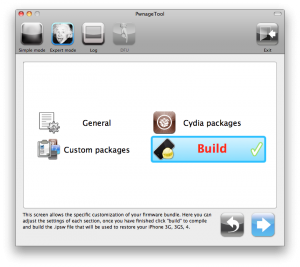
You can also add whatever packages you want in the “Expert” mode of PwnageTool, if you wish to pre-install something from Cydia.

Here is a list of supported devices:

  • iPhone4
  • iPhone 3GS
  • iPhone 3G
  • iPad (firmware 3.2.2)
  • AppleTV 2G
  • iPod touch 4G
  • iPod touch 3G

You can download PwnageTool 4.1 here.