2.1 | Jailbreak iPhone, iPod Touch, iPad - Part 6 Skip to content

Jailbreak iPhone, iPod Touch, iPad

новости про джейлбрейк iPhone, iPod Touch и iPad

Archive

Tag: 2.1

itunes821

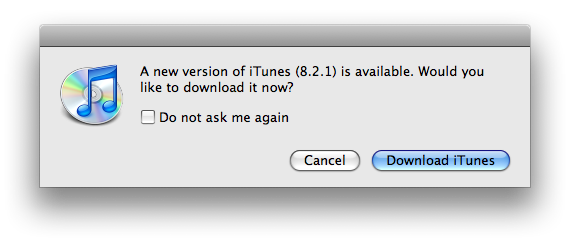
Apple has released a minor update to iTunes, version 8.2.1 available via pop up when you open iTunes, or when you launch Apple Software Update:

iTunes 8.2.1 provides a number of important bug fixes and addresses an issue with verification of Apple devices.

What it does, is it breaks Palm Pre sync. Maybe there are some other fixes. If you use jailbreak, we do NOT recommend you this upgrade. Other users can download it here.

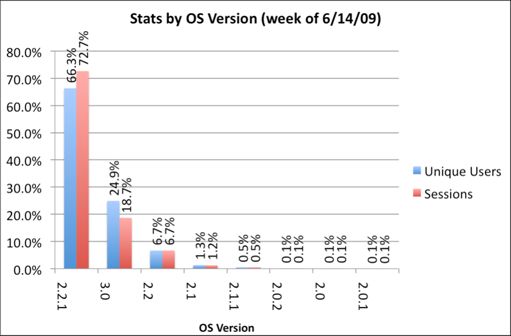
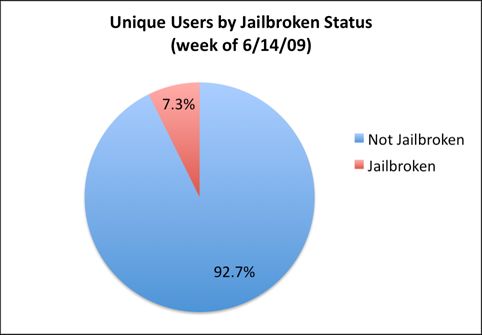
We just posted statistics from AdMob about firmwares on iPhones and iPods. Here are the numbers from another company – PinchMedia. This company deals with monitoring the use of applications.

The results below show that:

  • most users (66%) use firmware 2.2.1,
  • only 1 of 4 users installed the new 3.0 firmware,
  • 7.3% of iPhone and iPod Touch owners performed jailbreak.

pinchmedia-stats

pinchmedia-stats-jailbreak

Clippy is an iPhone addition from Cydia for copy/paste functionality. It was updated to version 0.96-1. Many issues are resolved and a lot of bugs fixed. Among these are: the ability to copy text from Safari, the ability to copy text from messages or biteSMS and Fix for the Mail application, many different crashes, etc.

Instructions:

  • Press-and-hold on list items to invoke Clippy on static text
  • Press-and-hold on the keyboard’s “123” button to invoke Clippy on editable text
  • Tap-pause-and-drag to highlight portions of editable text (except in web pages)

Install from Cydia on a jailbreaked iPhone or iPod Touch.

Here are several photos that show how Clippy works:

img_0154 img_0155

img_0156 img_0157


Read the rest of this entry »

Yes, DevTeam released new version of their software. First of all, please, do NOT use unofficial software from unknows sites (f.e. quickpwm.com). We recommend to download from torrent or official mirors.

We regulary publish latets software and firmware links. Use them or the same ones from DevTeam site.

So:

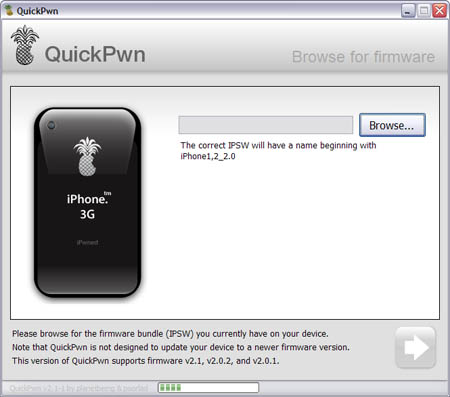
  • iPhone 2G and iPod Touch: update to 2.2.1 with iTunes and run QuickPwn to jailbreak, activate and unlock you device.
  • iPod Touch 2G: sorry, you need to wait a bit more
  • iPhone 3G + NO UNLOCK: If you do not need unlock, you are using your iPhone with one carrier or you hae factory unlcoked iPhone, just restore or upgrade to 2.2.1 using iTunes and use QuickPwn to jailbreak and add Cydia and Installer.
  • iPhone 3G + UNLOCK: you need to preserve current baseband software. Preserving the baseband will ensure that you can still use “yellowsn0w” the iPhone 3G unlock application. To upgrade your phone to 2.2.1 and preserve the state of the baseband you need to create a custom .ipsw with PwnageTool. This custom .ipsw will not contain the baseband update but of course will still allow all the cool new stuff from 2.2.1. PwnageTool is only available for Mac OS X.

DevTeam updated yellowsn0w to version 0.9.7 to work with modified (!!!) firmware 2.2.1, in which you preserve old baseband from firmware 2.2.

Here is an anouncement from DevTeam. They suggest to not update to the new firmware 2.2.1 yet. You can loose the ability to jailbreak and unlock. Just wait for them to check everything and release new software.

This is a step-by-step tutorial. If you have iPhone 3G this guide will help you jailbreak and activate the device. For iPhone 2G it will also perform the unlock.

I recommend using 2.2 firmware, because iPhone 3G unlock is avaliable now. But you can use it with old v2.1, v2.0.1 and v2.0.2.


Read the rest of this entry »

Congratulations, Windows users. The support for new firmware 2.1 is added. So here is what you can do:

  • Support for FW v2.0.1, v2.0.2, v2.1.0
  • Jailbreaking and Pwning iPhone 2G, iPhone 3G and iPod Touch
  • Adding Cydia and Installer
  • Replacing boot logos
  • Unlocking iPhone 2G

Changes from QuickPwn RC3

  • Support for firmware 2.1
  • Auto-detection of firmware version, insistence on correct firmware bundle to prevent user epic fail.
  • Use of iASign to activate to prevent bspatch epic fail.
  • Removed buggy and never really tested 2.0 support

Sorry, no jailbreak for new iPod Touch and no unlock for iPhone 3G.

Here are download links:

Firmwares v2.1: 2g firmware, 3g firmware

Related posts:

It is recommended that you all hold off jailbreaking 2.1. There are many issues that dev team is working through. A jailbreak isn’t quite enough.

Many apps are not yet stable. Categories will not work because we cannot launch one app from another at this time. Cydia is not yet stable. I recommend you wait a day or two still.

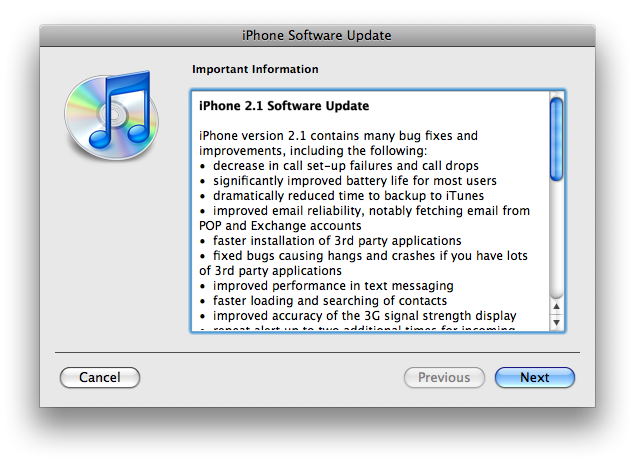
The iPhone 2.1 is out. It contains the following updates as listed by Apple:

– decrease in call set-up failures andcall drops
– significantly improve battery life for most users
– dramatically reduced time to backup to iTunes
– improve email reliability, notable fetching email from POP and Exchange accounts
– faster installation of 3rd party applications
– fixed bugs causing hangs and crashes if you have lots of 3rd party applications
– improved performance of text messaging
– faster loading and searching of contacts
– improved accuracy of the 3G signal strength display
– repeat alert up to two additional times for incoming text messages
– option to wipe data after ten failed passcode attempts
– Genius playlist creation

The 2.1 firmware is build 5F136 (weighing in at 237.8MB) and can be directly downloaded through iTunes. The new firmware also contains a number of security fixes including the well publicized passcode flaw.

Jailbreak for 2.1 is not avaliable yet.