ITunes | Jailbreak iPhone, iPod Touch, iPad - Part 6 Skip to content

Jailbreak iPhone, iPod Touch, iPad

новости про джейлбрейк iPhone, iPod Touch и iPad

Archive

Tag: iTunes

Apple recentrly released new version of iPhone OS 4. it is called iOS 4.0 GM. Here is an update from DevTeam about iOS 4 jailbreak:

For those who can legitimately activate to the iPhone3G 4.0GM seed, the “point to previous IPSW” redsn0w trick works and will jailbreak your 4.0GM. The “trick” is to point redsn0w at the 4.0beta4 IPSW instead of 4.0GM (do this after you’ve updated to 4.0GM and activated through the new iTunes 9.2 on your Mac). Since the carrier unlocks aren’t yet supported at 4.0, don’t do this if you use yellowsn0w/ultrasn0w/blacksn0w. Many JB apps are still pretty buggy in 4.0, so again this is mostly useful only for developers of those JB apps.

Note: If you’re experiencing MobileSafari crashes, double check that you’re running the version at the bottom of this page.

For those without legit iPhone3G 4.0GM seed access, please wait until the full public 4.0 release for updates to the jailbreak tools.

You can download redsn0w 0.9.5.b4 here.

Last week Apple has released its iPhone Os 4.0 beta 4 and redsn0w is finally updated to support this as well as beta 1. New version of jailbreak is 0.9.5.b4 and it can be applied on iPhone 3G only(!).

Redsn0w 0.9.5.b4 is targeted at developers who make jailbroken apps, and will not work if you are already using blacksn0w, ultrasn0w or yellowsn0w.

iPhone Dev-Team warns:

“You should stay clear of this beta software if you rely on a carrier unlock.”

To use the jailbreak, follow the guide below:

  1. Download redsn0w 0.9.5.b4 here. (Only Mac OS X version since app are developed on this OS).
  2. Make sure you have already activated your iPhone 3G with iTunes and your own developer ID.
  3. Launch the jailbreak.
  4. Select your stock iPhone1,2_4.0_8A274b_Restore.ipsw (beta4) or iPhone1,2_4.0_8A230m_Restore.ipsw (beta1) file that you used to update your firmware.
  5. Choose “Install Cydia” and then click “Next”. Use DFU mode to install the redsn0w.
  6. When your iPhone 3G comes back up, you will notice Cydia has a blank white icon. It also has no sources so you should go to the Sources panel and add this repo: http://apt.saurik.com/cydia-3.7 (make sure you are connected to the Internet before). When Cydia restarts, you should see its real logo now, and the standard sources should be ready to use.

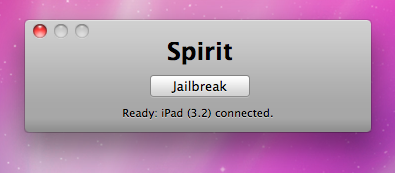
spirit_jailbreak

Finally the jailbreak for iPad, iPhone and iPod Touch from the Dev Team is available for download. It’s free and untethered and it’s called “Spirit”. The jailbreak supports every iDevice with firmware version 3.1.2, 3.1.3 or 3.2.


Read the rest of this entry »

iTunes crashed

Yesterday iTunes update was found to have issues with those of iPod Touches and iPhones that were tethered jailbroken with blackRa1n. If you have one of these, you will be unable to rejailbreak your device after rebooting it with blackra1n. The problem is being experienced only by Windows users. iH8Sn0w has an explanation:

“Blackra1n hooks to the dll that has different offsets of what it is actually looking for”.


Read the rest of this entry »

ipod3g

Several users report that Apple started allowing iPod touch owners to upgrade to iPhone OS 3 for no charge.

The information initially comes from PocketGamer’s Tracy Erickson:

Syncing a second generation iPod touch today with an older version of the software prompted me to accept the free upgrade. How exciting.

Just as when asked to download and install the latest firmware on an iPhone, iTunes simply asks for confirmation – no signing in to pay for the software.

Sounds like free a good price for iPod touch 3.1.3 upgrade.

PS: Jailbreakers: think before updating – you might lose the ability to jailbreak your device if you upgrade the firmware.

Update: Several users confirmed the free update. However a number of users report that they are still asked to pay for the update.

It looks like Apple has started banning iPhone hackers from the iTunes App Store.

A few day ago Sherif Hashim, the iPhone developer and hacker, tweeted that he had found an exploit in the latest iPhone OS 3.1.3, which could enable the unlock on 05.12.01 baseband for iPhone 3GS and iPhone 3G. Yesterday he has been banned by Apple for the so called “security reasons”. It seems that Apple is quite angry! Here is what Sherif gets when he tries to access App Store from his iPhone:

AppStoreBan

Sherif Hashim’s Tweets:

“Your Apple ID was banned for security reasons”, that’s what i get when i try to go to the app store, they must be really angry :)))))

and guess what my apple ID was, “sherif_hashim@yahoo.com”, what a fool was me not to notice :))), can’t help laughing, they are babies :)))

Another iPhone hacker named iH8sn0w, the developer of Sn0wbreeze (PwnageTool alternative for Windows), tweeted saying he was also banned by Apple right after he released an exploit known as XEMN:

@sherif_hashim lol, they did that to my ih8sn0wyday[@t]googmail.com too. (right after I posted XEMN)…

For now Apple isn’t banning Jailbreakers – they’re banning people who actively work to find exploits in the iPhone software to create Jailbreaks for the rest of us.

iphone-os-3.1.3

Apple has just released new firmware 3.1.3 (7E18) for iPhone 3GS, iPhone 3G, iPhone 2G, iPod touch, iPod touch 2G and iPod touch 3G.

The update includes:

  • Improves accuracy of reported battery level on iPhone 3GS
  • Resolves issue where third-party apps would not launch in some instances
  • Fixes bug that may cause an app to crash when using the Japanese Kana keyboard
  • Other security updates (more info)

So this is a minor update, which fixing only the accuracy of the 3GS battery meter and the stability of some third-party app launches. This update is avaliable via iTunes.

New firmware 3.1.3 also introduces a new version of the baseband, the 05.12.01. So if you need unlock do not update! DevTeam also warns us:

If you care about your jailbreak and unlock, don’t update your device – 3G and 3G(S) owners should pay particular attention to this warning.
PwnageTool and redsn0w are not yet compatible with 3.1.3

Experimenters show that the latest version of redsn0w 0.9.2 is able to jailbreak iPhone 2G, iPhone 3G and iPod touch 1G. Just point it at the 3.1.2 IPSW (download here) after doing update or restore to firmware 3.1.3. Sounds like DevTeam will release an updated version of redsn0w that will handle firmware 3.1.3 officially. They say iPod touch 2G with firmware 3.1.3 is also jailbreakable.

Users report that unlock software, blacksn0w and ultrasn0w, doesn;t work with the new baseband.

iPhoneFolders

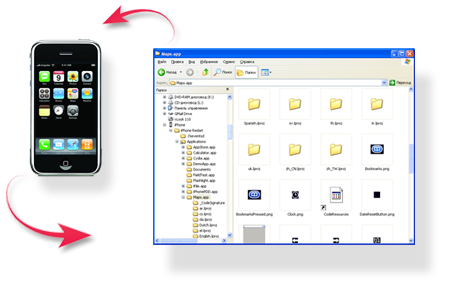
iPhone Folders is a Windows Explorer extension that allows you to browse contents of your iPhone or iPod Touch like a regular removable drive. After installation you’ll find it in My Computer folder.

Using this extension you can browse your phone filesystem, copy files to and from it, open files directly from iPhone, create shortcuts to folders on iPhone. In thumbnail mode program will display previews of png and jpg files on phone, application icons for installed applications (.app folders).

Compatible with x86 editions of Windows XP, Vista, 7 and x64 editions of Windows XP and Vista. Requires iTunes 8 or 9 for normal operation. Supports jailbroken and non-jailbroken phones (in the later case filesystem access is limited to Media folder).

You can download iPhone Folders version 1.0.31 here.
Read the rest of this entry »

itunes-902

Apple just released an update to iTunes, bringing the latest version to 9.0.2.

iTunes 9.0.2 adds support for Apple TV software version 3.0, adds an option for a dark background for Grid View, and improves support for accessibility.

According to PreCentral.net, this update also kills Palm Pre webOS sync. Again.

You can download iTunes here or through software update.

Updated: MuscleNerd has just confirmed that the update does not affect the Jailbreak, users can still use custom firmware. You can easily upgrade to 9.0.2.

3.0.1-jailbreak

DevTeam just released PwnageTool 3.1.4. It allows users to jailbreak firmware 3.1.2 on iPhone 2G/3G/3GS and iPod Tocuh 1G/2G. It also supports OTB iPhone 3GS with firmware 3.1.x. We remind you that if you need unlock, do not update on regular 3.1.x firmware, use Pwnagetool to create custom firmware to preserve old baseband.

Here is a quick howto:

  • Factory Unlocked iPhone 3G and iPhone 3GS: You do not need unlock, just use PwnageTool to create an ipsw and then use this to update and jailbreak your phone.
  • iPhone 3G and iPhone 3GS: if you need unlock, use PwnageTool to create a custom firmware with an old baseband. Then update using created custom firmware and install ultrasw0w via Cydia to unlock.
  • iPhone 2G: Use PwnageTool to do the magic and then restore with iTunes using your newly created .ipsw.The baseband will be unlocked, the phone jailbroken.
  • iPod Touch 1G: Use PwnageTool to create a firmware image and restore with that .ipsw using iTunes.
  • iPod Tocuh 2G: You must already be jailbroken in order to use PwnageTool. If so, create a firmware image and restore with that .ipsw using iTunes.
  • iPod Tocuh 3G: No support yet.

You can download PwnageTool 3.1.4 here.

There is only a MAC version of PwnageTool. DevTeam doesn’t plan to create Windows version.