ITunes | Jailbreak iPhone, iPod Touch, iPad - Part 4 Skip to content

Jailbreak iPhone, iPod Touch, iPad

новости про джейлбрейк iPhone, iPod Touch и iPad

Archive

Tag: iTunes

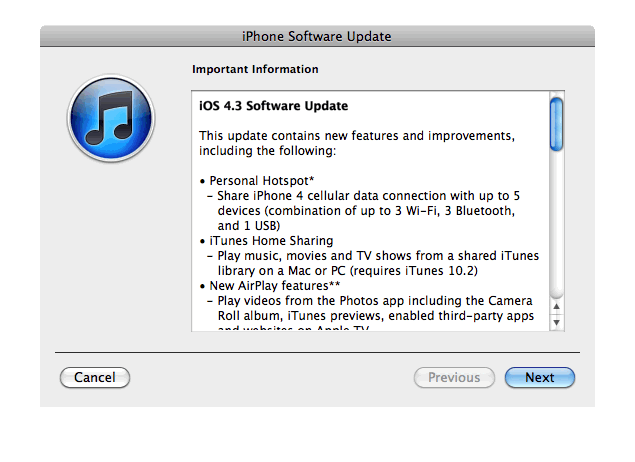
Apple just released new iOS 4.3 firmware. Jailbreakers and unlockers should wait for new tools. Everybody else will benefit. iOS 4.3 has Safari speed improvements, AirPlay features, hotspot, Home sharing, a new option for customizing the iPad’s side switch to serve as a mute toggle or screen orientation lock and much more:

This update contains new features and improvements, including the following:

* Personal Hotspot
– Share iPhone 4 cellular data with up to 5 devices (combination of up to 3 Wi-Fi, 3 Bluetooth, and 1 USB)

* iTunes Home Sharing
– Play music, movies, and TV shows from a shared iTunes library on a Mac or PC (requires iTunes 10.2)

* New AirPlay features
– Play videos from the Photos app including the Camera Roll album, iTunes previews, enabled third-party apps and websites on Apple TV
– Play slideshows from Photos on Apple TV using transitions available on Apple TV

* Faster Safari performance with Apple Nitro JavaScript engine

* HD video out using the Apple Digital AV Adapter
– View 720p HD videos from Videos app, iPod app, Photos, YouTube, Safari, Keynote, and enabled third-party apps on an HDMI display

* Ping features
– Push notifications for comments and follow requests
– Post and Like songs directly from the Now Playing screen
– Parental controls

* New Settings
– Messages setting for number of times to repeat an alert
– iPad side switch setting to lock screen rotation or mute audio notifications and sound effects

* Single tap conference call dialing with a pause to send a passcode

* Bug fixes

Products compatible with the software update:

  • iPhone 4 (GSM model)
  • iPhone 3GS
  • iPad
  • iPod touch (4th generation)
  • iPod touch (3rd generation)
  • Apple TV 2G

iPhone 3G, iPod Touch 2G and iPhone 4 Verizon do not have iOS 4.3 update.

Here are the direct links to download iOS 4.3:

device version release date
AppleTV(2G) (AppleTV2,1) 4.3 (8F191m) 03/09/2011 13:07:02
iPad (iPad1,1) 4.3 (8F190) 03/09/2011 13:07:02
iPad2,1 (iPad2,1) 4.3 (8F191) 03/09/2011 13:07:02
iPad2,2 (iPad2,2) 4.3 (8F191) 03/09/2011 13:07:02
iPad2,3 (iPad2,3) 4.3 (8F191) 03/09/2011 13:07:02
iPhone3GS (iPhone2,1) 4.3 (8F190) 03/09/2011 13:07:02
iPhone4 (iPhone3,1) 4.3 (8F190) 03/09/2011 13:07:02
iPodTouch(3G) (iPod3,1) 4.3 (8F190) 03/09/2011 13:07:02
iPodTouch(4G) (iPod4,1) 4.3 (8F190) 03/09/2011 13:07:02

pwnagetool413-3gs-3

UPDate: save your iOS 4.2.1 SHSH blobs now!

UPDate 2: Attention! We’ve received info, that Apple stopped signing iOS 4.2 for devices for which iOS 4.3 is available. This means you will not be able to restore to 4.2.1 without saved SHSH keys.

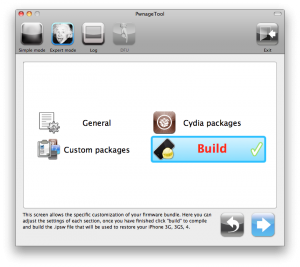
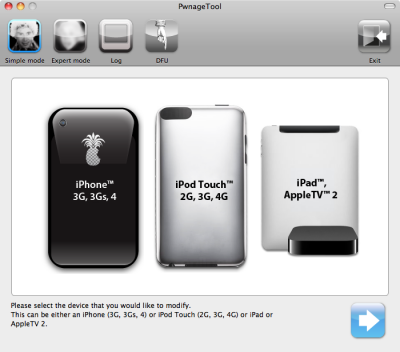
Using this tutorial you will be able to jailbreak iOS 4.2.1 running on iPhone 3G, iPhone 3GS, iPhone 4, iPod Touch 3G, iPod Touch 4G and iPad. Pwnagetool will also preserve baseband version if you need carrier unlock. If you have updated the baseband to version 06.15, you can use this tutorial. This tutorial uses PwnageTool 4.2 for Mac OS X.

We are not developers of jailbreak utilities, so we cannot assure that everything will work just fine. However we tried this tutorial on several devices and succeeded.

We will use iPhone 4 in our jailbreak tutorial. The process is the same for all devices.

Step One
Make a folder called “Pwnage” on the desktop. Download a couple of things:

Read the rest >>>

gp_web_win

These are step-by-step instructions on how to jailbreak iOS 4.2.1 on iPhone 3GS, iPhone 4, iPad, iPod Touch 2G, iPod Touch 3G, iPod Touch 4G using Greenpois0n for Windows. Tutorial for Mac OS X users is available here. All the steps are the same for all devices, we will cover iPhone.

Greenpois0n has been updated to support the iOS 4.1 and iOS 4.2.1 firmware. Use Limera1n if you want to jailbreak iOS 4.0, iOS 4.0.1, iOS 4.0.2.

Remember: Greenpois0n recommends a clean restore before continuing.

Unlockers: do not update to iOS 4.1 or iOS 4.2.1 if you need the unlock. Ultrasn0w does not support that baseband yet. The only exception is the iPhone 4. Experienced users can also try update to iOS 4.2.1 without upgrading your baseband by using TinyUmbrella. Start TSS Server->Start iTunes->Plug in your iPhone->Restore 4.2.1->Error 1013->Put phone into DFU Mode->Launch Greenpois0n.

We are not authors of this app. We do not promise that everything will go well, use this tutorial at your own risk.

Read the rest >>>>

gp_web_win

These are step-by-step instructions on how to jailbreak iOS 4.2.1 on iPhone 3GS, iPhone 4, iPad, iPod Touch 2G, iPod Touch 3G, iPod Touch 4G using Greenpois0n for Windows. Tutorial for Mac OS X users is available here. All the steps are the same for all devices, we will cover iPhone.

Greenpois0n has been updated to support the iOS 4.1 and iOS 4.2.1 firmware. Use Limera1n if you want to jailbreak iOS 4.0, iOS 4.0.1, iOS 4.0.2.

Remember: Greenpois0n recommends a clean restore before continuing.

Unlockers: do not update to iOS 4.1 or iOS 4.2.1 if you need the unlock. Ultrasn0w does not support that baseband yet. The only exception is the iPhone 4. Experienced users can also try update to iOS 4.2.1 without upgrading your baseband by using TinyUmbrella. Start TSS Server->Start iTunes->Plug in your iPhone->Restore 4.2.1->Error 1013->Put phone into DFU Mode->Launch Greenpois0n.

We are not authors of this app. We do not promise that everything will go well, use this tutorial at your own risk.

Step One
Open your web browser and download the latest Windows version of GreenPois0n from here.


Read the rest of this entry »

gp_web

These are step-by-step instructions on how to jailbreak iOS 4.2.1 on iPhone 3GS, iPhone 4, iPad, iPod Touch 2G, iPod Touch 3G, iPod Touch 4G using Greenpois0n for Mac OS X. Tutorial for Windows users is available here. All the steps are the same for all devices.

Greenpois0n has been updated to support the iOS 4.1 and iOS 4.2.1 firmware. Use Limera1n if you want to jailbreak iOS 4.0, iOS 4.0.1, iOS 4.0.2.

Remember: Greenpois0n recommends a clean restore before continuing.

Unlockers: do not update to iOS 4.1 or iOS 4.2.1 if you need the unlock. Ultrasn0w does not support that baseband yet. The only exception is the iPhone 4. You can unlock iPhone 4 with iOS 4.1 using ultrasn0w. Experienced users can also try update to iOS 4.2.1 without upgrading your baseband by using TinyUmbrella. Start TSS Server->Start iTunes->Plug in your iPhone->Restore 4.2.1->Error 1013->Put phone into DFU Mode->Launch Greenpois0n.

We are not authors of this app. We do not promise that everything will go well, use this tutorial at your own risk.

Read the rest >>>>

gp_web

These are step-by-step instructions on how to jailbreak iOS 4.2.1 on iPhone 3GS, iPhone 4, iPad, iPod Touch 2G, iPod Touch 3G, iPod Touch 4G using Greenpois0n for Mac OS X. Tutorial for Windows users is available here. All the steps are the same for all devices, we will cover iPhone.

Greenpois0n has been updated to support the iOS 4.1 and iOS 4.2.1 firmware. Use Limera1n if you want to jailbreak iOS 4.0, iOS 4.0.1, iOS 4.0.2.

Remember: Greenpois0n recommends a clean restore before continuing.

Unlockers: do not update to iOS 4.1 or iOS 4.2.1 if you need the unlock. Ultrasn0w does not support that baseband yet. The only exception is the iPhone 4. Experienced users can also try update to iOS 4.2.1 without upgrading your baseband by using TinyUmbrella. Start TSS Server->Start iTunes->Plug in your iPhone->Restore 4.2.1->Error 1013->Put phone into DFU Mode->Launch Greenpois0n.

We are not authors of this app. We do not promise that everything will go well, use this tutorial at your own risk.

Step One
Open your web browser and download the latest Mac version of GreenPois0n from here.


Read the rest of this entry »

android market

This week Google has released a new version of its client app for Android Market, which will work on any smartphone running Android OS 1.6 or higher.

The company aims to facilitate the process of discovering new software and its purchase. That’s why new Android Market will have a Cover Flow-like style of app listings and include new categories like Widgets and Live Wallpapers, as currently the catalog is filled pretty much with these kinds of software. Besides that, app pages will now have more info and links to related content.

Read the rest of this entry »

untethered

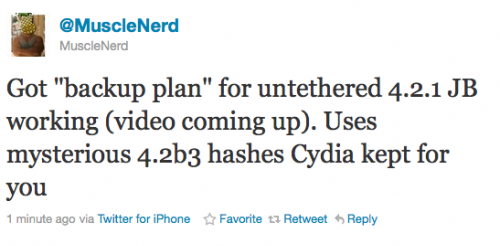
Currently iOS 4.2.1 jailbreak for iPhone 4, iPhone 3GS new bootrom, iPad, iPod 3G/4G is a tethered jailbreak. That means if you have to reboot your device, it will show a “connect to itunes” logo until you run the jailbreak software again. Musclenerd from iPhone DevTeam has announced that untethered jailbreak for iPhone iOS 4.2.1 is ready. Unfortunately this will be only for those who saved 4.2b3 SHSH keys via Cydia or tinyumbrella.

Got “backup plan” for untethered 4.2.1 JB working (video coming up). Uses mysterious 4.2b3 hashes Cydia kept for you.

“Backup plan” because hacker comex is working on a more extensible jailbreak. We’ll keep you up to date with more information as it develops. For now you can watch the proof video:


Read the rest of this entry »

iOS 4.2 Jailbreak

Next iPhone/iPod/iPad firmare iOS 4.2 is due out soon. What can we expect in terms of jailbreaking 4.2?

Limera1n exploit for 4.2 in most cases is a tethered jailbreak. That means if you have to reboot your device, it will show a “connect to itunes” logo until you run the jailbreak software again.

  • iPhone 3G – will run 4.2 untethered. Redsn0w will be updated.
  • iPhone 3GS – old bootrom will run 4.2 untethered if done via Pwnagetool while updating from 4.1. Otherwise it will be tethered.
  • iPhone 4 – tethered
  • iPod 2G – untethered.
  • iPod Touch 3G, iPod Touch 4G – tethered
  • iPad – tethered.

Tethered jailbreak isn’t that bad for iPads and iPods. But if something happens and your iphone reboots while you’re away from your computer, you cant use the device until you get home and run some tool on your computer again.

We suggest not updating until new expoit will be implemented in new utility.

The community is working on a solution to this to either make the jailbreak untethered or at least semi-tethered. Semi-tethered means the device will at least reboot, but unjailbroken while on the road until you return to your computer.

Just a day after PwnageTool 4.1.1 release, DevTeam created one more update for popular jailbreak utility – PwnageTool 4.1.2 for Mac OS X. This release should solve some problems that users had. However there are still users reporting iTunes errors when restoring custom firmware. Anyway PwnageTool 4.1.2 is worth trying.

You can download PwnageTool 4.1.2 here.

Here is a step-by-step Tutorial: how to jailbreak and unlock your iPhone using PwnageTool.