джейлбрейк | Jailbreak iPhone, iPod Touch, iPad - Part 37 Skip to content

Jailbreak iPhone, iPod Touch, iPad

новости про джейлбрейк iPhone, iPod Touch и iPad

Archive

Tag: джейлбрейк

DisplayOut, is a a very powerful little jailbreak tweak that lets you output anything that’s on your iDevice’s screen to a TV. The folks over at iSpazio gave it a try today and unsurprisingly, it works just great with FaceTime.

As you’ll see in their video, it scales very well and besides the sound issues due to the iPhone’s limited connectivity (which could be worked around), it looks like a totally viable alternative to those entreprise video-conferencing solutions some companies are spending big dollars on these days.
ipad

Cydia, the jailbreak App Store, is without a doubt the symbol of jailbreaking.  Rock, a second App Store, has had some success of its own over its 18 months of existence. Well, times have changed. Saurik, Cydia’s creator, has now acquired Rock and will merge it into Cydia. As a result, all apps, licenses and so on will be moved from Rock to Cydia over the next couple of days. This will bring the total number of available jailbreak apps, themes and extensions to over 20,000. As for Rock, it will be shut down.


Read the rest of this entry »

iOS4.14.2Jailbreak

Only a few days passed since Dev Team has confirmed that Comex will try to jailbreak iOS 4.1, using other exploit. However, according to the response received on Twitter, it became known that Comex may not take part in the new iOS 4.x jailbreak.

Comex replied to the message on Twitter in such a way: “ariif, the next jailbreak might not be from me :)”.

Of course, it does not mean that Comex leaves the scene and would not take part in jailbreaking as Geohot, most likely it is only this version he isn’t planning to jailbreak. Nevertheless the smile in his reply certainly means something good…

According to the latest tweets from different hackers (MuscleNerd, pod2g and others) the exploit for iOS 4.1 has been already discovered:

Works on 4.1 (!) iBSS iv=c2c5416472e5a0d6f0a25a123d5a2b1c key=1fbc7dcafaec21a150a51eb0eb99367550e24a077b128831b28c065e61f894a0

I just successfully updated to 4.1 without a baseband update. PLEASE wait for 4.1.0 TinyUmbrella!!!

Crazy timing that @pod2g got latest exploit just as 4.1 went public (lots of work left…keep away from 4.1 for now!)

congrats to @pod2g for the latest exploit and also @p0sixninja who have been trying for months.

This means that the jailbreak and unlock for iPhone and iPod Touch is possible. However please be patient and wait for the utilities.

Have you ever wanted to display something on your iPad to external big screen? Here’s a quick video tutorial how to do that:


Read the rest of this entry »

pdffix

As you may know, few days ago Apple had released a new version of iOS for all its mobile devices except first-generation iPhone and iPod touch, so owners of the latter are still not protected from a security flaw that allows hackers to obtain a remote control of their handsets. In fact, the latest compatible version for them is currently iOS 3.1.3.

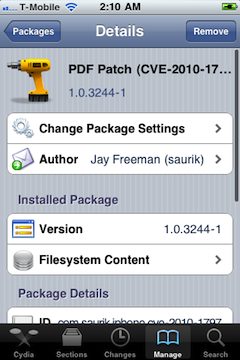
But Saurik (who is known as a developer of Cydia) recently announced on the Dev-Team blog that he released a PDF patch that is compatible with any iOS version down to 2.x. It can be found in Cydia if you’ll search for “PDF Patch”. After installing it you can check if the patch is working properly with visiting jailbreakme.com page. After sliding the box to jailbreak you should only see the star background (and not a dialog box), which means you are no longer vulnerable.

Read the rest of this entry »

4.0.2 3.2.2

Today Apple released patches for its iOS that address a security hole in Mobile Safari, which allowed users to jailbreak their iDevices. The PDF exploit they used also allowed hackers to gain remote control over the device with an iOS.

iOS 4.0.2 is available for:

Apple did NOT release the patch for the first generation iPhones.

iOS 3.2.2 is intended to use on the iPad and iPad 3G.

You can update your device via the links above or simply by connecting your device to iTunes and clicking Update. But note, if you want to continue using jailbreak you should not update your handset/tablet and don’t forget to backup your SHSH blobs.

Now adding Flash to your iPhone and iPad is very easy. Apple didn’t want Flash to be on their devices. Several hackers created a project Frash – a Flash port for iPhone and iPad. Today it is available as a package in Cydia. To install follow these steps:


Read the rest of this entry »

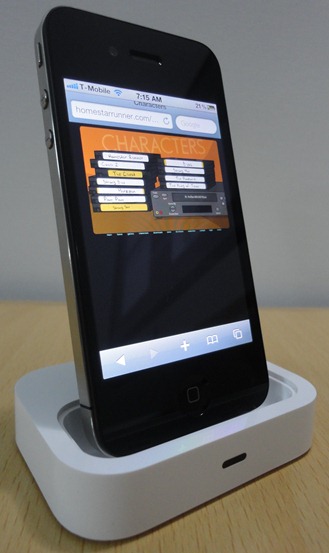
The Flash port project is called Frash. Recently it became available for iPad, now iPhone users can install it on their devices. Of course you need to jailbreak, since Apple doesn’t support Flash in iDevices.

Credits go to hackers Comex for the Frash port and Grant Pannell for iPhone 4 compilation.

Here is the video proof from redmondpie:


Read the rest of this entry »

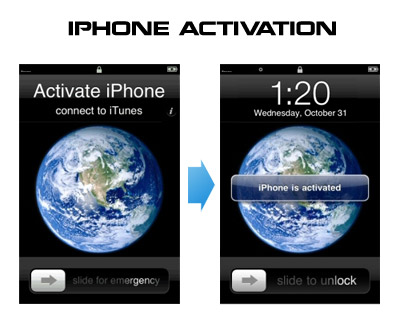
Having problems activating your iPhone? Don’t have original SIM-card? Cannot get passed emergency unlock screen? We have a solution:

If you have iPhone 3G, just use redsn0w to jailbreak and hactivate. If you have iPhone 3GS or iPhone 4 follow these instructions:

If you are already Jailbroken:

So you have an iPhone with iOS 4.0, but don’t have the original SIM and stuck on the Emergency Call Screen:

  1. Download ifunbox software (download link)
  2. Run ifunbox software and sync with phone
  3. Go to /private/var/root/Library/, delete original lockdown folder and put this lockdown folder after you extract it from the zip file
  4. Restart phone

If you are not jailbroken


Read the rest of this entry »