3.2 | Jailbreak iPhone, iPod Touch, iPad - Part 2 Skip to content

Jailbreak iPhone, iPod Touch, iPad

новости про джейлбрейк iPhone, iPod Touch и iPad

Archive

Tag: 3.2

redsn0w-096rc14

DevTeam released the untethered jailbreak for the latest iOS 4.3.2 – RedSn0w 0.9.6 rc14.

The 4.3.1 untether works on all Apple devices that support 4.3.2 except for the iPad2:

Redsnow is easy to use, it is available for Windows and Mac OS. As usual for unlockers – do not updaate to 4.3.1, wait for PwnageTool and Sn0wBreeze.

You can download RedSn0w 0.9.6 rc14 here.

New tutorials are on it’s way. For now you can still use our tutorials for iOS 4.3.1. Just download iOS 4.3.2 here, update in iTunes, point redsn0w to it, everything else is the same:

pwned

I0n1c has confirmed that his untethered jailbreak exploit is still working for iOS 4.3.2. This is good news for all jailbreakers.

Here are his recent tweets:

Apple has been nice. I just verified that the untether vulnerability is not fixed in iOS 4.3.2 – my Ipad 1 is running untethered jailbroken

Of course the public untether binaries will not work with iOS 4.3.2 – I have to generate new untether binaries with new dyld/kernel offsets

I won’t be able to create all the untether binaries before sunday, because I will be on planes, …

The dev-team cannot produce the untether binaries on their own, because they don’t have the source code to the untether exploit.

Well from what I hear lots of the problems people had with 4.3.1 (like wifi, 3g, …) are gone in 4.3.2

The new version of iOS 4.3.2 jailbreak tools RedSn0w and PwnageTool will be released by the iPhone Dev-Team quite soon.

ios432

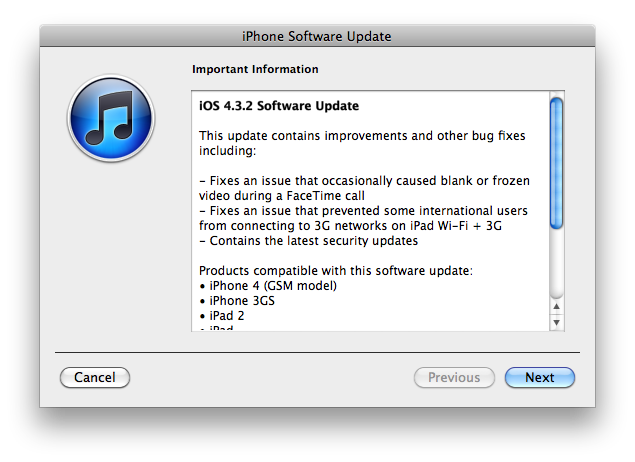
Apple has released iOS 4.3.2 for the iPhone, iPad, and iPod touch.

This update contains improvements and other bug fixes including:

  • Fixes an issue that occasionally caused blank or frozen video during a FaceTime call
  • Fixes an issue that prvented some international users from connecting to 3G networks on iPad W-Fi + 3G
  • Contains the latest security updates

Products compatible with this software update:

  • iPhone 4 (GSM model)
  • iPhone 3GS
  • iPad 2
  • iPad
  • iPod touch (4th generation)
  • iPod touch (3rd generation)

For information on the security content of this update, please visit http://support.apple.com/kb/HT1222.

Apple has also updated the firmware for the Verizon iPhone to 4.2.7 although this wasn’t listed in the release notes.

Current jailbreak tools work with iOS 4.3.2 in tethered mode only. Please save your SHSH keys for iOS 4.3.1 asap.

Here are direct download links for the latest firmwares:


Read the rest of this entry »

These are instructions on how to jailbreak and unlock your iPhone 3G on iOS 4.2.1 using PwnageTool 4.1.3 for Mac OS X. This tutorial will explain how to upgrade your baseband if needed for an unlock.

Step One
Make a folder called “Pwnage” on the desktop. Download a couple of things:

You will also need the 4.2.1 iPhone firmware.

If you are on the 05.14 or 05.15 baseband you will also need the iPad 3.2.2 firmware. You can find out your baseband version in Settings -> General -> About -> Modem Firmware.

When downloading the IPSW file, it is best to download it with Firefox since Safari often auto extracts it!
pwnagetool-413-1

Step Two
Double click to mount PwnageTool then drag the PwnageTool icon into the Pwnage folder.

Read More>>>

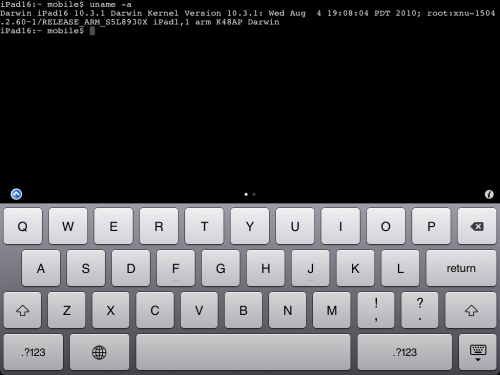
MobileTerminal-iPad-05

MobileTerminal is a terminal emulator application for the iPad and iPhone. The version of MobileTerminal that is available in Cydia doesn’t work with iPad iOS 3.2.2 and iPhone iOS 4.x. However there are beta versions that do work, but aren’t on Cydia because they are still in beta stages. This tutorial will show you step-by-step how to install MobileTerminal on iPad (tutorial for iPhone is here). If you have old version of MobileTerminal installed – uninstall it in Cydia (Search – MobileTerminal – Remove).

First of all you need to jailbreak your iPad. Here is an easy tutorial: how to jailbreak iPad with iOS 3.2.2 using Limera1n. After you successfully jailbreaked iPad:

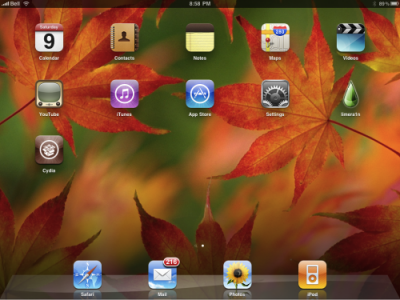
  1. Run Cydia by tapping on Cydia icon
  2. cydia_icon

  3. The Cydia will start:

Read the rest of this entry

The iPhone DevTeam has just released jailbreak utility PwnageTool 4.1 for Mac OS X.

PwnageTool allows you to restore to a custom IPSW file. The main advantage of PwnageTool is for unlockers. It gives the ability to keep current baseband and preserve ultrasn0w unlock. This is only for those, who have not updated to iOS 4.1 by themseleves.

You can also add whatever packages you want in the “Expert” mode of PwnageTool, if you wish to pre-install something from Cydia.

Here is a list of supported devices:

  • iPhone4
  • iPhone 3GS
  • iPhone 3G
  • iPad (firmware 3.2.2)
  • AppleTV 2G
  • iPod touch 4G
  • iPod touch 3G

You can download PwnageTool 4.1 here.

greenpois0n

Greenpois0n for Windows and Linux was released a few days ago. Today Chronic Dev Team created a Mac OS version.

Greenpois0n does jailbreak of firmware iOS 4.1 on the following devices:

iPhone 4
– iPhone 3G S
iPod touch 4G
iPod touch 3G
– iPad (iOS 3.2.2)

Greenpois0n uses that same exploit as limera1n.

You can download GreenPois0n from here.

In addition to our LimeRa1n jailbreak tutorials, here is a nice video showing all the process:

LimeRa1n supports iPhone 3GS, iPhone 4, iPod Touch 3G and iPod Touch 4G with iOS 4.0 -- iOS 4.1, and iPad with iOS 3.2.2.

Here you can find our LimeRa1n tutorials:

These are instructions on how to jailbreak your iPad with latest iOS 3.2.2 using Limera1n for Mac. You can find the Windows version of this tutorial here.

Step 1
Open your browaer and navigate to www.limera1n.com and download LimeRa1n for Mac by clicking on the Mac logo.


Read the rest of this entry »

These are instructions on how to jailbreak your iPad with latest iOS 3.2.2 using Limera1n for Windows. You can find the Mac OS version of this tutorial here.

Step 1
Open your browaer and navigate to www.limera1n.com and download LimeRa1n for Windows by clicking on the Windows.

When prompted save the download to your desktop


Read the rest of this entry »