MobileTerminal | Jailbreak iPhone, iPod Touch, iPad Skip to content

Jailbreak iPhone, iPod Touch, iPad

новости про джейлбрейк iPhone, iPod Touch и iPad

Archive

Tag: MobileTerminal

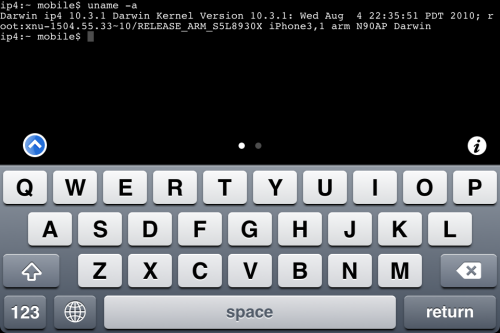
MobileTerminal-iPhone4-04

MobileTerminal is a terminal emulator application for the iPad and iPhone. The version of MobileTerminal that is available in Cydia doesn’t work with iPhone iOS 4.x. However there are beta versions that do work, but aren’t on Cydia because they are still in beta stages. This tutorial will show you step-by-step how to install MobileTerminal on iPhone with iOS 4.x (tutorial for iPad is here). If you have old version of MobileTerminal installed – uninstall it in Cydia (Search – MobileTerminal – Remove).

First of all you need to jailbreak your iPhone. If you have not done it already here is an easy tutorial: how to jailbreak iOS 4.0-4.1 on iPhone using Limera1n. After you successfully jailbreaked iPhone:

  1. Run Cydia by tapping on Cydia icon
  2. cydia_icon

  3. The Cydia will start:

Read the rest of this entry

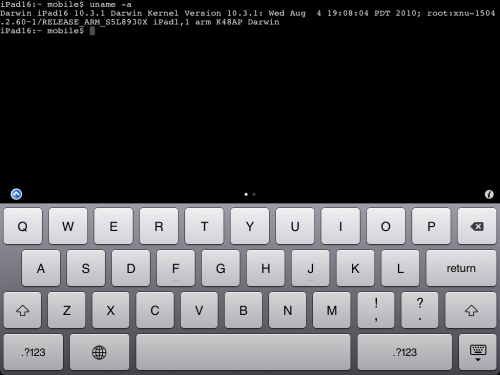
MobileTerminal-iPad-05

MobileTerminal is a terminal emulator application for the iPad and iPhone. The version of MobileTerminal that is available in Cydia doesn’t work with iPad iOS 3.2.2 and iPhone iOS 4.x. However there are beta versions that do work, but aren’t on Cydia because they are still in beta stages. This tutorial will show you step-by-step how to install MobileTerminal on iPad (tutorial for iPhone is here). If you have old version of MobileTerminal installed – uninstall it in Cydia (Search – MobileTerminal – Remove).

First of all you need to jailbreak your iPad. Here is an easy tutorial: how to jailbreak iPad with iOS 3.2.2 using Limera1n. After you successfully jailbreaked iPad:

  1. Run Cydia by tapping on Cydia icon
  2. cydia_icon

  3. The Cydia will start:

Read the rest of this entry

ios for ipad

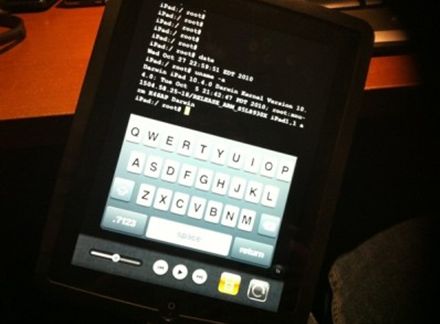
It seams that hackers have had their hands on the iOS 4.2 beta 3 for iPad. But, as we know, there is no official jailbreak for it. Recently the well-known iOS hacker posted aт interesting picture in Tweeter. The shot depicts an iPad running MobileTerminal, a jailbreak application, which gives users full access to the terminal command line interface. But it looks strange, because it means that the hackers missed the beta 4, which should be released this past Tuesday, according to the Apple’s schedule. This could signal that Apple may skip beta 4 altogether and go straight to a GM build sometime next week.

A few hours ago iH8sn0w posted a tweet that he is able to run jailbreak on the new firmware 4.0 beta 1. DarkMalloc, another developer who worked on the project, has just released new video that shows firmware 4.0 jailbreak on iPhone 3G:

The interesting thing, besides the presence of Cydia and MobileTerminal, is the possibility to have multiple applications open at once. That means that multitasking on iPhone 3G can be enabled. Officially Apple doesn’t want to activate this functionality on iPhone 3G, just iPhone 3GS and later devices.

MobileTerminalicon

This is quite simple. If you did a jailbreak on your iPhone you need to change the default password. Why? Because hackers can access your phone, read your mail, sms, download other data. The second reason is because there are already several viruses (worms) that use these default passwords.

Here’s a quick step-by-step tutorial.

  1. If you don’t have MobileTerminal application installed: run Cydia, search for MobileTerminal and install.
  2. Run MobileTerminal.
  3. Type passwd and press return.
  4. Enter the default user password alpine and press return.
  5. Enter a new password and press return.
  6. Enter a new password again and press return.
  7. Congratulations, you changed it for default mobile user. Let’s do the same for root user.
  8. Login as root user: type su root and press return.
  9. Type passwd and press return.
  10. Enter the default root user password alpine and press return.
  11. Enter a new password and press return.
  12. Enter a new password again and press return.
  13. That’s it!

The passwords are now changed, and your jailbroken iPhone or iPod Touch is now a bit more secure than it was before and less vulnerable to the worm detected recently.

Thanks to Dev Team and the porting work of Jay Freeman as well as the authors of 3Proxy, it is now possible to “tether” your iPhone 3G and use its Internet connection on your laptop.

WarningTethering your iPhone is against the iPhone data plan terms. AT&T could slap you with huge fees if you overuse this. I recommend only using it during emergencies.

Here is a basic plan (by the way, this should work for old IPhone also):

  • Jailbreak your iPhone 3G
  • Install 3Proxy and Terminal
  • Create an ad-hoc Wi-fi network using your laptop
  • Join the network with your iPhone
  • Find the iPhone’s IP address
  • Open Terminal and run the proxy program
  • Open Safari on your iPhone and open a web page
  • Configure your browser to use the proxy

Later we’ll discuss it with more details.

Step 1: Jailbreak your iPhone


Read the rest of this entry »