Ultrasn0w | Jailbreak iPhone, iPod Touch, iPad - Part 5 Skip to content

Jailbreak iPhone, iPod Touch, iPad

новости про джейлбрейк iPhone, iPod Touch и iPad

Archive

Tag: ultrasn0w

These are instructions on how to jailbreak your iPhone 3GS (all bootroms) and iPhone 4 using Limera1n for Windows. Limera1n supports iOS 4.0, iOS 4.0.1, iOS 4.0.2 and iOS 4.1.

Remember: Do not update to iOS 4.1 if you need the unlock. Ultrasn0w does not support that baseband yet.

Step 1
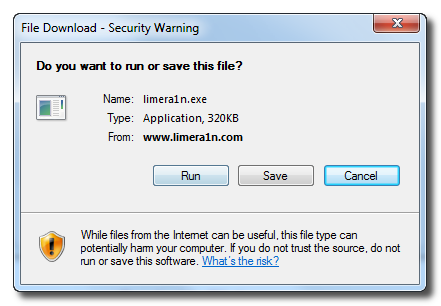
Download LimeRa1n here. If you have problems downloading go directly to www.limera1n.com and use link at the bottom of the screen.

When prompted save the download to your desktop

Read the rest of this entry »

Famous hacker Geohot is back and today he released the latest iOS 4.1 jailbreak. It is called LimeRa1n and supports iPhone 3GS, iPod Touch 3G, iPad, iPhone 4, iPod Touch 4G with iOS firmwares 4.0-4.1 and beyond. It can also hacktivate your device, so there is no need in phone SIM-cards and other tricks.

This software is still in beta and was updated 3 times in last several hours. So use with caution.

There is Windows version only for now. Geohot plans to release LimeRa1n for Mac and Linux soon. You can Download it here.

Some users report that they have jailbroken their iOS 3.2.2 iPads successfully with limera1n, while others report that they tried, but failed.

Do not forget to backup.

For many users of iPhone 3GS and iPhone 4 with iOS 4.0.2 now there is a hope to perform jailbreak using LimeRa1n and unlock using ultrasn0w. We recommend NOT to do it if you have not saved your SHSH keys. You can try, but if something goes wrong without SHSH keys you’ll have to restore to iOS 4.1, and there is no unlock for iOS 4.1 (possibly forever). Just wait for PwnageTool utility.

DevTeam reported that Limera1n uses a different exploit than SHAtter, so they will not release SHAtter utility, they don’t want let Apple fix both security holes. However they plan to release PwnageTool using the same exploit.


Read the rest of this entry »

redsn0w-0-9-6-b1

RedSn0w 0.9.6 b1 for Mac OS X was released a while ago. Today DevTeam created a version for Windows users. RedSn0w 0.9.6 b1 can jailbreak iOS 4.1 and iOS 4.1 running on iPhone 3G or iPod touch 2G.

You can download it here.

Redsn0w is easy to use:

  1. Download firmware here.
  2. Launch redsn0w 0.9.6 b1
  3. Select your stock 4.1 or 4.0 ipsw (you’ve already used this to update your device to 4.1 or 4.0)
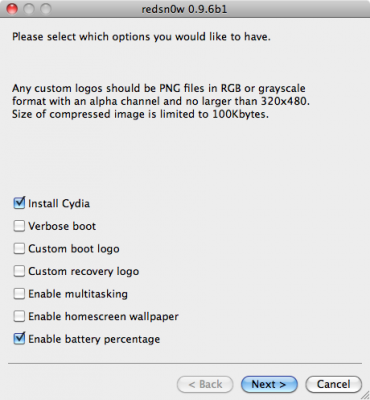
  4. Select “Install Cydia” and any of the other options shown above, then click “Next”. Use DFU mode to install the jailbreak.

This is still beta, so there might be some problems:

Any Windows users seeing “Waiting for reboot” for too long (more than 20 seconds or so), please try “shaking” the JB process by unplugging then replugging your USB cable (while letting redsn0w continue to run). Also, try using a USB port “closer” to your computer (as opposed to on your monitor or behind another hub).

As usual DevTeam reminds us:

IF YOU USE THE ULTRASN0W UNLOCK, PLEASE WAIT FOR PWNAGETOOL TO SUPPORT 4.1. DO NOT USE REDSN0W

That’s because to use redsn0w at 4.1, you need to already have updated to official 4.1 from Apple. If you do that, you lose the ultrasn0w unlock (possibly forever).

redsn0w-0-9-6-b1

DevTeam recently released new version of redsn0w to jailbreak iOS 4.1. New RedSn0w 0.9.6 b1 supports iOS 4.0 and iOS 4.1 running on iPhone 3G or iPod touch 2G.

There is only Mac OS X x86 version, that you can download here.

Redsn0w is easy to use:

  1. Download firmware here.
  2. Launch redsn0w 0.9.6 b1
  3. Select your stock 4.1 or 4.0 ipsw (you’ve already used this to update your device to 4.1 or  4.0)
  4. Select “Install Cydia” and any of the other options shown above, then click “Next”.  Use DFU mode to install the jailbreak.

As usual DevTeam reminds us:

IF YOU USE THE ULTRASN0W UNLOCK, PLEASE WAIT FOR PWNAGETOOL TO SUPPORT 4.1.  DO NOT USE REDSN0W

That’s because to use redsn0w at 4.1, you need to already have updated to official 4.1 from Apple.  If you do that, you lose the ultrasn0w unlock (possibly forever).

You cannot use JailBreakMe method to jailbreak and unlock iOS 4.0.2 on iPhone 3G. However you can still jailbreak and unlock iPhone 3G using redsn0w. Here are the instructions:

  • Download the latest RedSn0w 0.9.5-b5 in our utilities page here.
  • Download firmware images for iOS 4.0 here.
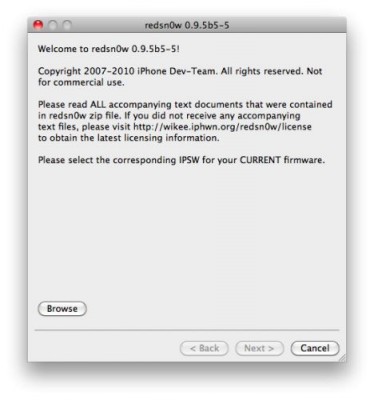
  • Run RedSn0w and point it at the 4.0 IPSW. (Yes – point it at the 4.0 IPSW even though you’re at 4.0.2). This will also hacktivate your iPhone3G at 4.0.1 if you haven’t already been activated by iTunes.
  • If you need a carrier unlock – install ultrasn0w in Cydia (add repository http://repo666.ultrasn0w.com). For T-Mobile in the USA remember to turn off 3G mode in Settings→General→Network.

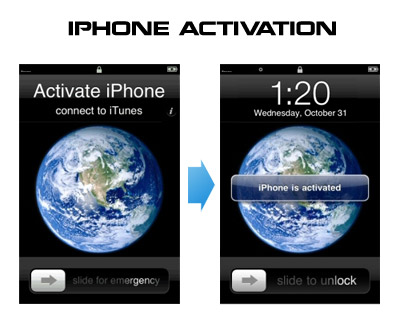
Having problems activating your iPhone? Don’t have original SIM-card? Cannot get passed emergency unlock screen? We have a solution:

If you have iPhone 3G, just use redsn0w to jailbreak and hactivate. If you have iPhone 3GS or iPhone 4 follow these instructions:

If you are already Jailbroken:

So you have an iPhone with iOS 4.0, but don’t have the original SIM and stuck on the Emergency Call Screen:

  1. Download ifunbox software (download link)
  2. Run ifunbox software and sync with phone
  3. Go to /private/var/root/Library/, delete original lockdown folder and put this lockdown folder after you extract it from the zip file
  4. Restart phone

If you are not jailbroken


Read the rest of this entry »

MuscleNerd tweeted today that the recent redsn0w utility is able to jailbreak the iOS 4.1 beta2 on iPhone 3G and iPod Touch 2G. This is useful for developers only, however good news for everyone.

Here’s some info from the DevTeam wiki page:


Read the rest of this entry »

There is no official jailbreak utility for iOS 4.0.1. However you can still jailbreak and unlock iPhone 3G. Just do the following:

  • Download the latest RedSn0w 0.9.5-b5 in our utilities page here.
  • Download firmware images for iOS 4.0 here.
  • Run RedSn0w and point it at the 4.0 IPSW. (Yes – point it at the 4.0 IPSW even though you’re at 4.0.1). This will also hacktivate your iPhone3G at 4.0.1 if you haven’t already been activated by iTunes.
  • Install ultrasn0w in Cydia (add repository http://repo666.ultrasn0w.com) if you need a carrier unlock (and in the USA, remember to turn off 3G mode in Settings→General→Network).

Here’s what hackers tweeted about new Apple firmwares 4.0.1 for iPhones and 3.1.2 for iPad:

DevTeam:

As with *any* new FW, jailbreakers + unlockers must avoid this upcoming 4.1 update until our tools are updated

3GS, ipt3G, iPhone4 users (regardless of current FW or JB status) should backup 4..0 SHSH blobs http://is.gd/dskh9 soon

MuscleNerd:

Obviously avoid today’s 4.0.1 update until JB tools are updated. Luckily, no baseband change so ultrasn0w lives on 🙂

each FW version has unique blobs. But using http://is.gd/dskh9 you can get 4.0 blobs on PC while you stay at 3.1.2

Hah for those iPhone3G or ipt2g(non-MC) users at 4.1beta1: use redsn0w from 2 wks ago to JB http://is.gd/dstU3 🙂


Read the rest of this entry »

Congratulations to all iPhone users. iPhone 4 has been successfully jailbroken. iPhone hackers @planetbeing and @chpwn has managed to get root access on the device using @comex’s userland jailbreak method. However do not expect new jailbreak utility soon. @p0sixninja has confirmed that it cant be released in its current shape because it contains some of Apple’s proprietary code:

@i_Enthusiast the jailbreak shown is a more of a stepping stone for us, it can’t be released because it includes some of apples software

You should not expect the carrier unlock soon too. This is because iPhone 4 uses a new baseband OS, which will require a complete rewrite for ultrasn0w unlocking tool:


Read the rest of this entry »