YouTube | Jailbreak iPhone, iPod Touch, iPad - Part 6 Skip to content

Jailbreak iPhone, iPod Touch, iPad

новости про джейлбрейк iPhone, iPod Touch и iPad

Archive

Tag: YouTube

The Flash port project is called Frash. Recently it became available for iPad, now iPhone users can install it on their devices. Of course you need to jailbreak, since Apple doesn’t support Flash in iDevices.

Credits go to hackers Comex for the Frash port and Grant Pannell for iPhone 4 compilation.

Here is the video proof from redmondpie:

Read the rest of this entry »

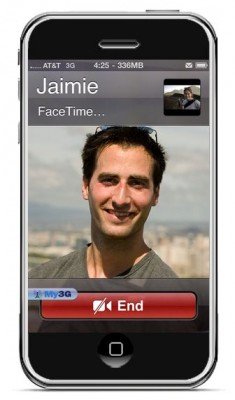
FaceTime feature gives users the possibility to make  voice calls. Apple restricted this feature to Wi-Fi only. Today it became possible to use it over 3G!

Setup Instructions:

  1. Jailbreak your iPhone 4 via www.jailbreakme.com.
  2. Download and upgrade to the latest Cydia package.
  3. Open Cydia, Go to Manage then Sources.
  4. Click Sources, Edit then add: http://apt.modmyi.com
  5. Search for “My3G” — download, and install it. It costs $2.79. My3G makes Apps believe that they are on WiFi instead of 3G.
  6. Go through the Rock setup process with a username and password. Open My3G and leave all settings on the default.
  7. FaceTime should now work over 3G! — Make sure to “Forget” the WiFi network you are on (via iOS settings) if you want to test it.

We haven’t seen any difference between the 3G FaceTime call and a WiFi FaceTime call. The quality is very good.

Here’s a video demo:


Read the rest of this entry »

Here’s an interesting video from MuscleNerd, who jailbreaks an iPad using JailBreakMe in a plane (over New Mexico via “Gogo Inflight Internet” wifi). Nice!!

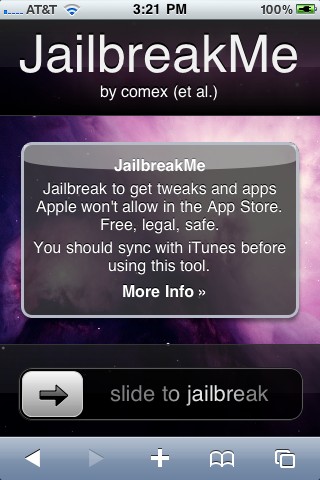
Here is the quick 1 minute video of JailBreakMe working on an iPhone 4:

Here is the video of recently released universal safari jailbreak called JailBreakMe working on an iPhone 3G:

Jay Freeman, better known as Saurik, the creator of Cydia, was interviewed by the home radio Make It Work. He speaks about the history and the future of the iPhone jailbreak.

Saurik describes the origins of Jailbreak and Unlock for the very first model of the iPhone. Jay explains that initially there were two important things to do with the iPhone 2G -- to use other carrier than AT&T and to install any application.

He continues discussing the main applications from Cydia. Cycorder was the first to allow video recording, and Winterboard was the only one that allowed users to change the graphical interface of the iPhone. He also speaks about Comex, the hacker who is currently working with the Dev Team for releasing and Unlock for the iPhone 4. According to Saurik the tool is still not ready to be released to the public due to severe bugs in the code. Here the second part:


Read the rest of this entry »

iH8Sn0w has successfully performed a tethered jailbreak for iPhone 3GS with new firmware  iOS 4 and the new bootrom. Unfortunately this jailbreak requires users to have 3.1.2 SHSH blobs saved.

Alright… If anyone has their 3.1.2 SHSH blobs, NOT 3.1.3. Then I’ll see if I can produce a tool that will do this job…

Here is a video demo posted by AKinGdom1:

The utility will be available soon. Might be as soon as tomorrow.

Hackers who created the Spirit jailbreak have successfully been able to run flash content on the iPhone. Hopefully an acceptable Flash player will arrive soon for jailbreaked iPhones, iPads and iPod Touches.

Hacker msftguy created unofficial PwnageTool which allows to upgrade to the pre-release of iOS 4.0 GM while keeping your jailbreak and old baseband.

This is not an official release by Devteam, so we recommend to wait for the final versions of both iOS 4.0 and PwnageTool.

For the advanced users who want to experiment here is a link.

Msftguy also provided a video:

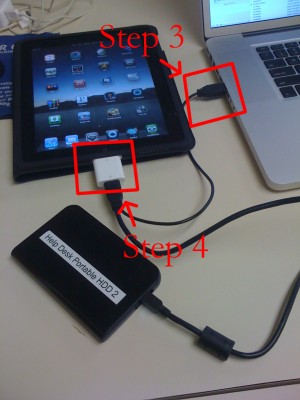
iPad USB Camera Connection Kit is much more useful as it seems. Max Sha, an experienced user, was able to access external hard drive with this kit. All you need is a jailbroken iPad, an external drive, a split-USB cable to give the drive some power and a terminal of some sort (f.e. MacBook) to mount the external storage. While it is a little unwieldy, it shows that Terabytes of external storage for iPad is possible.

Here is a complete step-by-step guide from Max Sha:


Read the rest of this entry »