2.0 | Jailbreak iPhone, iPod Touch, iPad - Part 4 Skip to content

Jailbreak iPhone, iPod Touch, iPad

новости про джейлбрейк iPhone, iPod Touch и iPad

Archive

Tag: 2.0

admob

AdMob, a company that supplies advertising services for iPhone developers, says that between September 15th and 22nd only 23% of devices were updated to iPhone OS 3.1. This counts only devices that run apps with AdMob ads.

Some more statistics: 51% are still running OS 3.0, and 19% are still running v2.2.1, while 7% are still running v2.0 or earlier.

The reasons, as always, are very different. The update for the iPod Touch costs money, there are problems with internet tethering in 3.1, there is no firmware 3.1 jailbreak tool for Windows and it is impossible to jailbreak iPhone 3GS.

Have you perfomed the upgrade or not? Please, leave a comment why.

via iphonealley

purplera1n1

Geohot released a beta software for iPhone 3GS jailbreak called PurpleRa1n. It is beta and has some issues, but it gets the job done if you’re patient.

Requirements: You must have
1) Windows xp sp2, Vista, Windows 7, MAC OS
2) iTunes 8.2.0.23
3) Purplera1n software

The jailbreak is a bit incomplete. The kernel vm_mem patch is not present so Winterboard will not work as some other critical tweaks. (SBSettings does work!).

Use with caution and be patient. If you’re not in a hurry, wait for the release from DevTeam.

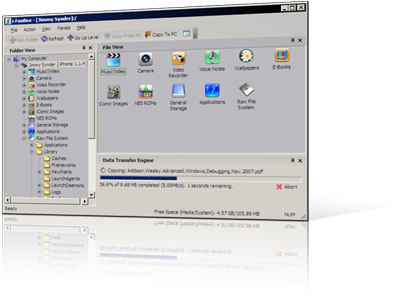
I use iFunBox a lot. This is a very useful utility for jailbreaked iPhones. Recently it was updated to version 0.7.224.86. Here is a download link.
What’s New:
1. Thumbnail view supported for wallpapers, camera and all other folders.
2. Support Symlink for the filesystem of firmware 2.0. All .app can be listed in Application folder.
3. Downloading music and movie from iPhone with filename encoded with album name and artist name.
4. Support E-Books, converting plain text to UTF-16 automatically.
5. Support Book Shelf, converting plain text to UTF-8 automatically.

Limitations:
Uploading music and movie to iPhone is now disabled on devices with firmware 2.x.

The developer, Kevin Rose, says this application will be avaliable officially via AppStore. No jailbreaking and hacking. The only concern.. will Apple approve it? I hope so. Watch the video:

PS: It will be free 🙂

Related posts:

This is a step-by-step tutorial. If you have iPhone 3G this guide will help you jailbreak and activate the device. For iPhone 2G it will also perform the unlock.

I recommend using 2.2 firmware, because iPhone 3G unlock is avaliable now. But you can use it with old v2.1, v2.0.1 and v2.0.2.


Read the rest of this entry »

Today the 400th package was added to Cydia 2.0 repository today. This number includes all kind of applications, modding themes, sound packages, winterboard themes, etc. Most of this stuff is free. All you need to use this is to jailbreak your iPhone.

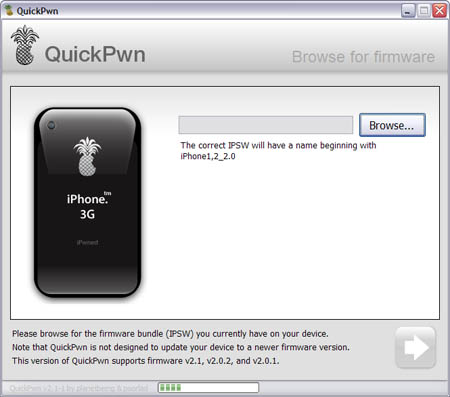
Congratulations, Windows users. The support for new firmware 2.1 is added. So here is what you can do:

  • Support for FW v2.0.1, v2.0.2, v2.1.0
  • Jailbreaking and Pwning iPhone 2G, iPhone 3G and iPod Touch
  • Adding Cydia and Installer
  • Replacing boot logos
  • Unlocking iPhone 2G

Changes from QuickPwn RC3

  • Support for firmware 2.1
  • Auto-detection of firmware version, insistence on correct firmware bundle to prevent user epic fail.
  • Use of iASign to activate to prevent bspatch epic fail.
  • Removed buggy and never really tested 2.0 support

Sorry, no jailbreak for new iPod Touch and no unlock for iPhone 3G.

Here are download links:

Firmwares v2.1: 2g firmware, 3g firmware

Related posts:

There are so many tools, some for Mac OS, others for Windows, different versions… Complicated. So let’s summerize a little bit.

If you have iPhone 3G, you’ll be able to install 3-rd party non AppStore applications (through separate applications called Cydia and Installer) and run these applications. If you have old iPhone, in addition to that you’ll be able to unlock the device (use with any carrier).

There are two methods: quickpwn and custom firmware method. First one is for quikly pwning and jailbreaking  the device without restore. You should use it if you have unlocked device or an AT&T contract.

If you are Windows user:

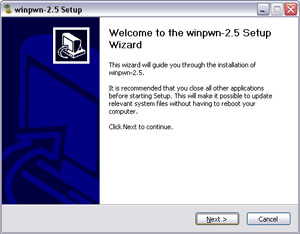
  • Go for WinPwn. The current version is 2.5.0.2 (also called 2.5 beta-2). Download here. It supports both iPhone and iPhone 3G, firmwares 2.0, 2.0.1, 2.0.2. You can use either quickpwn or custom firmware method.
  • There is a separate QuickPwn tool for Windows. The current version is RC3. Download here. Do you need it? Yes, if you want to quick pwn and you do not like WinPwn (or you had problems with it).

If you’re using Mac OS:

  • Go for PwnageTool. The current version is 2.0.3.1. Download here. Works with 2.0, 2.0.1, 2.0.2 firmwares using custom-firmware method.
  • There is a version of QuickPwn tool for MAC OS. The current version is 1.0.0. Download here. It works only with firmware 2.0.2. Do you need it? Yes, if you want to quick pwn.
    QuickPwn is not a replacement for PwnageTool, they are different tools and provide different features, QuickPwn is for quickly pwning a device, whereas PwnageTool is designed to custom build and tailor the ipsw production process, both tools will be actively developed in the future.

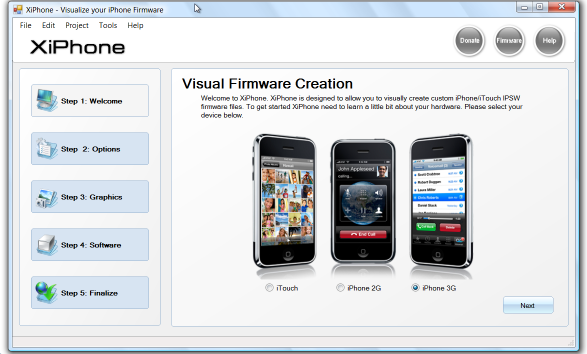
    Recently a new project has been started, called XiPhone. It will be based on XPWN. So functionality similar to WinPwn and Pwnage will be present (jailbreak, unlock, etc). In addition to that developers plan to include:

    • Auto downloading of stock firmware files from apple’s site (no need to hunt for it then select it)
    • Wizard based modern GUI (created with .net 2.0), and Vista Style UI.
    • Export of firmware settings so users can pass around an XML file which contains a configuration that works for them.
    • Auto updates to the XiPhone software.
    • Community based wallpapers used for Bootscreen, Restore screen and others
    • Enabling / Disabling of options available based on the device you select.

    Unfortunately, only Windows platform users will be able to use XiPhone.

    This is the most famous Windows-based utility to jailbreak and unlock Apple’s iPhone and iTouch.

    Release notes:

    • The new nice interface
    • Very very very easy to use
    • QuickPwn Support for firmwares 2.0/2.0.1/2.0.2
    • Root partition resize support
    • Installer support
    • Basic / Expert modes
    • Wizard style interface
    • Automatic updater
    • Support for WinXP and Vista 32/64bit.

    Notes:

    • Why is it beta? It’s just the saying.. Use at your own risk
    • You MUST do a full uninstall of winpwn before installing the new version
    • Make sure you have the latest version of iTunes (7.7 and above)

    Bug fixes

    • Crash when building ipsw
    • Quickpwn crash bug fix

    Download WinPwn 2.5.0.2: Rapidshare.com